
Summary of Make a Desktop Tamagotchi
Summary: A hobby project to build a desktop Tamagotchi using an LED matrix and an Arduino-compatible ATmega328P. The device uses shift registers and driver arrays to control four 8x8 LED matrices, plus buttons, a buzzer, and an RTC for timekeeping. The guide covers required tools, a complete parts list, and separates the project into microcontroller and display hardware sections to simplify construction and coding.
Parts used in the Desktop Tamagotchi:
- ATmega328P with Arduino bootloader
- 16 MHz crystal
- Two 22 pF capacitors
- Programming interface (Arduino board or FTDI adapter)
- 4 x 74HC595 shift registers
- 2 x ULN2803 Darlington transistor arrays
- DS1302 RTC
- 32.768 kHz crystal for RTC
- 3V coin cell battery holder
- 3V coin cell battery
- 4 right-angled push buttons
- Piezo buzzer
- 4 x 8x8 LED matrix modules
- 16 x 330 Ohm resistors (matrix current limiting)
- 2 rows of 16 female pin headers
- 2 rows of 16 male pin headers
- 1 row of 4 female headers (for programming)
- 5 x 100 nF capacitors
- 1 x 10 uF capacitor
- 1 x 10K resistor
- Power jack connector
- 5V DC wall wart
- Large piece of protoboard
- Wires for connections
- Soldering iron
- Solder wire
- Cutters
- Needle nose pliers
- Optional solder braid or solder pump
One day I was sitting behind my desk at work and I got that weird need to build something, after looking around for a bit I got my eye on an LED matrix and that sparked an idea in my head : “I WANNA MAKE A TAMAGOTCHI”.
So for those of you that don’t know what the heck is a Tamagotchi here is a little snip-it from wikipedia :
“The Tamagotchi (たまごっち Tamagocchi?) is a handheld digital pet, created in Japan by Akihiro Yokoi of WiZ and Aki Maita of Bandai. It was first sold by Bandai in 1996 in Japan.”
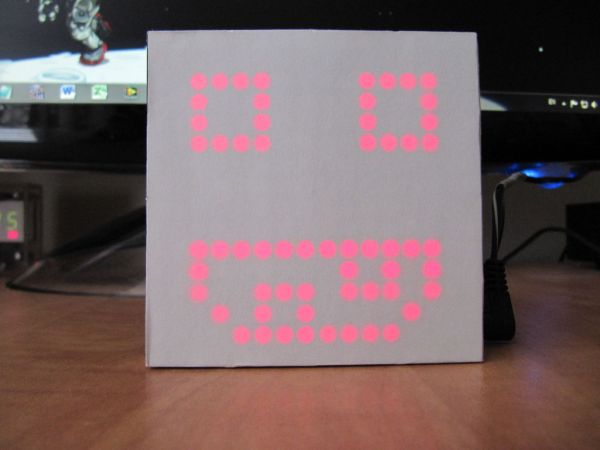
So my take on this classic toy is to make it in to a desktop gadget with an LED matrix for a display, and an Arduino for brains to make it more accessible to people. With that said join me as we design,build and program the World’s first (As far as I know) desktop Tamagotchi.
Step 1: Getting The Right Stuff
So like any other electronics project you will need to get some basic tools:
1) Soldering Iron
2) Some solder wire
3) A pair of cutters
4) A pair of needle nose pliers
Optional : Get some solder braid or a solder pump to fix soldering mistakes
As for the electronics the parts list a bit longer, here is what you will need to get:
1) An ATmega328P with the arduino bootloader + 16Mhz crystal with two 22pF caps
* You will need something to program the chip as well like an arduino platform or an FDTI adapter
2) 4 x 74HC595 shift registers
3) 2 x ULN2803 Darlington transistor array
4) 1 x DS1302 RTC + 32.768kHz Crystal
5) 1 x 3V coin cell battery holder + the battery.
6) 4 x right angled push buttons
7) 1 x Peizzo Buzzer
8) 4 x 8×8 LED matrix modules
9) 16 x 330Ohm resistors (you will need to calculate the value for your matrix)
10) 2 x row of 16 female pin headers
11) 2 x row of 16 male pin headers
12) 1 x row of 4 female headers(For programming)
13) 5 x 100nF cap
14) 1 x 10uF cap
15) 1 x 10K resistor
15) Power jack connector
16) 5V DC wall wart
17) A big piece of protoboard
18) Some wires for connections
Step 2: The Hardware Side
Even if this project if mostly software focused we will need to build the hardware first to make life writing code and debugging it easier.
The hardware consists of 2 main parts: The microcontroller part and the LED display.
The microcontroller part is very straight forward, it’s an standalone arduino(ATmega328 with the arduino bootloader) with
some peripherals(4 buttons, a buzzer and an RTC), but the it’s the most critical part as it does all of the thinking.
For more detail: Make a Desktop Tamagotchi
- What is the core microcontroller used in the project?
The project uses an ATmega328P with the Arduino bootloader and a 16 MHz crystal plus two 22 pF caps. - How is the LED display implemented?
The display is made from four 8x8 LED matrix modules driven by 74HC595 shift registers and ULN2803 driver arrays. - What real time clock is used for timekeeping?
The DS1302 RTC with a 32.768 kHz crystal is used. - How many push buttons are required?
Four right-angled push buttons are required. - What power source is recommended?
A 5V DC wall wart is recommended with a power jack connector; the RTC uses a 3V coin cell battery in a holder. - Do I need any programming hardware to load the bootloader or sketches?
Yes, you need a programming interface such as an Arduino board or an FTDI adapter to program the ATmega328P. - What passive components are required for stable operation?
The parts list includes five 100 nF capacitors, one 10 uF capacitor, a 10K resistor, and two 22 pF caps for the 16 MHz crystal. - Are there any driver ICs needed for the LED matrices?
Yes, the project uses 4 x 74HC595 shift registers and 2 x ULN2803 Darlington arrays to drive the matrices. - What tools are listed as necessary for assembly?
Necessary tools include a soldering iron, solder wire, cutters, and needle nose pliers; solder braid or a solder pump is optional. - What board is suggested for wiring the project?
A big piece of protoboard is suggested for assembling the hardware.
