
Summary of Make a Variable Resistor with 1 Million Settings
This tutorial guides readers on building a DIY variable resistor capable of generating one million distinct resistance settings using six rotary switches. The project involves wiring resistors in series across switch terminals to create a decimal-based selection system, allowing users to dial in specific values from 0 to 1M Ω. It covers sourcing affordable materials like plastic enclosures and rotary switches, soldering techniques for connecting components, and labeling strategies for clear operation.
Parts used in the Variable Resistor with 1 Million Settings:
- 3" x 5" x 2" plastic project enclosure
- 6 rotary switches (12 position)
- 6 knobs with set-screws
- 54 resistors (9 each of 1, 10, 100, 1k, 10k Ω and 10 of 100k Ω)
- Copper wire (22 or 24 gauge solid core)
- 2 alligator clip connectors
- 2 banana plug sockets (optional)
Make a Variable Resistor with 1 Million Settings
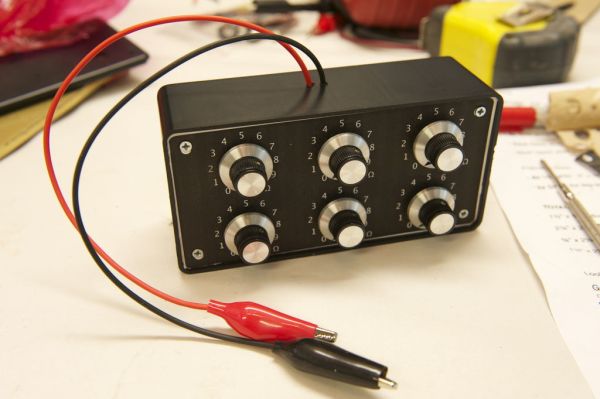
Last week in my college physics lab we got to use these variable resistance ‘boxes’. They had two inputs and six dials, and could generate one million different resistances across the two inputs. I knew I had to have one, and why not make it myself? This tutorial demonstrates how to build one for yourself for pretty cheap.
Materials:
3″ x 5″ x 2″ plastic project enclosure – radio shack: < $10
6 rotary switches (12 position) – parts-express.com: $20 with shipping
6 knobs (make sure they have set-screws) – www.mammothelectronics.com: $8 with shipping
54 resistors (9 of 1,10,100, 1k, 10k Ω, 10 of 100k Ω) – radio shack: $10
Copper wire (22 or 24 gauge solid core) – radio shack: $5
2 alligator clip connectors – radio shack: $3
2 banana plug sockets (optional) – radio shack
Tools:
Soldering iron & solder
Drill or drill press, and bits
Needle-nose pliers
Step 1
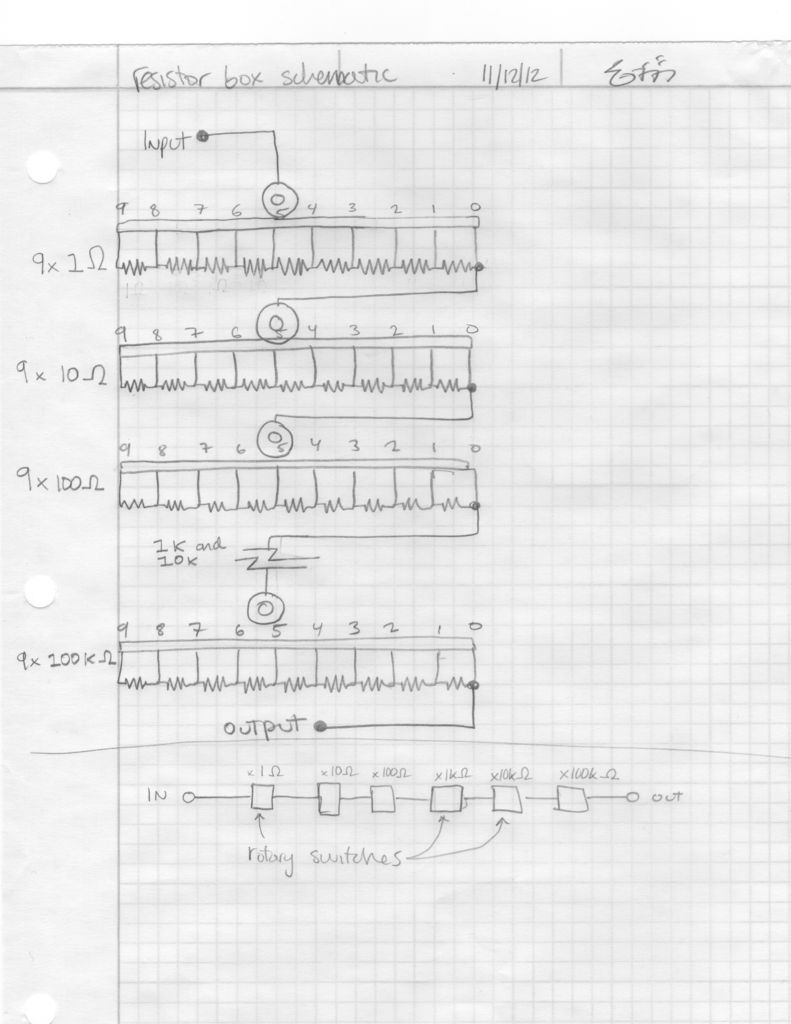
The Circuit
Step 2
Wiring the Rotary Switches
I would wait until you’ve assembled the box before you daisy chain your switches together. This will just make assembly easier.
Step 3
Labeling the Box Lid
In order to actually see which resistance you are setting, I’d recommend labeling the lid of your box. One possibility is labeling each knob with “x1Ω”, “x10Ω”, etc, to indicate each knob’s capability of selecting a multiple of said resistance. Also, make sure to add tick marks with numbers going from 0-9 around each dial.
This is also the time to figure out how you want to orient your knobs on the box lid. I’m doing a 2×3 pattern, but it may be different for you depending on the size/shape of the project box you bought.
Before you finalize you label, make sure the switches will actually have enough clearance to fit! Check to be sure they dont conflict with each other or the sides and bottom of the box when they are spaced according to your label layout.
I made the label on photoshop and printed it out on sticky back label paper. I’ve included the file if you’d like to use it. (Also, laser cutting a custom acrylic box top would be really cool too).
A note on the label included: The dimensions of the box lid are 3 x 6, but I made the dimensions of the label slightly smaller because there is a bevel around the edges of the lid, and I didnt want the label ‘overhanding’ on the bevel. So, if you use this label, make sure to print it out so the dimensions are 2.75 x 5.75 inches. This way, the label will stop right at the edge of the flat part of the box top and the bevel.
For more detail: Make a Variable Resistor with 1 Million Settings
- How many different resistances can this project generate?
The device can generate one million different resistances. - What is the highest resistance value achievable?
The maximum resistance is 1M Ω. - How are the resistors connected in the circuit?
Resistors are added in series across adjacent leads of the rotary switches. - How many resistors are needed for each order of magnitude?
You need 9 resistors for each magnitude except the 100k Ω level which requires 10. - Which direction should the numbers increase on the switches?
The numbers should increase in clockwise order when looking at the switch with the knob pointing at you. - Can I use banana plugs instead of alligator clips?
Yes, banana plug sockets are listed as an optional component. - What is the recommended size for the label file?
The label dimensions should be 2.75 x 5.75 inches to fit the flat part of the box top. - When should I daisy chain the switches together?
It is recommended to wait until after assembling the box before connecting the switches together.
