
Summary of MegunoLink Pro – Visualize serial data of your mcu with ease
MegunoLink Pro is a versatile tool for embedded electronics designers, enabling visualization and control of serial data from microcontrollers like Arduino, PIC, and TI. It features customizable docked visualizers for plotting time-based or X-Y data, logging streams via a unique channeling system, monitoring variables in tables, mapping coordinates on maps, and prototyping graphical interfaces with sliders and buttons. It also supports hex file programming for Arduino devices and manages multiple connections including wired, Bluetooth, and UDP networks.
Parts used in the MegunoLink Pro Project:
- Docked and tabbed visualizers
- Connection Manager visualizer
- Time Plot visualizer
- X-Y Plot visualizer
- Channeling system for selective monitoring
- Table visualizer
- Mapping visualizer
- Interface Panel with buttons and sliders
- Hex file programmer
MegunoLink Pro is a tool designed to aid embedded electronics designers. From hobbiests using the Arduino platform to commercial engineers using PIC or TI micros. MegunoLink provides a set of tools to help visualize serial data and investigate what is going on inside that piece of silicon. MegunoLink is made up of a set of visualizers that each have a unique function and any number of them can be utilized at once.
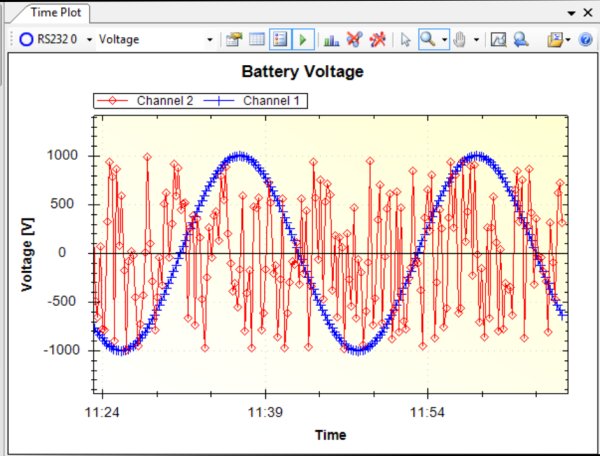
With these visualizers and our functional tabbed and docked interface you can create a full control center for your embedded project. Plot, log and monitor serial streams from both hardwired, bluetooth, and network based (UDP) devices.
Benefits
- Docked and tabbed visualisers allow for a completely customizable interface.
- Our Connection Manager visualizer allows you to manage multiple connections to serial ports (wired or bluetooth) or UDP network devices.
- Plot time based data, either time-stamped by the PC or by the micro-controller itself using our Time Plot visualizer.
- Plot arbitrary x and y data using our X-Y Plot visualizer.
- Log or monitor serial data from any connection. Megunolink also features a unique channeling system which allows you to selectively monitor or log data. Perfect for filtering out clutter from your serial stream.
- The Table visualizer provides a tabular way to display incoming streams of data. Perfect for monitoring a set of variables inside the micro-controller.
- Our Mapping visualizer will take a stream of coordinates and draw on a map where they are coming from. Great for setting up a location aware sensor networks.
- The Interface Panel lets you prototype a graphical interface with buttons, numerical sliders, and text-boxes.
- Program Arduino devices with hex files generated using Visual Studio Express or Atmel Studio
- Automatic updates.
- Check out the demo video below and download the demo Arduino Program here.
For more detail: MegunoLink Pro – Visualize serial data of your mcu with ease
- What is MegunoLink Pro?
A tool designed to help visualize serial data and investigate internal processes in embedded electronics projects. - Can it monitor data from Bluetooth devices?
Yes, it can plot, log, and monitor serial streams from hardwired, Bluetooth, and network-based devices. - How does the channeling system work?
It allows users to selectively monitor or log data to filter out clutter from serial streams. - Does it support mapping coordinates?
Yes, the Mapping visualizer draws coordinates on a map for location-aware sensor networks. - What types of plots are available?
It offers Time Plot for time-based data and X-Y Plot for arbitrary x and y data. - Can I prototype a graphical interface?
Yes, the Interface Panel lets you create interfaces with buttons, numerical sliders, and text-boxes. - Is it possible to program Arduino devices?
Yes, it programs Arduino devices using hex files generated from Visual Studio Express or Atmel Studio. - How many visualizers can be used at once?
Any number of visualizers can be utilized simultaneously to create a full control center.
