
Summary of Mini 7-Segment Clock V3
The author designed a custom 3D-printed enclosure for the Mini 7-Segment Clock v3 by modeling the PCB in SketchUp. To secure the board without mounting holes, raised internal rails snap the PCB into place, ensuring both sides remain visible. Additionally, the design eliminates soldered ICSP headers in favor of pogo pins for programming to save space and avoid interference with the power cord.
Parts used in the Mini 7-Segment Clock v3:
- Mini 7-Segment Clock v3 PCB
- EAGLE software
- SketchUp
- 3D printer
- Raised internal rails
- Inner-divider
- Pogo pins
- 6-pin ICSP header (on PCB)
- Power cord
- Acrylic back panel
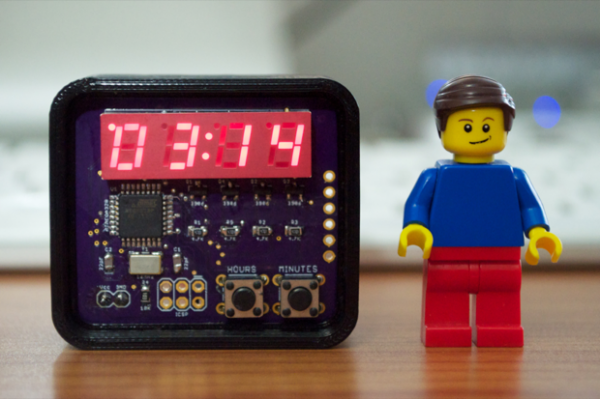
While I waited for the Mini 7-Segment Clock v3 PCBs to arrive, I got to work on designing an enclosure. First, I exported the PCB from EAGLE to SketchUp. I then assembled a complete 3D model with all the necessary components. With the 3D model complete, I could then design an enclosure to house the PCB and know exactly what it’s going to look like before printing it. I even incorporated a little cable strain relief. There are no mounting holes on the PCB, so I can’t use board stands. I had to think of an ingenious way to secure the PCB into the enclosure, keeping both sides of the PCB visible, with a model that I can actually print
The solution was to incorporate some little raised rails along the inside of the enclosure. The PCB will be held in place by snapping it into the 3D-printed frame between the inner-divider and those rails. The design is very minimal, it’s just enough to keep the clock upright. I think it’s going to look pretty sweet. I don’t want to hide the PCB in a little project box where all you can see is the display. I want to showcase the PCB and the electronics. The PCB has a 6-pin ICSP header for burning the bootloader, but I’m not going to solder in a header. I’ve always wanted to try and program a chip with pogo pins. What’s the use of soldering in a header if it’s only going to be used once? Seems like a waste. Not to mention, sometimes it just gets in the way. The ICSP header on version 2 of the Mini 7-Segment Clock got in the way of the power cord. It wasn’t apparent until I screwed on the back panel and realized what little space I had to work with. I managed to squeeze the cable through the hole in the acrylic, but it was tight.
For more detail: Mini 7-Segment Clock V3
- How was the enclosure designed?
The author exported the PCB from EAGLE to SketchUp to create a complete 3D model before printing. - How is the PCB secured inside the enclosure?
It is held in place by snapping it between an inner-divider and raised rails along the inside. - Why were mounting holes not used for the PCB?
The PCB does not have mounting holes, so board stands cannot be used. - What method is used for programming instead of soldering headers?
The author plans to program the chip using pogo pins. - Why did the author decide against soldering a header for the ICSP connection?
Soldering is considered a waste since the header is only used once and can get in the way. - What issue occurred with the version 2 ICSP header?
The header interfered with the power cord, making it difficult to screw on the back panel. - How was the power cord managed in the previous version?
The cable was squeezed through a hole in the acrylic, but it was very tight. - Does the new design hide the electronics?
No, the design keeps both sides of the PCB visible to showcase the electronics.
