
Summary of Printed circuit board 'Multiuse tiny1' using ATmega8
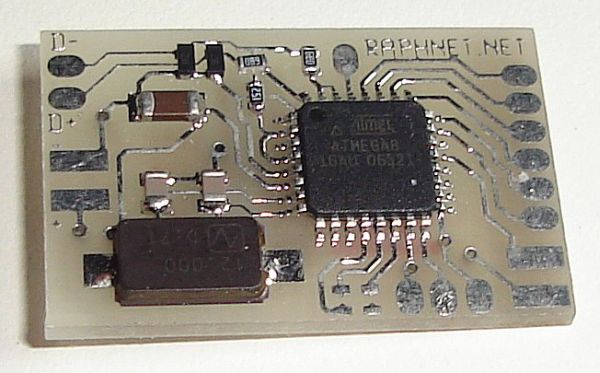
The Multiuse tiny1 is a compact PCB originally designed to convert NES/SNES controllers to USB, now repurposed for various projects like sensor interfaces and adapters. It features an Atmel AVR Atmega8 microcontroller, optional voltage regulator, and extensive signal pads. Its small dimensions (27.5mm x 17.7mm) make it ideal for space-constrained applications, supporting firmware-only USB drivers with necessary components pre-included.
Parts used in the Multiuse tiny1:
- Atmel AVR Atmega8 microcontroller
- 12MHz crystal with capacitors
- 68 ohm resistors
- Zener diodes
- LM1117 voltage regulator (optional)
- Solder pads for microcontroller signals
- Resistors R1 through R10
- Capacitors C1 and C5
Project overview
This small PCB, which I named Multiuse tiny1 was originally designed to convert NES/SNES controllers to USB. Since there is not a lot of space availabe inside an SNES controller, I designed the PCB to be as small as necessary. The PCB has improved since the beginning, thanks to the many other uses I found for this PCB.
Characteristics:
- Small: width=27.5mm, height=17.7mm, thickness=3.4mm (withou regulator) or 5.3mm (with regulator)
- Atmel AVR Atmega8 microcontroller on-board.
- The following microcontroller signals are available via solder pads: PC5(ADC5/SCL), PC4(ADC4/SDA), PC3(ADC3), PC2(ADC2), PC1(ADC1), PC0(ADC0), PB5(SCK), PB4(MISO), PB3(MOSI), PB2(SS/OC1B), PB1(OC1A), PB0(ICP1), PD0(RXD), PD1(TXD), PD2(INT0). Please note that PD0(RXD) and PD1(TXD) are tied together.
- Optional voltage regulator can supply a lower voltage to the MCU and/or external peripherals.
- This circuit is perfect for the Firmware-Only USB Driver from Objective development. All necessary components are there (Atmega8, 12mhz crystal with capacitors, 68 ohms resistors and zener diodes).
Known projects which use this PCB:
- X2Wii: N64, SNES or NES Gamepad to Gamecube/Wii adapter
- USBTenki: USB-connected temperature, humidity and pressure sensors.
- Infra-red receiver for Kenwood keyboard
- Gamecube/Nintendo 64 controller to USB adapter
- Four NES and/or SNES controllers to USB adapter
- Atari style joystick/controller to USB adapter
Programming:
To program the microcontroller, programmer wires must be soldered directly on the board. Just follow the schematic. Some programming signals (unfortunately not all) are available on the back side of the board.
USB:
When USB is not used, it is not necessary to solder the zener diodes nor is it necessary to install resistor R1. The 68 ohms resistors R2 and R3 may be replaced by 0 ohm resistors if you need to use those ports. (That’s what I did for the SNES/NES Gamepad to Gamecube/Wii adapter project.
Regulator:
The PCB backside has a footprint for an lm1117 voltage regulator. 0 ohm resistors or solder bridges must be installed to select the power source for the microcontroller and the circuit output.
When no regulator is needed, installing U3, R9, R10, C5, R7 and R8 is not necessary. But dont forget to install R6, R6 and C1.
The voltage regulator has an adjustable output. Here is a convenient tool you can use to calculate the output voltage that would be obtained depending on the selected resistors.
For more detail: Printed circuit board ‘Multiuse tiny1’ using ATmega8
- What is the primary function of the Multiuse tiny1 PCB?
It was originally designed to convert NES/SNES controllers to USB but is now used for various projects. - Can the voltage regulator be omitted?
Yes, if no regulator is needed, installing U3, R9, R10, C5, R7, and R8 is not necessary. - How do I program the microcontroller on this board?
Programmer wires must be soldered directly on the board following the schematic. - What are the dimensions of the PCB?
The width is 27.5mm, height is 17.7mm, and thickness is 3.4mm without a regulator or 5.3mm with one. - Is the circuit compatible with Firmware-Only USB Drivers?
Yes, all necessary components for Objective Development's driver are included. - Which signals are available via solder pads?
Pads include PC5, PC4, PC3, PC2, PC1, PC0, PB5, PB4, PB3, PB2, PB1, PB0, PD0, PD1, and PD2. - What should be done with zener diodes if USB is not used?
They do not need to be soldered if USB is not utilized. - Can the 68 ohm resistors be replaced?
Yes, R2 and R3 can be replaced by 0 ohm resistors if those ports are needed.
