
Summary of Signet – Open Source Password Manager
Signet is a compact, open-source USB device that securely stores passwords and personal data in encrypted memory. Compatible with MacOS, Linux, Windows, and Android, it functions as a physical alternative to cloud storage. The device acts as a USB keyboard to auto-fill credentials and requires a physical button press for sensitive operations, ensuring protection against hostile software without needing driver installations on desktops.
Parts used in the Signet Project:
- USB device
- Encrypted memory
- Cross-platform application
- Master password
- Graphical interface
- Keyboard-based navigation
- Standalone executable
- USB host adapter cable
- Physical button
- Built-in data types
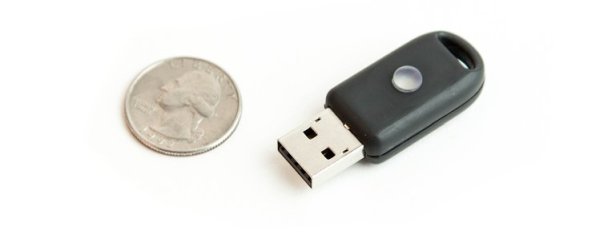
Signet is a compact, open hardware, and free and open source software USB device that safely stores your passwords, bookmarks, contacts, and other personal data in encrypted memory. It’s compatible with MacOS, Linux, Windows, and Android so you can use it on any device with a USB port. The device is smaller than the average house key, making it easy to take with you wherever you go. This makes Signet a practical alternative to storing sensitive data in the cloud. Unlike cloud-based or proprietary solutions, Signet is fully auditable with no proprietary software, firmware, or binary blobs to potentially hide security flaws.
A Powerful Cross-Platform Application
Access your data through a cross-platform application that unlocks your data with your master password. Once unlocked, Signet acts as both a password manager and a general personal information database. Signet acts as a USB keyboard to allow you to easily enter data into web forms. Signet can also type both a username and password to log you into a website instantly. The application features an intuitive graphical interface as well as keyboard-based navigation to enable you to perform common tasks quickly.
Easily Access Your Data Anywhere
On desktop operating systems (Windows, GNU/Linux, MacOS), the Signet application software can run as a standalone executable with no driver installation needed, allowing you to quickly access your data at new locations. If you’re away from a computer, you can still access your data on your Android device through a USB host adapter cable.
Physical Security for Peace of Mind
Unlike pure software solutions, Signet protects your data from any hostile software on the systems you use. Signet will not transmit, modify, or destroy any data without the command being confirmed by a button press when the device flashes. This physically secures the device because only the user can press the device’s button. No system’s security is absolute, but physically requiring a button press to confirm sensitive operations increases the complexity and decreases the potential effectiveness of any attack.
Flexible Data Storage
Signet’s personal information database allows you to store whatever data you might want to keep with you and possibly off the cloud. It features built-in types for contacts, bookmarks, credit cards, and miscellaneous account numbers. You can add new data types to the database so you can keep track of whatever else is important to you and you can add fields to individual entries for notes and related data.
Read more: Signet – Open Source Password Manager
- What is Signet?
It is a compact, open hardware, and free and open source software USB device that safely stores passwords, bookmarks, contacts, and other personal data. - Can I use Signet on an Android device?
Yes, you can access your data on an Android device through a USB host adapter cable. - Does Signet require driver installation on desktop operating systems?
No, the application software runs as a standalone executable with no driver installation needed on Windows, GNU/Linux, or MacOS. - How does Signet protect data from hostile software?
It physically secures the device by requiring a button press to confirm commands before transmitting, modifying, or destroying any data. - What built-in types does the database feature?
The database features built-in types for contacts, bookmarks, credit cards, and miscellaneous account numbers. - Can I add new data types to the database?
Yes, you can add new data types to the database to keep track of whatever else is important to you. - How does Signet help with logging into websites?
Signet acts as a USB keyboard to type both a username and password to log you into a website instantly. - Is Signet compatible with proprietary software?
No, unlike proprietary solutions, Signet has no proprietary software, firmware, or binary blobs.
