
Summary of SNAPEDA LAUNCHES NEW 3D VIEWER
SnapEDA launched an enhanced 3D viewer allowing engineers to preview parts before downloading. Key features include viewing dimensions, zooming for details, and rotating models to check angles. This tool aids in identifying design issues like component shadowing, verifying clearances, and communicating specifications through visual renderings. Users can toggle dimensions, use full-screen mode, and navigate via mouse wheel or right-click dragging within the 3D Model tab.
Parts used in the SnapEDA 3D Model Viewer:
- 3D Models
- Dimensions Tool
- Zoom Feature
- Rotation Function
- Full-screen View Button
- Mouse Wheel
- Right Mouse Button
SnapEDA is excited to share that they have launched a new and improved 3D viewer for our parts. It allows engineers to preview 3D models available on SnapEDA before download. [via SnapEDA blog]
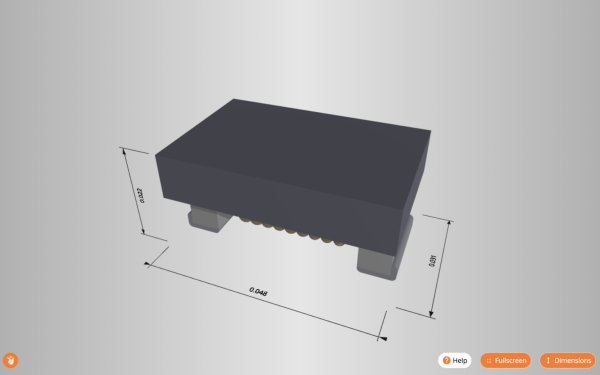
They’ve added three key features, based on feedback from our community. First, they’ve added dimensions to the viewer so that engineers can verify key measurements before downloading. This was by far, the most requested feature of our new viewer. Second, they’ve added the ability to zoom in and out to get a closer look at the component’s details. And finally, engineers can rotate the parts to see them from every angle.
Benefits of using 3D models when designing PCBs include, among many others:
- Getting immediate visual feedback of your designs, which will aid in identifying issues such as shadowing of components
- Confirming clearances between a component and its enclosure, or between other components
- Verifying that the component outlines and designators of your parts are correctly positioned
- Communicating design specifications – and demonstrating your hard work – to key stakeholders (ex: managers, clients, etc.) through beautiful 3D renderings of your circuit board
What’s New In The SnapEDA 3D Model Viewer
Dimensions: You can now view measurements of the models. You can enable or disable this feature by clicking on Dimensions in the bottom right-hand corner.
- Full-screen view: If you want to take a closer look at the 3D model, click on the Fullscreen button in the bottom right-hand corner. To exit full-screen view, click the button again, or hit the escape key on your keyboard.
- Zoom: Zoom in and out on the 3D model using your mouse wheel.
- Panning: Pan using your right mouse button and by dragging your cursor.
Check out our new viewer in the 3D Model tab of our any of our parts with 3D models available. Give it a try for yourself by checking out the parts showcased in this post. Make sure to click on the 3D Model tab to see them.
Read more: SNAPEDA LAUNCHES NEW 3D VIEWER
- How do I view measurements of the models?
You can enable or disable this feature by clicking on Dimensions in the bottom right-hand corner. - Can I zoom in and out on the 3D model?
Yes, you can zoom in and out using your mouse wheel. - What is the best way to exit full-screen view?
You can click the Fullscreen button again or hit the escape key on your keyboard. - How can I rotate the parts to see them from every angle?
Engineers can rotate the parts using the viewer interface to inspect all sides. - Does the viewer help identify component shadowing?
Yes, getting immediate visual feedback aids in identifying issues such as shadowing of components. - Where can I access the new viewer?
You can check it out in the 3D Model tab of any part with 3D models available. - How do I pan around the model?
Pan using your right mouse button and by dragging your cursor. - What benefits does using 3D models provide when designing PCBs?
Benefits include confirming clearances, verifying outlines and designators, and demonstrating designs to stakeholders.
