
Summary of USB AVR in-system Programmer using ATtiny2313
Summary: The article describes modifying a serial AVR ISP to USB by replacing level-shifting transistors with an FT232BM USB-to-serial chip. Firmware was adapted for an 11.0592 MHz crystal and the programmer was tested with AvrOspII. The FT232BM circuit includes optional EEPROM, indicator LED, USB-B connector, 6-pin AVR target connector, and a switch to power the target from USB (subject to USB 500 mA limit).
Parts used in the USB AVR In-System Programmer:
- FT232BM USB to serial chip
- ATtiny2313 microcontroller
- 11.0592 MHz crystal
- Serial EEPROM (optional, IC1)
- LED (D1) for TX/RX indication
- USB-B connector (CN1)
- 6-pin AVR target connector (CN2)
- Power supply switch (S1) to supply target from USB +5V
- Passive components recommended by FT232BM datasheet (resistors, capacitors)
Introduction.
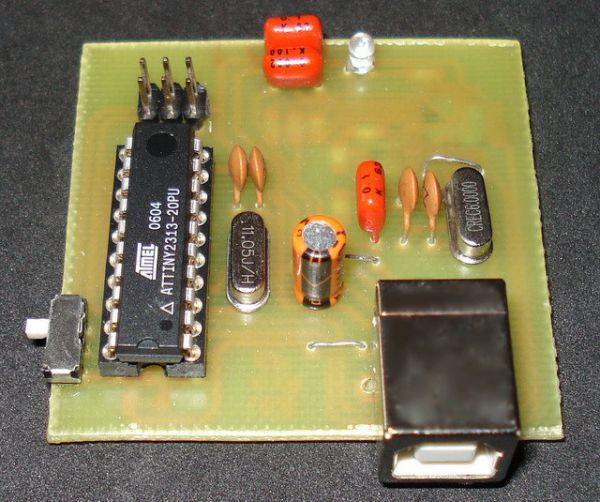
Nowadays, USB is the most popular connection between PC and peripherals such as AVR programmers, printers, scanners etc. For that reason I had to modify my old serial AVR In-System-Programmer (ISP) to work with USB connection. You can say, “use a USB to Serial adaptor to connect your AVR ISP with your PC”. Yes, that could be a solution but it would cost me more money than a singe FT232BM chip because I had to include an USB to RS232 adaptor and a power supply for my programmer. (almost €30).
So, the solution was to replace the two transistors, that were used to adapt the RS-232 voltage levels to TTL voltage levels, with a USB to RS-232 chip such as FT-232BM.
Initially, I used the John Samperi’s firmware V3.2 but afterwards I found out the Klaus Leidinger’s firmware that was a little bit faster. So, I chose the second one firmware but I had to modify the source code to work with 11.0592MHz crystal instead of 7.3724MHz that was initially designed because I couldn’t find this crystal in the market .
This programmer worked perfect with AVRprog but then I found a software that could support much more AVR devices than the AVRprog could program. This software is AvrOspII V5.47.
The circuit.
Following the schematic diagram that I read in the FT232BM manual I made the connections between ATtiny2313 and FT232BM. The FT232BM requires a few and ordinary components to work. When you connect this circuit to your PC you will see the message ” a new hardware was found” and then the factory name of FT232BM. IC1 is a serial EEPROM that used to store user’s settings. So, you can rename this programmer to be appeared as “AVR In-System-Programmer” or “MyAVR programmer”. Furthermore, you can add the firmware version of your circuit. Of cource, you can bypass this component because it’s optional. I saw that the programmer works with or without this EEPROM. Anyway, FTDI suggests you to use this EEPROM. Led D1 flashes when data are transmitted or received by FT232BM. CN1 is a USB-B connector and CN2 is a 6-pin connector to your target AVR (it is connected to the AVR to be programmed). The S1 switch is used to supply your target circuit with +5V from the USB connector of your PC. In this case you won’t need any additional power supply for your target circuit. Consider that a single USB port can supply up to 500mA current. You should not exceed this current limitation including the current that needs your AVR programmer too.
For more detail: USB AVR in-system Programmer using ATtiny2313
- Why replace transistors with an FT232BM?
To replace RS-232 level shifting with a USB to serial interface, simplifying the circuit and avoiding extra adapters and power supplies. - Which firmware was chosen for the modified programmer?
Klaus Leidinger's firmware was chosen because it was a little bit faster than John Samperi's V3.2. - Was the firmware modified and why?
Yes, the source code was modified to work with an 11.0592 MHz crystal instead of the original 7.3724 MHz. - Is the serial EEPROM required?
No, the EEPROM is optional; the programmer works with or without it though FTDI recommends using it. - What does LED D1 indicate?
LED D1 flashes when data are transmitted or received by the FT232BM. - What connectors are used on the programmer?
A USB-B connector (CN1) for PC connection and a 6-pin connector (CN2) to the target AVR are used. - Can the target AVR be powered from the USB port?
Yes, using switch S1 the target can be supplied with +5V from the USB port, but total current must not exceed 500 mA. - Which programming software worked best with the programmer?
AvrOspII V5.47 supported more AVR devices and was used after initial testing with AVRprog.
