
Summary of AVR Programmer using ATTINY2313 microcontroller
This article describes a modified AVR910 programmer capable of programming most AVR chips via ISP. The author improved the original design by replacing transistor-based level conversion with a MAX232 chip (or MAX3232 for 3.3V targets) and substituting a bi-color LED with separate red and green LEDs. The device connects to a PC via a serial port or USB-to-serial converter and draws power from the target board through a 6-pin ISP connector.
Parts used in the AVR Programmer using ATTINY2313 microcontroller:
- AVR chips
- ATTINY2313 microcontroller
- MAX232 chip
- MAX3232 chip
- Red LED
- Green LED
- Straight serial cable
- 6 pin ISP connector
- JRST jumper
- USB to serial converter
INTRODUCTION
AVR910 is a very useful programmer. It can program almost complete range of AVR chips. The original version made by Klaus is here, http://www.mikrocontroller-projekte.de/Mikrocontroller/AVR-Prog/AVR-Programmer.html. The programmer uses ISP capability of AVR chips. AVR910 first appeared in AVR910 application note by ATMEL. It is one of the fastest programmers for AVR. We can use AVR PROG available in AVR Studio, AVR OSP or AVRDUDE for interfacing with this programmer. The programmer connects to PC using serial port. For the notebook PC, we can use the USB to serial converter.
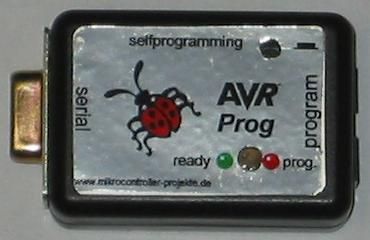
HARDWARE
I have done some minor modifications in the original design by Mr. Klaus. Klaus’s solution uses transistors for RS232 – TTL level conversion. I changed to MAX232. My experience with such transistor solutions is not good. This solution may not work for some computers. The MAX232 is a better solution. If your target board uses 3.3V, try the MAX3232 in place of MAX232. Second difference is the LED, Klaus’s design uses bi-color LED, I found it difficult to get such LED so I changed to use two LEDs, RED for busy and Green for idle. Rest of the part is the same as Klaus’s design. Here are the schematic (click on the image to enlarge the schematic), PCB layout files and component placement files.
SINGLE SIDED PCB LAYOUT FILES IN POST SCRIPT AND PDF FORMAT
You need to connect a straight serial cable between the programmer and serial port on PC. Connect your target board to this programmer with the help of 6 pin ISP connector marked SV1. It is recommended to have a 6 pin ISP header on target board for connecting with the programmer. Recommended ISP connector pin out on target board is given below. Connect the target board and programmer with straight cable i.e. Pin 1 to 1, Pin 2 to 2 and so on. Programmer board takes the power supply from target board so your target board needs to be powered up before you start programming. Leave the JRST jumper open.
For more detail: AVR Programmer using ATTINY2313 microcontroller
- How does the programmer connect to the PC?
The programmer connects to the PC using a serial port or a USB to serial converter. - What software can be used to interface with this programmer?
You can use AVR PROG available in AVR Studio, AVR OSP, or AVRDUDE. - Why did the author change the RS232 to TTL level conversion method?
The author changed to MAX232 because the original transistor solution was unreliable on some computers. - What should be used if the target board operates at 3.3V?
Try using the MAX3232 in place of the MAX232. - How is the power supply provided to the programmer board?
The programmer board takes the power supply directly from the target board. - What is the recommended way to connect the target board to the programmer?
Connect them using a straight cable where Pin 1 goes to Pin 1, Pin 2 to Pin 2, and so on. - Does the target board need to be powered up before programming?
Yes, the target board needs to be powered up before you start programming. - What state should the JRST jumper be left in?
Leave the JRST jumper open.
