
Summary of E-Paper clock in a Sick of Beige case
The author successfully assembled an e-paper clock, praising the precise cutouts and flush fit of the display. To avoid increasing thickness or visible screws, a custom spacers solution using shortened screws and nuts was implemented between the breakout board and PCB. This method maintains parallel alignment while keeping the profile slim.
Parts used in the E-Paper Clock:
- E-Paper boards
- Ribbon connectors
- Breakout board
- 7-pin header
- PCB
- Screws with nuts
- 1/16" length of screw
- Cutouts on the PCB
My E-Paper boards finally arrived. They look awesome. I totally nailed the cutouts for the e-paper display. They’re perfect.
The ribbon connectors on the display fit nicely through the slots.
They clip right into the breakout board, which is perfectly aligned over the holes for the 7-pin headerThey clip right into the breakout board, which is perfectly aligned over the holes for the 7-pin header
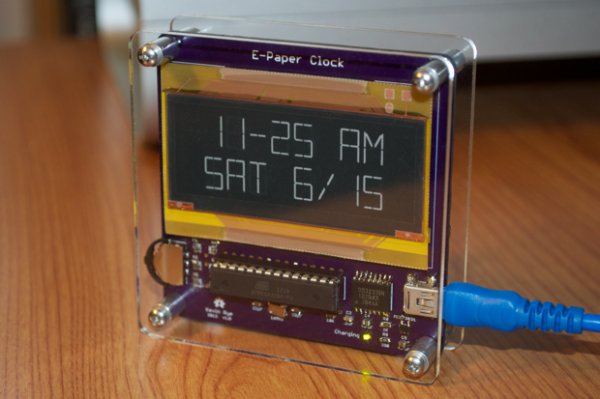
The display sits nice and flush with the PCB.
I wanted to put board stands under the breakout board, but I didn’t want to widen the overall thickness of the clock. I wanted to keep the display and the breakout board as close to the PCB as possible. I didn’t want screws going through the board either. If I did use a board stand, I’d either have a screw head or a nut on the display side. The display wouldn’t sit flush with the PCB.
Solution? I attached some screws with nuts to the breakout board, but I cut them down so that they don’t extend through to the other side of the PCB.
The nuts act as spacers and the tiny 1/16” length of screw that extends beyond the nut is just enough to sit inside the cutout on the PCB, but not protrude out the other side. The nuts give the breakout board just enough lift to keep it parallel to the PCB.
For more detail: E-Paper clock in a Sick of Beige case
- How were the ribbon connectors handled?
The ribbon connectors fit nicely through the slots and clip right into the breakout board. - What problem did the author face with board stands?
Board stands would widen the overall thickness or require screws that prevent the display from sitting flush. - Why were standard board stands rejected?
The author wanted to keep the display and breakout board as close to the PCB as possible without widening the clock. - How did the author solve the spacer issue?
They attached screws with nuts to the breakout board but cut them down so they do not extend through to the other side. - What role do the nuts play in this assembly?
The nuts act as spacers to give the breakout board just enough lift to keep it parallel to the PCB. - How long is the screw extension beyond the nut?
The tiny 1/16 inch length of screw extending beyond the nut is enough to sit inside the cutout on the PCB. - Does the display sit flush with the PCB?
Yes, the display sits nice and flush with the PCB thanks to the custom spacer solution.
