
Summary of Updating electricity meter to communicate via WLAN
The author upgraded an electricity meter to use WLAN by replacing an unreliable XBee setup with the RN-XV WiFi module, which offers simple HTTP communication and WPA2 security. Although the RN-XV was initially chosen for its footprint compatibility and ease of use, it suffered from frequent connection drops requiring manual reconnection attempts. The project utilized an AtMega microcontroller and a photoresistor sensor to detect meter LED blinks without direct mains contact.
Parts used in Electricity Meter Upgrade:
- Microchip MRF24WB0MA/RM WiFi module
- RN-XV WiFi module from Roving Networks
- AtMega microcontroller
- XBee receiver
- Photoresistor sensor
- Blu-tack adhesive
- Cisco Access Point
- Home server backend
A while ago Farnell sent email to me and offered one (inexpensive) product as a sample in exchange for mentioning it at this blog. I browsed for a while for an interesting part and settled with Microchip MRF24WB0MA/RM WiFi module (Order code 1823142). This module is quite inexpensive and is used in products like WiShield and thus has good Arduino support.

I wanted to upgrade my electricity meter to communicate with WLAN to get rid of XBee receiver at the back of my server. After some prototyping I ended up using RN-XV module from Roving Networks. Since my application did not have to do any fancy network stuff, RN-XV was a perfect match. It has the same footprint as XBee module, which I was already using, so the hardware required no changes. The module supports WPA2 security and can remember it’s settings. Communication via HTTP request is incredibly easy, I set up the module to generate http request to my home servers address each time when AtMega output measurement data.
In the end, only changes I made was to modify server backend to accept HTTP requests and change the code running on the AtMega to output measurement data periodically instead listening request from XBee.
The RN-XV was configured with following commands:
$$$
set ip dhcp 1 # get ip from dhcp
set wlan auth 4 # use wpa2-psk encryption
set wlan phrase password # set network password
set wlan ssid network # set the name of accesspoint to connect
set wlan linkmon 5 # After 5 tries declare connection to AP lost and try to reconnect again.
set ip proto 18 // turn on HTTP mode=0x10 + TCP mode = 0x2
set ip flags 0x6 # close tcp connection if accesspoint is lost
set ip host ip # server ip address
set ip remote 8080 # server port
set com remote GET$/? # GET string to be sent to server. Any data from uart will be concatenated to this string
set uart mode 2
All in all, for simple projects, I can really recommend the RN-XV module over the MRF24 due it’s simplicity, but definitely not for reliability. Both modules cost about the same, but apart from Sparkfun I don’t know who else has them in stock. Farnell could start selling them, since ordering from Sparkfun can get expensive if you don’t live in the states.
Sources can be found from the repository: https://github.com/JanneMantyharju/electricity-monitor
Monitoring electricity usage at home
Measurer
The schematic for the device is quite simple: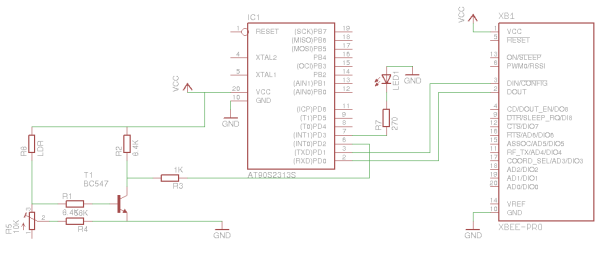
For more detail: Updating electricity meter to communicate via WLAN
-
Why did the author replace the XBee receiver?
The author wanted to upgrade the electricity meter to communicate with WLAN to get rid of the XBee receiver at the back of the server. -
What security protocol does the RN-XV module support?
The module supports WPA2 security and can remember its settings. -
How often did the RN-XV module lose connection in the initial test?
Each time after about 14 hours of operation the module lost connection to the access point forever. -
What is the default behavior when the RN-XV loses the AP?
By default if the module loses the AP it does not try ever to reconnect unless the linkmon parameter is specified. -
How does the device measure electricity usage without tampering with the meter?
A photoresistor attached on top of the meter led with blu-tack counts the blinks while keeping the circuit isolated from the mains. -
What command enables the automatic reconnection attempt on the RN-XV?
The set wlan linkmon command sets the number of tries before declaring connection lost and trying to reconnect again. -
Which protocol mode is enabled using set ip proto 18?
This command turns on HTTP mode combined with TCP mode. -
Does the RN-XV work better than the MRF24 for simple projects?
Yes, the author recommends the RN-XV over the MRF24 for simple projects due to its simplicity despite reliability issues.
