
Summary of Controlling DC motor with AVR ATtiny13 PWM and ADC Project
The article demonstrates using an ATtiny13 8-bit microcontroller to control a DC fan speed via PWM and ADC. A 10K trimpot provides an ADC input to vary PWM duty on OC0A, driving a TIP120 Darlington transistor to power a 12V fan. A switch toggles motor on/off and an LED blinks inversely with fan speed. The project uses AVR assembler to fit code in 1K flash and configures ADC, PWM, I/O, and simple debounce and delay routines.
Parts used in the ATtiny13 Fan Controller:
- AVR ATtiny13 microcontroller
- TIP120 Darlington pair transistor
- 12 Volt DC motor (computer cooling fan)
- 10K trimpot
- 3 Resistors: 2K7, 10K (two pieces), 300 Ohm
- 2 Capacitors: 100nF and 10nF
- 1 Diode: 1N4001
- 1 LED
- Switch S1
- AVRJazz Tiny2313 programmer board (from ermicro)
- OvrOspII programmer software (from Mike Henning)
- Atmel AVR Studio 4 (IDE)
It’s interesting to explore what we can do with this tiny 8 pins; 8-bit microcontroller. The ATtiny13 is the smallest and cheapest Atmel AVR 8-bit microcontroller families but yet, it’s loaded with sophisticated peripherals such as two 8-bit PWM channels and 4 channels 10-bit ADC. Although the memory is quite small; 1 K flash, 64 SRAM and 64 EEPROM but this more the adequate for most PWM and ADC application, if you need more memory, bellow is the list of other Atmel AVR 8 pins microcontrollers which have compatible pins with ATtiny13 microcontroller.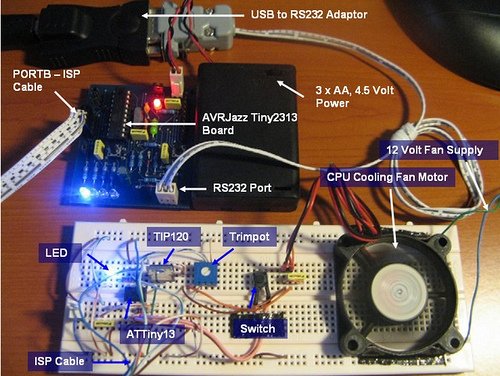
In order to demonstrate the ATtiny13 microcontroller capabilities using both PWM and ADC, I decided to use it for controlling the motor speed, after searching for the right motor for this project, finally I’ve found a microprocessor cooling fan from my old Intel Celeron computer; so I think this is a perfect motor for this project. By connecting it to the TIP120 Darlington pair transistor and to the ATtiny13 OC0A output we could easily controlling this fan speed using PWM, bellow is the complete schema for this project: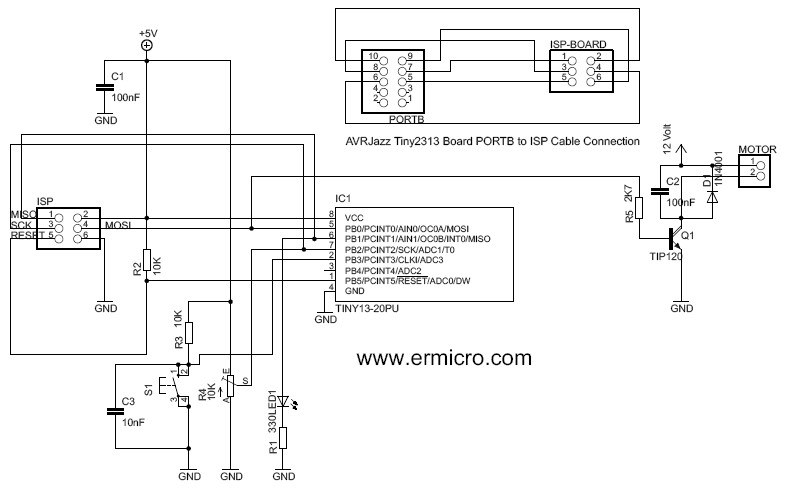
The 10K trimpot is used as an input for ADC which connected to the ADC1 input on the ATtiny13 (PIN 7) and to make it little bit more interesting I added the switch (S1) for switching the fan on/off and LED for the program life beacon, this LED will blink according to the PWM value passed to the fan, if the fan rotate faster the LED will blink slowly, but when the fan rotate slower the LED will blink faster. The fan speed is controlled by the trimpot which works as a voltage divider that supply the variable voltage to the ATtiny13 analog input.
The following is the list of hardware and software I use in this project:
- 3 Resistors: 2K7, 10K (2 pieces), 300 Ohm
- 1 Trimport: 10K
- 2 Capactors: 100nF, 1 capacitor: 10nF
- 1 Diode: 1N4001
- 1 LED
- AVR ATtiny13 microcontroller
- 1 TIP 120 Darlington pair transistor
- One 12 Volt DC motor
- AVRJazz Tiny2313 board as the programmer board from ermicro
- OvrOspII programmer software from Mike Henning
- Atmel AVR Studio 4 for the coding, compiling and debugging environment
The Tiny Code
To program the ATtiny13; this time I choose to use AVR’s assembler instead of C, because I just want to make sure that everything will feed into this tiny 1K flash boundary and just curiously how big this code will be; Ok let’s take a look in this assembler code bellow:
;*********************************************************************
; Program		: t13pwm.asm
; Description		: Tiny13 Fast PWM and ADC Fan Controller
; Last Updated	        : 15 December 2008
; Author		: RWB
; IDE/Compiler  	: Atmel AVR Studio 4.14
; Programmer    	: AvrOspII v5.47 from Mike Henning
;               	: AVRJazz Tiny2313 Board
;*********************************************************************
.include "tn13def.inc"
; The Tiny13 Default Frequency Clock
.equ F_CPU = 9600000
.cseg
; Start on the flash ram's address 0
.org 0
main:   ldi R24,RAMEND         ; Initial Stack Pointer
	out SPL,R24            ; SP = RAMEND
; Initial I/O
        ldi   R16,0b00010011   ; Set PB0=Output, PB1=Output, PB2=Input, PB3=Input, PB4=Output
        out   DDRB,R16         ; DDRB=0x13
; Initial ADC
        ldi   R16,0b10000110
	out   ADCSRA,R16       ; Turn On the ADC, with prescale 64
	ldi   R16,0b00000000
	out   ADCSRB,R16       ; Free running mode
	ldi   R16,0b01100001
	out   ADMUX,R16        ; Internal Reference 1.1 Volt,Left Adjust, Channel: PB2 (ADC1)
	ldi   R16,0b00000100   ; Disable Digital Input on PB2
	out   DIDR0,R16
; Initial PWM
        ldi   R16,0b10000011
 	out   TCCR0A,R16       ; Fast PWM Mode, Clear on OC0A
	ldi   R16,0b00000100
	out   TCCR0B,R16       ; Used fclk/256 prescale
; Initial the Button Flag and PORTB
	ldi   R17,0            ; Initial Button Flag
        out   PORTB,R17
lb_00:  sbic  PINB,PB3         ; if (PB3 == 0)
        rjmp  lb_20            ; else goto lb_20
        ldi   R19,5            ; Use delay for simple debounce
  	rcall delay_func
	sbic  PINB,PB3         ; if (PB3 == 0), read again
        rjmp  lb_20            ; else goto lb_20
	cpi   R17,1            ; Process if button pressed
	brne  lb_10            ; if (R17 != 1) goto lb_10
	ldi   R17,0            ; else R17=0
	ldi   R16,0            ; Disable PWM Clock
        out   TCCR0A,R16       ; TCCR0A = 0
	out   TCCR0B,R16       ; TCCR0B = 0
	cbi   PORTB,PB0        ; Turn off Motor
	cbi   PORTB,PB1        ; Turn off LED
        rjmp  lb_20
lb_10:	ldi   R17,1	       ; R17=1
        ldi   R16,0b10000011
	out   TCCR0A,R16       ; Fast PWM Mode, Clear on OCR0A
	ldi   R16,0b00000100
	out   TCCR0B,R16       ; Used fclk/256 prescale
        sbi   PORTB,PB1        ; Turn on LED
lb_20:  cpi   R17,1            ; if (R17 != 1)
	brne  lb_40            ; goto lb_50
				            ;
        sbi   ADCSRA,ADSC      ; Start ADC conversion
lb_30:  sbic  ADCSRA,ADSC      ; while (ADCSRA & (1<<ADSC))
	rjmp  lb_30
	in    R16,ADCH         ; Read the result Ignore the last 2 bits in ADCL
        out   OCR0A,R16        ; OCR0A = R16
        cbi   PORTB,PB1        ; Turn off LED
	mov   R19,R16
	rcall delay_func       ; Call Delay Function Parameter R19
        sbi   PORTB,PB1        ; Turn on LED
lb_40:	mov   R19,R16
	rcall delay_func       ; Call Delay Function Parameter R19
     	rjmp  lb_00
; Simple Delay Function
delay_func:
delay0: ldi   R20,25           ; R20 = 25
delay1: ldi   R21,255          ; R21 = 255
delay2: dec   R21              ; Decrease R21
	brne  delay2           ; if (R20 != 0) goto delay2 label
        dec   R20              ; Decrease R20
        brne  delay1           ; if (R20 != 0) goto delay1 label
	dec   R19              ; Decrease R19
	brne  delay0           ; if (R19 != 0) goto delay0 label
	ret                    ; Return to the caller
.exit
The first statement groups in the main area is to initial the stack, the stack use the microcontroller SRAM memory and we put the stack pointer to the end of 64 byte boundary (RAMED), the next statement groups is to initial the data direction register on the PORTB and make the direction as the following tables:
For more detail: Controlling DC motor with AVR ATtiny13 PWM and ADC Project
- What microcontroller is used in this project?
The ATtiny13 8-bit microcontroller is used. - How is the fan speed controlled?
Fan speed is controlled by PWM generated on OC0A and driven through a TIP120 transistor, with duty set by the ADC reading from the 10K trimpot. - Which ADC input is used for the trimpot?
The trimpot is connected to ADC1, which is on PB2 (pin 7) of the ATtiny13. - How does the LED indicate PWM activity?
The LED blinks according to the PWM value: faster blinking at lower fan speed and slower blinking at higher fan speed. - What is the purpose of the switch S1?
Switch S1 toggles the fan on and off. - Which programmer and software are used to program the ATtiny13?
The AVRJazz Tiny2313 board is used as the programmer and OvrOspII is the programmer software; Atmel AVR Studio 4 is used for coding and compiling. - What PWM mode and prescaler are configured in the code?
Fast PWM mode is configured and a clock prescale of fclk/256 is used. - Which voltage reference is used for the ADC?
The internal 1.1 Volt reference is selected in the ADC configuration. - Why was assembler chosen over C for this project?
Assembler was chosen to ensure the code fits within the ATtiny13s 1K flash memory and to measure code size precisely. - How is ADC result used to set PWM output?
The code reads ADCH (left-adjusted ADC) into a register and writes it directly to OCR0A to set the PWM duty cycle.
