
Summary of LINUX AND WINDOWS HARDWARE BOOT SELECTION SWITCH
Stephen Holdaway built a physical switch to easily boot between Linux and Windows, eliminating the need for timed keystrokes during GRUB startup. The device uses an STM32 microcontroller acting as a USB mass-storage drive. When connected, it presents a virtual filesystem containing a file that indicates the selected OS, allowing the BIOS to read this choice before booting.
Parts used in the Linux and Windows Boot Selection Switch:
- STM32 microcontroller
- Physical switch with Linux and Windows labels
- USB mass-storage interface
- GRUB bootloader configuration
- BIOS storage access
- Virtual filesystem emulator
Stephen Holdaway has created a switch with “Linux” and “Windows” labels, enabling you to boot into the correct OS with ease. About the reason for creating the switch, he says:
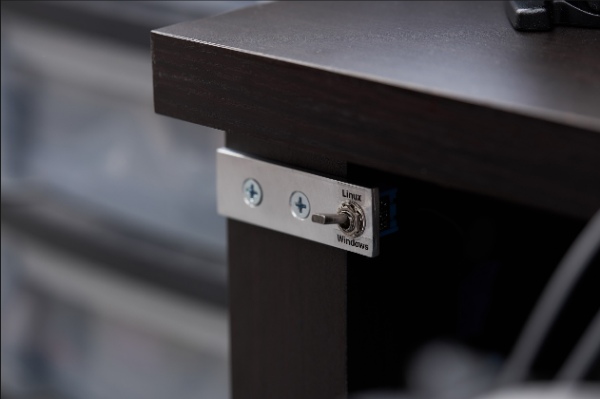
Dual-booting Linux and Windows is a great way to get the best of both worlds, but there’s one thing that’s always bothered me. To boot into Linux, I simply press the power button and walk away. To boot into Windows on the other hand requires a tactical, precision-timed strike on the keyboard to change the selection when GRUB briefly reveals itself. Now I could just increase the GRUB selection timeout, or remove it entirely, but I’d still need to wait around to make an operating system selection. I could use the mode in GRUB that remembers the last OS selection, but I’d still need to be around to change it half the time. I could make a “reboot into Windows” action in Linux, but I’m just as often booting from a powered-off state as I am rebooting from Linux. Since I always know which operating system I want ahead of time, why not make a physical switch to select between Linux and Windows?
For the project, he uses an STM32 microcontroller to act as a USB mass-storage device, which serves up a dynamic file. The file can be loaded by the system’s boot configuration to change its boot behavior based on the physical input.
Instead of him making a custom USB interface, he leverages the fact that the BIOS already enables GRUB, with access to all attached storage devices. All he did was to present the device as storage, containing a file whose contents indicate the switch position. This looks simple. However, there are a few layers to it:
- Provide the mass-storage class descriptor, indicating one of several storage protocols to use (SCSI, ATA).
- Implement the chosen storage protocol. This is a set of commands to interrogate the storage device’s capabilities, capacity, layout and other metadata in addition to standard requests to read and write sectors.
- Emulate a valid filesystem when read from, without actually having any storage medium.
Read more: LINUX AND WINDOWS HARDWARE BOOT SELECTION SWITCH
- Why did Stephen Holdaway create this switch?
To avoid needing a tactical, precision-timed strike on the keyboard to change the selection when GRUB briefly reveals itself. - What hardware acts as the USB mass-storage device?
An STM32 microcontroller serves up a dynamic file based on physical input. - How does the system know which operating system to boot?
The device presents a file whose contents indicate the switch position for the boot configuration to load. - Does the project require a custom USB interface?
No, it leverages the fact that the BIOS already enables GRUB with access to all attached storage devices. - What protocols are indicated by the mass-storage class descriptor?
The descriptor indicates one of several storage protocols to use such as SCSI or ATA. - Does the device contain actual physical storage media?
No, it emulates a valid filesystem without actually having any storage medium. - Can you reboot from Linux using this method?
Yes, but the author notes they are often booting from a powered-off state rather than rebooting from Linux.
