
Summary of Aleratec Releases its Free RoboRacer SDK for Automated DVD/CD Publishing
Aleratec announced the RoboRacer SDK for developers to integrate its DVD/CD RoboRacer LS Duplex into custom applications. This DLL-based API supports C# and C++ via the CDECL convention, enabling automation features like burning, auto-flipping, and LightScribe labeling. Ideal for medical records, the system eliminates printing costs by laser-etching labels directly onto discs, offering superior clarity and color-coding for organized management in high-volume production environments.
Parts used in the RoboRacer SDK Project:
- DVD/CD RoboRacer LS Duplex
- Dynamic Link Library (DLL) based Application Program Interface (API)
- C# DLL import libraries
- C++ DLL import libraries
- LightScribe enabled DVD CD recorders
- Specially coated LightScribe media
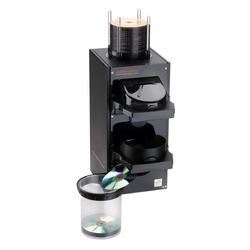
Chatsworth, CA (Vocus) January 19, 2010
Aleratec Inc., leading developer and manufacturer of “Prosumers’ Choice” solutions for the USB, Flash, HDD, Blu-ray, DVD CD, duplicating, and DVD/CD publishing markets, announced today its RoboRacer SDK for software developers that wish to integrate Aleratecs DVD/CD RoboRacer LS Duplex into their applications.
The DVD/CD RoboRacer LS Duplex SDK allows software developers to integrate all of the RoboRacers unique features into existing software applications. The SDK is a Dynamic Link Library (DLL) based Application Program Interface (API) which uses the CDECL calling convention, and includes DLL import libraries for C# and C++.
Were excited to make this RoboRacer SDK available, stated Perry Solomon, Aleratecs president and CEO. Software Developers have been looking for a way to integrate key features of the DVD/CD RoboRacer LS Duplex for a number of years and we are pleased to offer this SDK in response to their requests. The DVD/CD RoboRacer LS Duplex is ideal for medical records production environments where customers are looking for a fully automated device that can Burn, Auto-Flip and LightScribe Label discs automatically.
With LightScribe there is no printer! Direct-to-disc labels are laser burned, crystal clear and professional looking. No ink or other costly printing supplies are required. Aleratec Direct-to-Disc Publishing Systems utilize LightScribe enabled DVD CD recorders and specially coated LightScribe media to produce precise, laser-etched, disc labels with superior sharpness and clarity. LightScribe discs can be pre-labeled, for example, by department or classification level and appended with more detail later. With the added advantage of color coding, disc content can be immediately recognized, organized and properly managed. Aleratecs DVD/CD
RoboRacer LS Duplex is ideally suited for production environments, where multiple discs are being produced in a fully automated environment.
Key Features of the Aleratec DVD/CD RoboRacer LS Duplex include:
-
What is the RoboRacer SDK?
The RoboRacer SDK is a Dynamic Link Library based Application Program Interface that allows software developers to integrate unique features of the DVD/CD RoboRacer LS Duplex into existing applications. -
Which programming languages does the SDK support?
The SDK includes DLL import libraries specifically for C# and C++ using the CDECL calling convention. -
How does LightScribe labeling work without a printer?
Direct-to-disc labels are created by laser burning crystal clear and professional looking markings on specially coated LightScribe media. -
What are the key benefits of using LightScribe technology?
It requires no ink or costly printing supplies while producing precise, laser-etched disc labels with superior sharpness and clarity. -
In what environment is the RoboRacer LS Duplex ideal?
The device is ideally suited for medical records production environments requiring fully automated devices to burn, auto-flip, and label discs. -
Can discs be pre-labeled before final content is added?
Yes, LightScribe discs can be pre-labeled by department or classification level and appended with more detail later. -
How does color coding help manage disc content?
Color coding allows disc content to be immediately recognized, organized, and properly managed within production environments.
