
Summary of AN INKSCAPE EXTENSION FOR EXPORTING DRAWINGS INTO A KICAD PCB
Custom PCBs enable compact, professional circuits for diverse applications like medical devices and gamepads. Designers gain full control over component placement and copper layout to minimize parasitics and match enclosure shapes. The process involves outlining the PCB in Adobe Illustrator or Inkscape, then importing it into PCB design software. A specific Inkspace extension facilitates exporting drawings from Inkscape directly to KiCad, while an SVG to Eagle converter exists for other workflows.
Parts used in Custom PCB Design:
- Adobe Illustrator
- Inkscape
- PCB designing software (KiCad)
- Inkspace extension (Svg2Shenzen)
- Eagle CAD
- SVG to Eagle CAD converter
- Bare copper areas
- Drill pads
- Edge cut components
Certain electronic applications may require circuits that can fit in a small space, may call for the layout such that the outputs and input pins line up in the enclosure. This can all be possible with custom Printed Circuit Boards(PCBs). Custom PCBs can be used in industries, medical equipment, games, and various other applications. Makers also create fancy custom PCBs for keychains, making gamepads, making decorative pieces, etc. Industries use custom PCBs for verification. They add various indicators in the PCB design to validate the prototype.
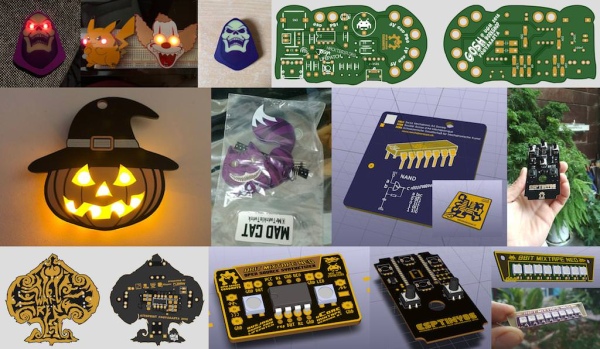
When you design a custom PCB, you have complete control over your design. In other words, you have control over the placement of every component and every piece of copper on the PCB. This control not only allows you to create circuits of various shapes and sizes but also to create circuits with minimal parasitics. Moreover, for some designers, appearance matters, and custom PCBs look more professional.
But designing a custom PCB is not an easy task. First, an individual has to create an outline of the PCB in Adobe Illustrator or similar software. Then, import it into PCB designing software and create bare copper areas. Finally, one arranges the components and creates the final design. Budi Prakosa, Frontend Engineer at Codeme.co.id made an Inkspace extension for exporting drawings into a KiCad PCB. To use the extension, you need to add the extensions file in InkScape ‘s User Extensions and then draw the PCB.
For using this feature with Eagle, you need to use this svg to Eagle CAD converter
Following are the features of this Inkspace extension:
- Draw Any kind of shapes without restriction
- Supports Drill Pad, and custom drill size
- Supports Edge Cut (PCB Shape)
- Works on OSX, Windows, and Linux
Budi Prakosa documented his extension Svg2Shenzen where he included the extension files, instructions on how to use the extension, and few examples as a tutorial.
Read more: AN INKSCAPE EXTENSION FOR EXPORTING DRAWINGS INTO A KICAD PCB
- What industries use custom PCBs?
Industries use them for verification, adding indicators to validate prototypes. - How can you create circuits with minimal parasitics?
You have complete control over the placement of every component and copper piece on the board. - Can makers create decorative custom PCBs?
Yes, makers create fancy custom PCBs for keychains, gamepads, and decorative pieces. - What is the first step in designing a custom PCB?
An individual must create an outline of the PCB in Adobe Illustrator or similar software. - Does the Inkspace extension support multiple operating systems?
Yes, it works on OSX, Windows, and Linux. - What shapes can be drawn using the Inkspace extension?
It allows drawing any kind of shapes without restriction. - How do you export drawings into KiCad?
You add the Inkspace extensions file to InkScape User Extensions and draw the PCB. - Is there a tool to convert SVG files to Eagle CAD?
Yes, you need to use an svg to Eagle CAD converter for this feature.
