
Summary of AVR Touchpad Handwriting Recognition using ATmega644 microcontroller
This ATmega644 project captures stylus handwriting on a touchpad, cleans the input, and classifies characters using an on-device neural network, displaying recognized letters on an LCD. It currently recognizes 26 alphabet letters but can be trained for arbitrary symbols. Three pushbuttons allow simple text formatting while the MCU processes touch input and reads neural network weights from flash.
Parts used in the AVR Touchpad Handwriting Recognition:
- ATmega644 microcontroller
- Touchpad input surface
- Stylus
- LCD display
- Three pushbuttons
- Flash memory (on MCU for neural network weights)
- Power supply (battery or regulated source)
- Supporting passive components (resistors, capacitors)
This ATmega644-based project implements a touchpad input system which takes user handwriting input and converts it to a printed character. Currently, the device only recognizes the 26 letters of the alphabet, but it could be easily generalized to include any figure of completely arbitrary shape, including alphanumeric, punctuation, and other symbols using available training system.
A stylus is used to draw the figure/character on the touchpad, and the result is shown on an LCD display. Pushbutton controls allow the user to format the text on the display.
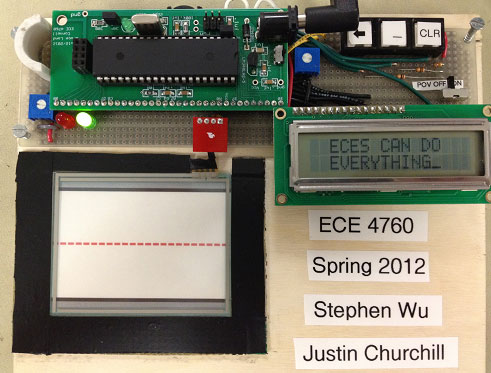
The program is fairly linear and follows a rather logical structure. Steps of operation are as follows.
- User writes a character on the touchpad when the MCU indicates that it is ready.
- The MCU captures the data and cleans it up (see Software section for more details).
- The captured drawing is passed through the neural network. This requires many sequential accesses to flash memory.
- The neural network returns the classified character and it is printed on the LCD display.
- Repeat from Step 1.
At any time during this process, the user can also interact with the three pushbuttons to change the contents of the LCD display.
For more detail: AVR Touchpad Handwriting Recognition using ATmega644 microcontroller
- What does the project do?
It captures handwriting from a touchpad, classifies the character using a neural network on an ATmega644, and prints the result on an LCD. - Which characters are currently recognized?
The device currently recognizes the 26 letters of the alphabet. - Can it be expanded to recognize other symbols?
Yes, it can be easily generalized to include alphanumeric, punctuation, and other symbols using the available training system. - How does the user input characters?
The user draws a character on the touchpad using a stylus when the MCU is ready. - What role do the pushbuttons play?
The three pushbuttons allow the user to change the contents or formatting of the LCD display at any time. - Where are the neural network weights stored?
The neural network requires many sequential accesses to flash memory on the MCU to read weights during classification. - What are the main software steps when a character is written?
The MCU captures and cleans the touch input, passes it to the neural network for classification, and then prints the classified character on the LCD.
