AVRStudio4 and Atmega128: An AVR Assembly Beginner Tutorial Guide

Contents hide

Summary of AVRStudio4 and Atmega128: An AVR Assembly Beginner Tutorial Guide


This article describes an AVR Assembly beginner tutorial for ECE students using AVR Studio 4 and the ATmega128. It covers installation, project creation, simulation, debugging techniques, PonyProg2000 for hardware programming, ATmega128 architecture (registers, memory, I/O, interrupts), assembler directives, instruction sets, coding style, and example starter code like an LED blink program.

Parts used in the AVR Assembly Beginner Tutorial:

  • PC running Windows
  • AVR Studio 4 (software)
  • ATmega128 microcontroller (target device)
  • AVR Simulator (debug platform in AVR Studio 4)
  • ISP dongle (parallel port programmer interface)
  • ISP cable (ribbon cable)
  • AVR microcontroller board with ISP header (J22)
  • PonyProg2000 (software programmer)
  • Parallel port LPT1 (PC interface)
  • ponyprogV205a.zip / setup.exe (PonyProg installer files)
  • m128def.inc (ATmega128 definition include file)

Introduction to AVR Assembly in ECE Education

This paragraph emphasizes a team approach to continue to improve how students learn in Electrical and Computer Engineering (ECE) programs. This goal is to provide greater consistency across the learning experience and process in varying courses. For example, the ECE 375 laboratory, where students learn about computer structure and assembly language programming. These labs are being updated to use Atmel tools and AVR RISC microcontrollers, forming the basis of an AVR Assembly Beginner Tutorial experience. This helps students by giving them a more uniform setup, making it easier to understand complicated topics like computer architecture and assembly code.

Purpose

The primary purpose of this document is to assist the reader in developing a fundamental understanding of writing assembly programs for the ATmega128 microcontroller and using AVR Studio 4 to compile the programs. Use this document as a supplementary resource alongside the lectures in ECE 375: Computer Structure and Assembly Language Programming. This resource supports students by providing extra hands-on experience that reinforces the learning that is happening within the classroom. This assists students in connecting the theoretical ideas discussed within lectures to a real, working programming environment.

AVR Studio 4 Overview

This software assists in the development and testing of AVR microcontroller programs. Its full environment includes writing source code, compiling, and debugging. THE software implements a whole range of programming and hardware tools, including: ICE50, JTAGICE, ICE200, STK500, and AVRISP. Developed by Atmel and offered free of charge, it allows students and developers a supported and direct way to develop and enhance their AVR-based projects. For those not familiar, Atmel made the software, and it is free to use. The program provides an easily accessible and consolidated avenue for students and developers to build and provide advancement of AVR projects.

ATmega128 Overview

The ATmega128 is a low-power 8-bit CMOS microcontroller based on the AVR enhanced RISC architecture. It is intended for embedded systems and delivers a combination of high performance and energy efficiency. It processes instructions in just one clock cycle, achieving a throughput of 1 MIPS per MHz. Its architecture makes it well-suited for applications where power consumption is a critical concern. Due to its simplicity and reliability, the ATmega128 is often part of an AVR Assembly Beginner Tutorial to teach students the basics of embedded systems programming.

Nomenclature

The different formatting styles in the document give a separation to different kinds of content. These conventions help improve clarity by showing the difference between regular text and code, or commands and menu items. This instructional approach can help readers traverse and understand the material better by giving clear definitions for each element.

Disclaimer

This portion acts as a legal disclaimer, properly attributing any trademarks and copyrights associated with the project. This section notes that “TekBots” and “Oregon State University” are trademarks of OSU, “AVR Studio 4′ and “ATmega128” are owned by Atmel, and “Windows” is owned by Microsoft. Noting these rights serves to inform readers and respects the ownership of intellectual property of the respective owners.

AVR Studio 4
This section highlights the practical use of AVR Studio 4 for completing most projects. It serves as a guide to help users navigate the IDE, develop, and debug AVR applications. By providing essential operational knowledge, it supports students and developers in streamlining their workflow and building core skills in embedded development.

Startup Tutorial

The basic processes of AVR Studio 4 are shown here via a hands-on tutorial. It gives precise, step-by-step directions on how to install the application, launch a fresh project, and conduct a simulation. The tutorial familiarizes pupils with the development environment using Lab 1 from the ECE 375 course as a real-world example. Following this instruction gives pupils the necessary skills to finish their first assignments and grow confidence in employing AVR Studio 4 for embedded systems coding.

Installation

This paragraph offers step-by-step instructions on installing AVR Studio 4. This part essentially walks the user through the installation procedure so that the application may be operational. Its applications and uses are strictly pedagogical, offering concise directions on how to:

  • Find and download the astudio4.zip file.
  • Unzip the acquired file into a readily available folder.
  • Run the setup.exe file.
  • Follow the onscreen instructions, usually accepting default installation locations.
  • Click the Finish button to finish the installation.

By clarifying the installation of AVR Studio 4, this thorough guide helps users directly by guaranteeing they can effectively configure the development environment needed for their projects with little trouble.

Project Creation

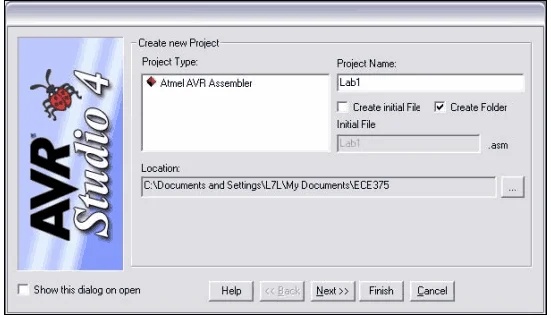
AVR Studio 4 is defined in this paragraph as project-based; a step-by-step instruction on starting a fresh project inside the IDE is also given. As emphasized here, AVR Studio 4’s primary aim is to offer an organized environment for creating microcontroller programs using file management, compiling options, and GUI settings. Establishing an organized workspace for every single program or lab is its main application. The detailed steps for creating a project include:

  1. Starting AVR Studio 4 via the Start menu.
  2. Initiating a new project either through the Welcome dialogue box or the Project menu.
  3. Selecting “Atmel AVR Assembler” as the project type.
  4. Naming the project (e.g., “Lab 1”).
  5. Choosing whether to create an initial file and project folder, with a specific instruction to uncheck the “create initial file” box if a file already exists.
  6. Specifying the project location, with recommendations for networked or local directories.
AVRStudio4 and Atmega128: An AVR Assembly Beginner Tutorial Guide
AVR Studio Project Creation

8. Begin the AVR Studio 4 program on your PC. Start the setup procedure by opening your current project developed for the ATmega128 microcontroller

9. Click Project > Configuration Options in the top menu. This window allows you to change critical parameters affecting project building and simulation.

10. In the Configuration Options window, under the Debug Platform section, select AVR Simulator. This will let you evaluate your code in a virtual setting without using actual equipment.

11. Find the Device dropdown menu inside the same window and choose ATmega128. This guarantees the simulation setting reflects your targeted microcontroller.

12. Usually on the left side of your screen, find the Project Workspace panel. This section lists your project structures and files.

13. Right-click on either the Source Files folder in the Project Workspace or your project name. Add Existing File to Project from the context menu.

14. Open a file browser, then browse to where lab1.asm is saved, click Open after choosing the file.

15. Make sure lab1.asm now shows under the Source Files section in the Project Workspace after adding. This confirms it is correctly attached to your project.

16. Save all modifications made to your project setup by clicking File or using the shortcut Ctrl + Shift + S.

17. Navigate to Build > Build All. AVR Studio will compile your code and show any syntax or logic problems. Search the Output window for messages.

18. To start the simulation once your build is successful, go to the Debug menu and choose Start Debugging or press F5. This lets you virtually step through and test your program.

19. Check your code’s behavior and logic using debugging methods such as breakpoints, step into, and memory watches to make sure everything functions as intended before proceeding to real hardware.

Project Simulation

This portion describes using AVR Studio 4’s integrated simulator to evaluate your code. It emphasizes recreating the ATmega128 microcontroller to check code behavior devoid of real hardware. In a virtual setting, users may run, debug, and debug their code, so detecting problems early is aided. Flexibility results from the possibility to respecify the chip using Debug → Select Platform and Device. This simulated function accelerates development and lessens dependence on hardware access rights now.

This section covers how to compile and simulate a program in AVR Studio 4. First, compile the code using Project → Build, the build icon, or F7. A message like “Assembly complete with no errors” confirms success and helps catch issues early.

After compiling, you can test the program using two simulation modes:

  • Debugging Mode: Runs code step-by-step for detailed analysis.

  • Run Mode: Runs the program continuously to observe behavior.

Start or stop simulations using the Debug menu or toolbar icons. These features help users test and debug code effectively without needing actual hardware.

Simulation Tips

This section emphasizes that meaningful outcomes require active debugger usage by users rather than just running a simulation. The aim is to demonstrate how simulation tools can be employed to examine program flow, registers, and memory. Using these tools helps users to meticulously review their code, identify secret faults, and boost performance. Turning the simulator into a potent tool for learning and improving embedded programs, this method makes it an essential component of any AVR Assembly Beginning Tutorial.

Line-By-Line Debugging

This section explains the importance of line-by-line debugging, a critical technique for verifying embedded programs in detail. It guides users on how to enter and navigate this simulation mode within AVR Studio 4.

The project describes several methods to initiate line-by-line debugging:

  • Starting the simulation directly in debug mode using the debug icon or Debug -> Start Debugging.

  • Using the pause key, stop a simulation already in progress.

  • Automatically halting execution at a particular location and switching to line-byline mode using setting a breakpoint in the code.

Once in line-by-line mode, certain navigational commands become active:

  • Step Into (F11): Executes the current line and steps into any called routine (like RCALL). Useful for inspecting internal logic.

  • Step Over (F10): Executes the current line and skips over internal steps of any called routine. Ideal for skipping known code.

  • Step Out (Shift+F11):  finishes the present exercise and pauses at the following direction following the call.

  • Run to Cursor (Ctrl+F10): Code runs till the cursor’s line is hittherefore saving time when going to a certain position.


These
 tools enable consumers to completely monitor code behavior, find faults, and increase reliability. Particularly in AVR Assembly Beginner Tutorial situations, this degree of control is critical for accurate and quick debugging.

Workspace Window

This paragraph explains two important areas in AVR Studio 4’s workspace window: the Project tab and the I/O tab, both essential for development and debugging.

The Project Window supports the organization of your work. It offers all the project files so that you may open them in the editor, reorganize, or rearrange them. From this centralized perspective, it is simpler to organize and maintain order during development.

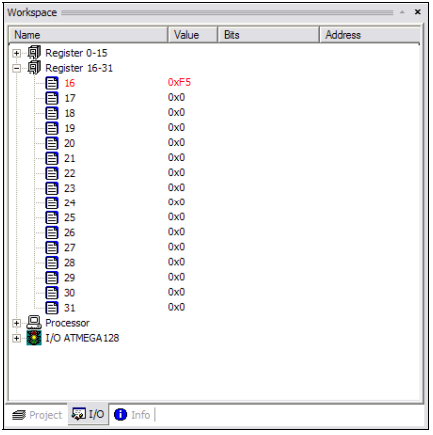
The I/O Window is used during simulation and displays all the ATmega128’s registers. It becomes active in line-by-line mode and allows users to monitor register values, explore bits and memory addresses, and simulate inputs on ports. The “I/O ATMEGA128” section specifically shows the microcontroller’s internal registers. This helps users observe and test program behavior, offering real-time feedback to aid in debugging and understanding how the code interacts with hardware.

I/O Window in Workspace: AVR Assembly Beginner Tutorial
I/O Window in Workspace

This section explains two useful simulation features. The “I/O ATMEGA128” node lets users simulate inputs and interrupts to test how the microcontroller reacts to events. The Info Window provides details like register names, memory locations, and pin configurations. These tools help users debug and verify code more efficiently without needing actual hardware.

Memory Windows

The memory structure of the ATmega128 is discussed in this paragraph, together with how users may see or change it using the simulator. Each with a particular purpose in the operation of the microcontroller, covering several memory areas like registers, program memory, data memory, and EEPROM. By visiting the Memory Window (View → Memory Window or Alt+4), users can inspect and change memory values to understand code behavior and troubleshoot difficulties. Effective program analysis and debugging depend on this.

Memory Window: AVR Assembly Beginner Tutorial
Memory Window

This paragraph outlines the Memory Window in the simulator, which shows memory addresses, hex data, and ASCII values to help users interpret memory content clearly. A pull-down menu lets users switch between memory types like program, data, EEPROM, and registers. Direct editing of memory values during simulation makes it easier to test and debug code efficiently without recompiling.

Debugging Strategies

This paragraph presents practical tips and strategies to help streamline the debugging process for ATmega128 development. These practices are aimed at perfecting effectivenessreducing crimes, and making the law easier to understand and maintain during the simulation and testing phase.
Opining considerably improves readability and makes it easier to understand complex operations like” Initializing Stack Pointer.”

  • Espousing a harmonious coding format: Helps identify logical errors quickly by making the code cleaner and easier to follow.

  • Using pseudo-code before coding: Structures the logic beforehand, reducing the chance of major design flaws.

  • Breaking code into smaller routines/functions: Makes it easier to isolate and debug specific sections.

  • Commenting out delay loops during debugging: Speeds up simulation by skipping unnecessary delays.

  • Utilizing breakpoints: Allows focused examination of the program’s state at specific points.

  • Monitoring I/O and Memory Windows: Helps track real-time data and detect unexpected behavior.

  • Verifying AVR instruction support: Ensures all instructions used are valid for the ATmega128.

  • Respecting memory ranges: Prevents invalid memory access and data corruption.

Microcontroller Programming with PonyProg2000

AVRStudio4 is great for simulation, but cannot upload code directly to a physical ATmega128 microcontroller. To address this, druggies can use PonyProg2000, a free diurnal programmer that transfers collected code from the PC to the microcontroller. This allows real-world testing and deployment of bedded systems. The section also hints at forthcoming step-by-step tutorials to help druggies get started with PonyProg.

Installing PonyProg2000

This section offers a clear, step-by-step guide to downloading and installing PonyProg2000, a free tool for programming ATmega128 microcontrollers. Since AVRStudio4 doesn’t support direct uploading to hardware, PonyProg2000 is essential for bridging simulation and real-world deployment. Though it’s freeware and may lack extensive documentation, the instructions make setup straightforward:

  1. Visit the site https://www.lancos.com/ppwin95.html and download version v2.05a BETA.

  2. Save the file ponyprogV205a.zip to an accessible folder.

  3. Unzip the file and extract setup.exe.

  4. Run setup.exe to begin installation.

  5. Approve any dialog boxes that appear.

  6. Follow the Installation Wizard steps.

  7. Accept the default directories when prompted.

  8. Once finished, the program is ready for use.

PonyProg2000 Setup

This paragraph introduces the essential setup needed after installing PonyProg2000 to successfully program a microcontroller. It highlights that installation alone isn’t enough—both the software and the ATmega128 board require proper configuration. It sets the stage for a step-by-step guide that helps users bridge the gap between simulation and real hardware programming.

Set up the AVR Microcontroller Board

This section provides a sequential guide for physically connecting the AVR microcontroller board to the PC, which is a prerequisite for programming using PonyProg2000. The basic purpose of these steps is to establish the necessary communication link between the computer and the ATmega128 microcontroller.

The steps are detailed:

  • 1. Connect the ISP dongal…to the parallel port on the PC (LPT1). This explains connecting the interface device that translates parallel data from the PC to the serial data required by the microcontroller. This is essential for the PC to communicate with the programming hardware.
  • 2. Connect one end of the ISP cable to the ISP dongle. This specifies connecting the ribbon cable from the interface dongle, carrying the programming signals.
  • 3. Connect the other end of the ISP string to the ISP harborage on the AVR microcontroller board; it should be the J22 that’s right next to the periodical harborage. This completes the physical data pathway to the microcontroller itself, directing the programming signals to the correct harborage on the target board.
  • 4. Now that the ISP connection is made, apply power to the microcontroller board. This step provides power to the microcontroller, which is necessary for it to operate and be programmed. The coexisting note advises on safe power running:” it is judicious to remove power from the AVR Microcontroller Board any time you plug or open the ISP string.” This is a pivotal safety and prevention tip to avoid damaging the tackle.
  • 5. The AVR Microcontroller Board is now connected to the PC and is ready to be programmed. This step confirms that the physical setup is complete and the board is in a state where it can admit programming commands.

Setup PonyProg2000

This section gives a step-by-step guide to configure PonyProg2000 for programming the ATmega128. It ensures proper communication between the software and microcontroller—an essential step for anyone following an AVR Assembly Beginner Tutorial to successfully upload code to real hardware.

The steps are outlined:

  • 1. Make sure the Microcontroller Board is properly connected as stated in Section 3.2.1 and then start up the PonyProg2000 program. This emphasizes the prerequisite of a correctly wired hardware setup before launching the software.
  • 2. Click OK to remove the splash screen and get access to the program. Also note, if you are like the author, you might want to check the box labeled “Disable Sound” first. This guides the user through the initial launch and offers an optional user preference.
  • 3. It will then bring up a prompt telling you to calibrate before any read/write operations. Click OK to close this dialog. This prepares the user for an expected calibration prompt.
  • 4. Another prompt asking to run the setup will appear; click OK to close this as well. This guides the user through another initial setup prompt.
  • 5. The first thing is to select the correct device. There are two pull-down menus on the right that do just that. Select “ AVR micro ” from the first pull-down menu and “ ATmega128 ” from the alternate. This is a pivotal step for setting up the software to fit and interact with the specific target microcontroller, the ATmega128.
  • 6. Now run the estimation by navigating the menu optionsSetup-> Estimation. This initiates the estimation process, which is essential for ensuring dependable communication between the software and the tackle.
  • 7. Click YES on the dialog to begin calibration. It should go very quickly. A dialog will then pop up and state that the calibration is complete. If you do not get this, then close all the other running applications and try again. This provides clear instructions for performing the calibration and troubleshooting advice if it fails, highlighting its importance for successful programming.
  • 8. Now run the interface setup by navigating the menu options, Setup->Interface Setup…. This directs the user to the interface setup options, which are vital for configuring how PonyProg2000 interacts with the PC’s hardware.
  • 9. A new dialog appears; fill in the information to match the figure below. This final step indicates that further specific settings are required, likely related to the parallel port or ISP dongle configuration.
Interface Board Setup: AVR Assembly Beginner Tutorial
PonyProg2000 Interface Board Setup
  • 10. Clicking “Probe” tests the connection between PonyProg2000 and the ATmega128, ensuring the software can detect and communicate with the chip. This quick check helps users confirm their setup is correct or identify issues before continuing.
  • 11. Once everything is set up, you should see a screen similar to the reference figure. This confirms that PonyProg2000 is properly configured for the ATmega128, giving users confidence that they’re ready to upload code successfully.
Fully Initialized PonyProg2000

Uploading a Program

This section guides users through uploading a program to the ATmega128 using PonyProg2000, assuming prior setup is complete.

  1. Compile in AVRStudio4 – Generate a .hex file, the machine-readable version of your code, required by PonyProg2000.

  2. Open in PonyProg2000 – Use File → Open Device File… or the folder icon to begin loading the hex file.

  3. Navigate to Your Project Folder – Locate the directory where your AVRStudio4 project was saved.

  4. Filter by File Type – Select *.hex in “Files of type:” to make the hex file visible.

  5. Select and Open – Choose the hex file named after your project and click Open.

  6. Confirm Load – A properly loaded file should display in the buffer window, confirming it’s ready for upload.

Successfully Loaded AVR Hex Program File in PonyProg2000

This final paragraph outlines the actual upload process for the ATmega128 using PonyProg2000, followed by a practical workflow for iterative programming and debugging.

7. Upload the program by clicking the icon or using Command → Write All (Ctrl+W). A confirmation dialog will appear—click Yes to begin. This command sends the .hex file to the ATmega128.

8. A progress bar will show the writing and verification process, which takes about 1–2 minutes. Once complete, a message will indicate success or failure. Click OK to return to PonyProg2000.

9. After programming, the ATmega128 automatically resets and runs your uploaded code. This confirms successful deployment.

To streamline development, follow this efficient debugging workflow:

  • Keep AVRStudio4 and PonyProg2000 open.

  • Make changes in AVRStudio4 and press F7 to recompile.

  • Switch to PonyProg2000 and click the Refresh icon to reload the updated program.

  • Use Write All again to re-upload the new version.

This cycle helps reduce rework and speeds up testing during embedded development.

ATmega128

This section introduces the foundational concept of registers in the ATmega128 microcontroller. It outlines the two main types: general-purpose registers and special-function registers, all of which are 8-bit memory locations directly connected to the CPU. Unlike general memory, registers are faster and play a critical role in CPU operations.

A reference to the Complete Datasheet at http://www.atmel.com/atmel/acrobat/doc2467.pdf is provided for deeper technical details.

Under 4.1.1 General Purpose Registers, the ATmega128 features 32 registers (R0–R31) that interface with the Arithmetic Logic Unit (ALU) to manipulate data efficiently during processing.

Section 4.1.1.1 Lower Registers focuses on the first 16 registers (R0–R15). These support loading immediate data and have access to Data Memory, ALU, and additional peripherals, making them versatile for various operations. An example of using immediate data with these registers is hinted at, emphasizing practical use.

Understanding the structure and role of these registers is essential for writing efficient code on the ATmega128.

Instruction Operation Purpose / Explanation
LDI R16, 30 Load Immediate Loads the decimal value 30 into register R16.
MOV R0, R16 Move Register Copies the value from R16 into R0. Now R0 = 30.
INC R0 Increment Increments R0 by 1. Now R0 = 31.
ADD R0, R16 Add Without Carry Adds R16 (30) to R0 (31). Now R0 = 61.

Upper Registers

This paragraph highlights the part of the upper 16 general-purpose registers(R16–R31) in the ATmega128. These registers support the LDI instruction for loading immediate data, making them ideal for setting values snappily. They’re generally used in AVR assembly for their effectiveness, support for computation operations, and compatibility with cargo and Store instructions. Their speed and inflexibility make them essential for the most demanding data processing tasks.

Instruction Explanation
LDI R16, $A4 Load the immediate hex value $A4 into register R16.
LD R17, X Load the value from the memory address pointed to by X into register R17.
ADC R16, R17 Add R17 to R16 With carry, the result is stored in R16.
ST Y, R16 Store the value in R16 to the memory address pointed to by Y.

X-, Y-, Z-Registers

The last six general- purpose registers( R26 – R31) in the ATmega128 serve as 16- bit pointer dyads — X( R27R26), Y( R29R28), and Z( R31R30) — for circular memory addressing. This allows the CPU to access memory locations quickly, which is especially useful for handling arrays and data structures. By avoiding hardcoded addresses, these registers enable more flexible and effective memory operations in embedded systems.

Name Low Byte High Byte
X-Register R26 R27
Y-Register R28 R29
Z-Register R30 R31

This paragraph presents a code example that shows how to use special registers for handling data in embedded systems. It reads data from SRAM, modifies it, and stores it in a nearby memory location. This basic operation is key for tasks like sensor data handling or temporary storage, helping developers learn how to manage memory effectively using special registers.

Instruction Explanation
LDI R26, $5A Load 0x5A into the low byte of the X-pointer (R26)
LDI R27, $02 Load 0x02 into the high byte of the X-pointer (R27)
LD R16, X+ Load value from SRAM at address in X, then increment X
INC R16 Increment the value in R16 (data manipulation)
ST X, R16 Store the modified value back to SRAM at updated X

Special Function Registers

This paragraph explains the part of Special Function Registers( SFRs) in the ATmega128 microcontroller. SFRs give a way to control and cover internal factors like timekeepers, periodical anchorages, and ADCs. A crucial illustration is the Status Register( SREG), which stores flags such as Carry, Overflow, and Zero — important for guiding tentative program flow after computation operations. These flags help manage opinions and error checking in law. Penetrating SFRs requires IN and OUT instructions, as they’re located in specific I/ O memory regions.

Bit Name Description
7 I Global Interrupt Enable
6 T Bit Copy Storage
5 H Half Carry Flag
4 S Sign Bit
3 V Two’s Complement Overflow Flag
2 N Negative Flag
1 Z Zero Flag
0 C Carry Flag

This paragraph explains how the Zero Flag in the Status Register( SREG) is used for program control. When a former operation results in zero, the Zero Flag is set. The BREQ( Branch if Equal) instruction also uses this flag to decide whether to jump to another part of the program. This allows the program to make opinions grounded on data, enabling features like circles, conditionals, and error running.

Stack Pointer

This paragraph explains the Stack and Stack Pointer( SP) in the ATmega128. The Stack is used for a temporary data storehouse, original variables, and return addresses from subroutines or interrupts. The SP keeps track of the Stack’s top and is made up of two 8-bit registers SPH and SPL. In AVR, the mound grows over, so each PUSH operation decreases the SP. This system ensures effective program inflow control, especially during function calls and interrupt running.

Bit 15 14 13 12 11 10 9 8
Label SP15 SP14 SP13 SP12 SP11 SP10 SP9 SP8
Register → → → → → → → → → → → → → → → → SPH
Bit 7 6 5 4 3 2 1 0
Label SP7 SP6 SP5 SP4 SP3 SP2 SP1 SP0
Register → → → → → → → → → → → → → → → → SPL

This paragraph explains how to initialize the Stack Pointer in the ATmega128. Setting the Stack’s starting address ensures PUSH and POP operations do within a safe memory region, precluding corruption or crashes. Including the ATmega128 description train allows the use of meaningful register names like SPH and SPL, perfecting the law’s clarity. This setup is essential for any program that uses the stack for temporary storage or function calls.

Instruction Description
.include "m128def.inc" Includes ATmega128 register and constant definitions.
LDI R16, LOW(RAMEND) Load the low byte of the SRAM end address into register R16.
OUT SPL, R16 Set the Stack Pointer Low (SPL) register.
LDI R16, HIGH(RAMEND) Load the high byte of the SRAM end address into register R16.
OUT SPH, R16 Set the Stack Pointer High (SPH) register.

I/O Ports

This paragraph explains the I/ O Anchorages A to G on the ATmega128, used for communication between the microcontroller and external bias. These anchorages arebi-directional with voluntary internal pull-up resistors, allowing flexible input/output configurations. Each leg follows the Pxn naming format. The three main control registers are DDxn for setting direction, PORTxn for affair or enabling pull-ups, and PINxn for reading inputs. While some anchorages support advanced features, the focus is on their introductory I/ O use, which is essential in bedded systems.

Bit 7 6 5 4 3 2 1 0 Register Access Initial Value
PORTA PORTA7 PORTA6 PORTA5 PORTA4 PORTA3 PORTA2 PORTA1 PORTA0 Output R/W 0
DDRA DDA7 DDA6 DDA5 DDA4 DDA3 DDA2 DDA1 DDA0 Direction R/W
PINA PINA7 PINA6 PINA5 PINA4 PINA3 PINA2 PINA1 PINA0 Input Read Only Undefined (N/A)
  • PORTA: Used to write output values or enable pull-up resistors (if the pin is input).

  • DDRA: Configures direction: 1 = Output, 0 = Input.

  • PINA: Reads the actual logic level at the pin.

This paragraph explains the roles of the DDxn and PORTxn bits in configuring I/O pin behavior on the ATmega128.

  • DDxn (Data Direction Register): Controls whether a pin is input (0) or output (1). This allows dynamic control of data flow direction.

  • PORTxn (Output Mode): When configured as an output (DDxn = 1), writing 1 to PORTxn sets the pin high; writing 0 sets it low, enabling control over external devices.

  • PORTxn (Input Mode): When configured as input (DDxn = 0), writing 1 enables the internal pull-up resistor to prevent floating states. Writing 0 disables the pull-up.

This paragraph explains the use of I/ O registers and provides a law illustration for harborage setup. The PINx register reads input countries from external bias, while PORTx sets affair situations. The illustration configures Port B as affair( transferring data) and Port D as input( entering data), icing correct leg geste
from the launch. This prevents crimes and improves law clarity. Including the ATmega128 description train allows for readable, emblematic register names like PORTB and DDRD.

Instruction Meaning
LDI R16, $FF Load 0xFF into register R16 (all bits set)
OUT DDRB, R16 Set all pins of Port B as outputs
LDI R16, $FF Set initial value high (0xFF)
OUT PORTB, R16 Set all Port B output pins to high (5V)
LDI R16, $00 Load 0x00 into R16 (all bits cleared)
OUT DDRD, R16 Set all pins of Port D as inputs
LDI R16, $00 No internal pull-up resistors
OUT PORTD, R16 Ensure Port D inputs are in tri-state (Hi-Z) mode

Additional Special Function Registers

This final paragraph attendants compendiums to the ATmega128 datasheet for detailed information on Special Function Registers( SFRs) not covered then. It highlights that unborn performances may expand to include other registers applicable to ECE 375, supporting deeper literacy. This ensures inventors know where to find accurate specs and reinforces the document’s evolving, educational purpose.

Interrupt Vectors

This paragraph introduces interrupts in the ATmega128 as tackle-touched off functions that allow the microcontroller to respond to events like button presses or data appearance without constant polling. Interrupts ameliorate effectiveness and responsiveness by executing special routines when specific events occur. The Global Interrupt Enable bit( bit 7 of SREG), along with AVR instructions like SEI and CLI, controls whether interrupts are allowed. Each intrusion also requires individual enabling. When touched off, the microcontroller saves the current address to the stack and jumps to a predefined Interrupt Vector, icing smooth and timely running before returning to the main program.

Vector No. Address Source Interrupt Name
1 $0000 Reset RESET
2 $0002 External INT0 INT0
3 $0004 External INT1 INT1
4 $0006 External INT2 INT2
5 $0008 External INT3 INT3
6 $000A External INT4 INT4
7 $000C External INT5 INT5
8 $000E External INT6 INT6
9 $0010 External INT7 INT7
10 $0012 Timer2 Compare Match TIMER2 COMP
11 $0014 Timer2 Overflow TIMER2 OVF
12 $0016 Timer1 Capture Event TIMER1 CAPT
13 $0018 Timer1 Compare Match A TIMER1 COMPA
14 $001A Timer1 Compare Match B TIMER1 COMPB
15 $001C Timer1 Overflow TIMER1 OVF
16 $001E Timer0 Compare Match TIMER0 COMP
17 $0020 Timer0 Overflow TIMER0 OVF
18 $0022 SPI Transfer Complete SPI, STC
19 $0024 USART0 Receive Complete USART0 RX
20 $0026 USART0 Data Register Empty USART0 UDRE
21 $0028 USART0 Transmit Complete USART0 TX
22 $002A ADC Conversion Complete ADC
23 $002C EEPROM Ready EE READY
24 $002E Analog Comparator ANALOG COMP
25 $0030 Timer1 Compare Match C TIMER1 COMPC
26 $0032 Timer3 Capture Event TIMER3 CAPT
27 $0034 Timer3 Compare Match A TIMER3 COMPA
28 $0036 Timer3 Compare Match B TIMER3 COMPB
29 $0038 Timer3 Compare Match C TIMER3 COMPC
30 $003A Timer3 Overflow TIMER3 OVF
31 $003C USART1 Receive Complete USART1 RX
32 $003E USART1 Data Register Empty USART1 UDRE
33 $0040 USART1 Transmit Complete USART1 TX
34 $0042 Two-Wire Interface (I²C) TWI
35 $0044 Store Program Memory Ready SPM READY

Memory Specifications

The ATmega128 has three main memory types: Program Memory for code, Data Memory for variables, and EEPROM for non-volatile storage. EEPROM retains data indeed when power is lost, making it useful for saving settings. All memory spaces use a direct addressing scheme, which simplifies access and memory operation for inventors.

Program Memory

The Flash memory in the ATmega128 stores the main program and supports in-system reprogramming, allowing updates without removing the chip. It has 128K bytes organized as 64K x 16 to match the AVR’s 16- or 32-bit instructions. For added security, it’s resolved into a charge section and an operation section, guarding the critical bootloader law from being overwritten. This design supports a secure, flexible, and effective program storehouse and updates.

Program Memory Map

Constant data, such as lookup tables or fixed messages, stays in the ATmega128’s program (Flash) memory to save SRAM. Since this data doesn’t change, Flash offers a persistent and efficient storage option. The AVR instructions LPM and ELPM load this data into registers during execution, allowing efficient memory usage and reliable access to fixed values.

SRAM Data Memory

The two available SRAM configurations in the ATmega128 are Normal mode and ATmega103 Compatibility mode. These options allow developers to adapt memory behavior for current or legacy applications. You select the mode using fuse bits, which are non-volatile and retain their settings after power loss. Although this context uses only Normal mode, having multiple options adds flexibility for memory management and system design.

Data Memory Map

The ATmega128 microcontroller features a structured data memory organization that supports various addressing modes for flexible and efficient data handling. The data memory divides into distinct regions: the first 32 locations store the register file, followed by 64 locations for standard I/O memory, then 160 bytes for extended I/O memory, and finally 4096 bytes for internal data SRAM. Some applications may also utilize optional external SRAM for increased storage capacity. The extended I/O space (from address $60 to $FF) is especially important for accessing certain peripheral registers and can only be reached using specific instructions like ST/STS/STD and LD/LDS/LDD.

To access these memory regions, the ATmega128 supports five addressing modes: Direct, Indirect, Indirect with Displacement, Indirect with Pre-decrement, and Indirect with Post-increment. These modes allow developers to use general-purpose registers X, Y, and Z (composed of register pairs R26–R31) as pointers for indirect addressing. This flexibility enhances the ability to manipulate data structures efficiently, whether accessing simple variables or navigating arrays and stacks. The automatic pre-decrement and post-increment features, in particular, make stack operations and loop-based array traversals more streamlined and efficient.

>>data-end=”1456″>EEPROM Data Memory

The ATmega128 microcontroller includes 4KB of EEPROM (Electrically Erasable Programmable Read-Only Memory), a non-volatile memory type that retains data even after removing power. This makes it ideal for operations taking patient storehouse, similar to saving configuration settings, estimation data, or storage preferences that may change during the device’s operation. For illustration, a smart device can store and modernize network credentials without demanding a full reprogram. Although not bandied in depth then, the EEPROM’s addition highlights the ATmega128’s inflexibility and flexibility for field-justifiable bedded systems.

Starter Code

This section presents an AVR program template that offers a ready-to-use foundation for developing operations on the ATmega128 microcontroller. By allowing inventors to copy the template into new systems, it eliminates the need to write boilerplate law from scratch, speeding up the setup process. The template promotes good coding practices and includes essential features such as reserved sections for intrusion vectors and introductory initialization routines. These rudiments help ensure proper supplemental setup and effective intruder handling. Overall, the template provides a structured and dependable starting point that reduces development time and supports clean, justifiable law.

;***************************************************************
;*
;* Project Name:       LED Blink
;* Description:        Blink LED connected to PB0 with delay
;*
;***************************************************************
;* Author:             Your Name
;* Lab:                Lab 1
;* Date:               31 July 2025
;***************************************************************

.include "m128def.inc"        ; Definition file for ATmega128

;***************************************************************
;* Program Constants
;***************************************************************
.equ const = $00              ; Generic constant
.equ DELAY = 200              ; Delay constant (approximate)

;***************************************************************
;* Program Variable Definitions
;***************************************************************
.def mpr = r16                ; Multipurpose Register
.def loop1 = r17              ; Inner loop counter
.def loop2 = r18              ; Outer loop counter

;***************************************************************
;* Interrupt Vectors
;***************************************************************
.cseg
.org $0000
    rjmp RESET                ; Reset Handler
    reti                     ; External IRQ0
    nop
    reti                     ; External IRQ1
    nop
    reti                     ; Timer2 Compare
    nop
    reti                     ; Timer2 Overflow
    nop
    reti                     ; Timer1 Capture
    nop
    reti                     ; Timer1 Compare A
    nop
    reti                     ; Timer1 Compare B
    nop
    reti                     ; Timer1 Overflow
    nop
    reti                     ; Timer0 Overflow
    nop
    reti                     ; SPI Transfer Complete
    nop
    reti                     ; USART RX Complete
    nop
    reti                     ; USART UDR Empty
    nop
    reti                     ; USART TX Complete
    nop
    reti                     ; ADC Conversion Complete
    nop
    reti                     ; EEPROM Ready
    nop
    reti                     ; Analog Comparator
    nop
    reti                     ; Two-wire Interface
    nop
    reti                     ; SPM Ready
    nop

;***************************************************************
;* Func: RESET
;* Desc: Reset Handler Routine
;***************************************************************
RESET:
    ; Initialize Stack Pointer
    ldi mpr, LOW(RAMEND)
    out SPL, mpr
    ldi mpr, HIGH(RAMEND)
    out SPH, mpr

    rjmp MAIN

;***************************************************************
;* Func: MAIN
;* Desc: Main Entry into program
;***************************************************************
MAIN:
    ; Set PB0 as output
    ldi mpr, (1 << PB0)
    out DDRB, mpr

LOOP:
    ; Toggle PB0
    in mpr, PORTB
    eor mpr, (1 << PB0)
    out PORTB, mpr

    ; Delay loop
    rcall Delay

    rjmp LOOP

;***************************************************************
;* Func: Delay
;* Desc: Simple delay routine using nested loops
;***************************************************************
Delay:
    ldi loop2, DELAY
Outer:
    ldi loop1, 255
Inner:
    dec loop1
    brne Inner
    dec loop2
    brne Outer
    ret

To apply an intrude tutor in the ATmega128, inventors produce a custom routine analogous to the RESET tutor that responds to specific interrupt events like timekeeper overflows or just changes. Replace the default NOP at the interrupt vector with an RJMP to the new handler. This setup lets the microcontroller efficiently manage real-time, asynchronous events, ensuring responsive behavior in embedded systems.

AVR Assembly Programming

The companion focuses on practical, commonly used AVR instructions and assembler directives, rather than serving as a complete reference. This approach benefits newcomers by emphasizing the most applicable commands and teaching effective usage techniques that lead to faster, smaller, and more resource-efficient programs.

Pre-compiler Directives

AVR pre-compiler directives, marked by a fleck( e.g.,. EQU), companion how law is assembled without generating executable instructions. They help manage memory, define macros, and organize law, perfecting readability and effectiveness. These tools give inventors less control over program structure. The forthcoming sections will cover the generally used directives and give a summary table.

Directive Description
.BYTE Reserve byte(s) for a variable
.CSEG Start code segment
.DB Define constant byte(s)
.DEF Define a symbolic name for a register
.DEVICE Specify the target device for assembly
.DSEG Start data segment
.DW Define constant word(s)
.ENDMACRO End a macro definition
.EQU Assign a constant value to a symbol
.ESEG Start EEPROM segment
.EXIT Exit the current file
.INCLUDE Include another source file
.LIST Enable list file generation
.LISTMAC Enable macro expansion in the list file
.MACRO Begin macro definition
.NOLIST Disable list file generation
.ORG Set code or data origin address
.SET Assign a value to a symbol (can be changed)

CSEG – Code Segment

The A .CSEG directive in AVR assembly marks the start of a code segment and helps organize executable instructions. While developers can separate code into logical blocks, the assembler combines them into one continuous segment. Since the directive takes no parameters, it’s simple to use and supports clear, modular code, especially helpful in larger embedded projects.

Syntax .CSEG
Purpose Defines the Code Segment, where program instructions are stored.
Example Below is an example showing how .CSEG and They .DSEG are used together.
Line of Code Explanation
.DSEG Begin Data Segment (SRAM).
vartab: .BYTE 4 Reserve 4 bytes in SRAM for the variable vartab.
.CSEG Switch to Code Segment (Flash memory).
const: .DW 2 Define a constant word 0x0002 in program memory at const.
mov r1, r0 Move the contents of the register r0 into register r1.

DB – Define constant byte(s)

In the AVR Assembly Beginner Tutorial, the .DB (Define Byte) A directive is introduced as a tool to reserve memory for byte-sized data, either in program memory or EEPROM. This directive is especially useful for storing constants, character strings, or arrays directly within the program code. Developers typically label .DB lines to symbolically reference the stored values, making the code easier to read and manage.

The The .DB directive accepts one or more expressions, with each representing a value between -128 and 255. When used in a code segment, the assembler efficiently packs these byte values, placing two bytes into each program memory word. If there’s an odd number of expressions, the final byte still uses a full word to maintain alignment. This efficient storage method, explained in the AVR Assembly Beginner Tutorial, helps conserve memory and improve data access in embedded applications.

Field Details
Directive .DB (Define Byte)
Category AVR Assembly Beginner Tutorial
Purpose Store byte-sized constants in program memory or EEPROM
Syntax LABEL: .DB expressionlist
Expression Values must be between -128 and 255
Label Usage A label is used to symbolically reference the stored data
Packing Rule Two bytes are packed per program memory word; the odd last byte takes the full word
Use Case Useful for storing arrays, strings, and constants
Example “`asm
.CSEG
consts: .DB 0, 255, 0b01010101, -128, $AA
text: .DB “Hello World”
“`

DEF – Set a symbolic name on a register

The. DEF directive in AVR assembly lets inventors assign emblematic names to registers( e.g., naming R16 as loop_counter). This improves law readability and makes programs easier to understand and maintain. Developers can assign multiple symbolic names to a register and reassign those symbols later, allowing flexibility in complex or modular code. This makes. DEF is essential for writing clear, tone- tone-establishing assembly programs.

Field Value
Directive .DEF
Syntax .DEF Symbol = Register
Example 1 .DEF temp = R16
Example 2 .DEF ior = R0
Instruction 1 ldi temp, $F0 – Load 0xF0 into temp
Instruction 2 in ior, $3f – Read SREG into ior
Instruction 3 eor temp, ior – Exclusive OR

EQU – Set a symbol equal to an expression

The. EQU directive in AVR assembly assigns a constant value to an emblematic marker, perfecting law clarity. Formerly defined, the marker can not be changed or readdressed. This helps inventors avoid hardcoding values and simplifies updates. It also allows the use of markers in expressions for better readability and error reduction.

Directive Syntax Example Description
.EQU .EQU label = expression .EQU io_offset = $23.EQU porta = io_offset + 2 Defines a constant value for a symbolic label.
clr r2out porta, r2 Uses the defined constant in later instructions.

INCLUDE – Include another file

The INCLUDE directive in AVR assembly lets the assembler insert one file’s contents into another during assembly. It helps modularize law by letting inventors exercise delineations, macros, or routines across multiple lines. When encountered, the assembler reads the specified train until EOF or an. EXIT directive. This improves thickness, reduces duplication, and supports hierarchical association. Include lines that can themselves contain further. INCLUDE directives.

Directive Syntax Description
.INCLUDE .INCLUDE "filename" Inserts the contents of another file into the assembly file during assembly.
Example File Code
iodefs.asm .EQU sreg = $3F   .EQU sphigh = $3E .EQU splow = $3D
incdemo.asm .INCLUDE "iodefs.asm" in r0, sreg ; Read status register

ORG – Set program origin

A .ORG directive in AVR assembly sets the memory address for the following code or data, controlling the location counter. It’s mainly used to position routines, bootloaders, or interrupt vectors at fixed addresses. Within a Code Segment, it sets the program memory counter, which counts in words (2 bytes each). Labels on the same line as .ORG take on the specified address, allowing symbolic referencing. The counter defaults to zero if not set. This precise memory control is essential for systems with fixed memory layouts or hardware-specific constraints.

Directive Syntax Description
.ORG .ORG expression Sets the memory address (location counter) where the next code or data appears.
Example Code Explanation
.CSEG Start code segment (Program Memory)
rjmp main Jump to the label main
.ORG $0042 Set the location counter to the address $0042, often to skip interrupt vectors
main: Label where the main program starts
mov r0, r1 Operate (move content from R1 to R0)

Expressions

The AVR assembler supports expressions made of operands, operators, and functions for dynamic value and address calculations. The assembler evaluates all expressions as 32-bit values, enabling precise and flexible computations in assembly code.

Operands, Functions, and Operators in AVR Expressions

The AVR assembler builds expressions using operands, functions, and operators to perform complex compile-time calculations and assignments.

Operands include:

  • User-defined labels that act as symbolic references to memory locations and take on the value of the location counter at their point of definition.

  • Constants are defined using the EQU directive, offering fixed symbolic values for clarity and reuse.

  • Integer constants in Decimal, Hexadecimal, or Binary format, offering flexibility for value representation.

  • PC, the current value of the Program memory location counter, is useful for relative addressing.

Functions available in the assembler include:

  • LOW(), HIGH(), BYTE2(), BYTE3(), and BYTE4() for extracting individual bytes from a 32-bit expression.

  • LWRD() and HWRD() to get the low and high 16-bit words.

  • PAGE() to extract bits 16–21, useful in paged memory systems.

  • EXP2() for computing 2 raised to a power, and LOG2() for the integer part of a base-2 logarithm.

Drivers supported are analogous to those in C/ C and are used for collect-time computations only — they don’t induce executable AVR instructions. These include computation and logical drivers similar as-, *,/, &,|, etc.

This structure allows for largely flexible and effective configuration of registers, address computations, and emblematic programming in AVR assembly.

Basic Instructions

AVR instructions fall into three main categories: Arithmetic and Logic, Branch, and Data Transfer. These form the core of how AVR microcontrollers perform calculations, control program flow, and move data. Understanding them is key to writing efficient AVR assembly code.

Common Nomenclature

The standard picking convention in AVR Assembly Instructions provides a consistent and predictable format that helps programmers write and understand assembly language. This format generally follows the structure “ Instruction NameArgument 1, Argument 2. ” This thickness helps clarify how each instruction functions. For illustration, the instruction “ LDI ”( cargo Immediate) directly conveys its operation to the programmer.

pivotal part of this convention is that the result of any operation is always stored in the first argument. This rule simplifies tracking the inflow of data between registers and makes debugging easierOverall, this standardized picking approach enhances the readability of AVR assembly law and reduces the liability of crimesenabling inventors to interpret and maintain their law more efficiently.

AVR Instruction Nomenclature

Arithmetic and Logic Instructions

This paragraph highlights the capabilities of the ATmega128’s computation and sense instructions, which use the microcontroller’s ALU( computation logic Unit). It explains that these instructions are all 8-bit operations, generally use two arguments, and modernize the Status Register( SREG), which is essential for branching and error handling.

The breakdown of available instructions is as follows:

  • Addition: ADD, ADC, ADIW for basic and multi-byte addition.

  • Subtraction: SUB, SUBI, SBC, SBCI, SBIW for various subtraction types.

  • Logic: AND, ANDI, OR, ORI, EOR for bitwise logical operations.

  • Complements: COM, NEG for inverting or negating values.

  • Register Bit Manipulation: SBR, CBR for setting or clearing specific bits.

  • Register Manipulation: INC, DEC, TST, CLR, SER for common register operations.

  • Multiplication: MUL, MULS, MULSU For integer multiplication.

  • Fractional Multiplication: FMUL, FMULS, FMULSU For fractional math used in DSP or control systems.

This rich instruction set supports a wide range of computation and sense operations vital to embedded programming. The harmonious picking conventions further aid inventors in literacy and applying the instructions effectively.

Ending Letter Meaning Description
C Carry The operation will involve the carry bit
I Immediate Operation involves an immediate value as the second argument
W Word The operation is a 16-bit operation
S Signed The operation handles signed numbers
SU Signed/Unsigned The operation handles both signed and unsigned numbers

AVR Branch Instructions Overview

This paragraph explains the significance of Branch Instructions in AVR assembly, which are essential for controlling program flow by modifying the Program Counter( PC). These instructions allow the law to jump to new locales based on specific conditions or to call applicable routines.

Branch instructions are categorized as follows:

  • Unconditional Branches (Jumps): These directly change the PC to jump to another memory position. They’re used for circle creation, skipping law, or penetrating routines. Instructions like RJMP( Relative Jump) offer effective short-range jumps.

  • Function Calls (CALLs): Like jumps, but they also push the return address onto the stack before jumping. They allow modular rendering through subroutines, with the RET instruction returning control to the point after the call.

  • Conditional Branches: Conditional branches change the Program Counter (PC) only if a specific condition is true, typically by checking certain bits in the Status Register (SREG). Instructions like BRNE (Branch if Not Equal) commonly enforce control structures such as loops or conditional execution.

Comparison instructions like CP and CPI Set the necessary condition flags in SREG without storing a result, enabling precise decision-making logic for responsive embedded systems.

Test Boolean Mnemonic Complementary Boolean Complementary Mnemonic Comment
Rd > Rr Z•(N⊕V) = 0 BRLT(1) Z + (N⊕V) = 1 BRGE* Signed
Rd ≥ Rr (N⊕V) = 0 BRGE (N⊕V) = 1 BRLT Signed
Rd = Rr Z = 1 BREQ Z = 0 BRNE Signed
Rd ≤ Rr Z + (N⊕V) = 1 BRGE(1) Z•(N⊕V) = 0 BRLT* Signed
Rd < Rr (N⊕V) = 1 BRLT (N⊕V) = 0 BRGE Signed
Rd > Rr C + Z = 0 BRLO(1) C + Z = 1 BRSH* Unsigned
Rd ≥ Rr C = 0 BRSH / BRCC C = 1 BRLO / BRCS Unsigned
Rd = Rr Z = 1 BREQ Z = 0 BRNE Unsigned
Rd ≤ Rr C + Z = 1 BRSH(1) C + Z = 0 BRLO* Unsigned
Rd < Rr C = 1 BRLO / BRCS C = 0 BRSH / BRCC Unsigned
Carry C = 1 BRCS C = 0 BRCC Simple
Negative N = 1 BRMI N = 0 BRPL Simple
Overflow V = 1 BRVS V = 0 BRVC Simple
Zero Z = 1 BREQ Z = 0 BRNE Simple

Skip instructions allow the program to conditionally skip the next instruction based on the value of a specific bit. They are mainly used for compact bit testing. For example, SBRS skips the next instruction if a bit is set. This enables efficient, minimal logic without full branching, ideal for checking single bits in registers or I/O.

Immediate Addressing in AVR Data Transfer Instructions

This paragraph introduces Data Transfer Instructions in AVR assemblyhighlighting their crucial part in moving data within the microcontroller. AVR uses five addressing modes—Immediate, Direct, Indirect, Indirect with Pre/Post-Increment, and Indirect with Displacement—each defining how the program accesses data.

It also focuses on Immediate Addressing, where a constant value is loaded directly into a register using the LDI instruction. This is generally used to initialize circle counters or set fixed values in registers.

The main benefit is speed and simplicity, as the instruction embeds the value directly, avoiding redundant memory access.

Line Instruction Description
1 .def counter = r22 Register r22 ko symbolic name counter diya gaya for readability.
2 ldi counter, 16 Register counter (i.e., r22) mein value 16 load ki — loop ke liye counter.
3 Loop: Label defines kiya — loop ka starting point.
4 breq Exit Agar Zero Flag set hai (i.e., counter = 0), to Exit label par jump karo.
5 adc r0, r1 r1 ki value ko r0 mein add karo with carry.
6 dec counter Counter ko 1 se decrement karo.
7 rjmp Loop Loop ke start par wapas jump karo — unconditional jump.
8 Exit: Label define kiya — jab loop finish ho jaye to yahaan aata hai control.
9 inc r0 r0 ko increment karo — loop ke baad operation.

Direct Addressing

 Direct addressing is the simplest way to move data in AVR assembly. It involves specifying the exact memory address from which data is read or written. However, it applies directly only to the register file or requires intermediate steps using registers when working with SRAM.
This system forms the foundation of the cargo and Store medium in data handling.

  • Purpose: Access memory by specifying the actual address.

  • Limitation: Cannot directly transfer between two SRAM locations — must go through a register.

  • LDS/STS Instructions: Used for loading from and storing to SRAM.

  • IN/OUT Instructions: Optimized for I/O Memory ($0020–$005F) and are faster than LDS/STS.

  • Use Case: Common for register–memory data transfers, especially in peripheral interaction.

  • Efficiency: IN/OUT takes fewer cycles and is suited for frequent memory operations.

Instruction Description
.equ addr = $14D0 Defines a constant addr with memory address $14D0.
Loop: Label for the start of the loop.
lds r0, addr Load the byte at address $14D0 into register r0.
inc r0 Increment the value in r0 by 1.
sts addr, r0 Store the updated value from r0 back to address $14D0.
rjmp Loop Jump unconditionally back to the Loop label.

Bit and Bit-Test Instructions

This section introduces instructions that operate on individual bits within 8-bit registers, allowing precise control and testing of specific bits, essential for low-level hardware interaction.

Shift and Rotate Instructions

Shift and Rotate Instructions move bits within a register to the left or right. Shifts may discard bits, while reels cycle them backconserving all data. These are useful for tasks like multiplying/ dividing by powers of two or enforcing cyclic redundancy checks. Special versions like ASR maintain the sign bit for signed arithmetic, while SWAP exchanges nibbles, helping in data format conversions.

Bit Manipulation Instructions

Bit Manipulation Instructions( e.g., BSET, BCLR, SBI, CBI) allow direct setting or clearing of individual bits. These are generally  used for enabling or disabling tackle features or controlling I/ O register flags.

SREG Manipulation Instructions

SREG Manipulation Instructions help modify status flags like Carry or Zero without manually tracking bit positions. This improves readability and reduces errors in code dealing with condition-based control flows.

Bit Bit Name Set Bit Clear Bit
C Carry Bit SEC CLC
N Negative Flag SEN CLN
Z Zero Flag SEZ CLZ
I Global Interrupt Flag SEI CLI
S Signed Test Flag SES CLS
V Two’s Complement OVF Flag SEV CLV
T T Flag SET CLT
H Half Carry Flag SEH CLH

Coding Techniques

This section focuses on the importance of code structure in assembly language programming. The basic purpose is to provide guidelines for writing code that is easy to understand, debug, and maintain.

Structure

Consistent code structure in assembly language is essential for better readability and easier debugging. A clear layout, including proper instruction placement and formatting, reduces confusion and saves time. The “four-column method” is suggested as a practical example, helping programmers write more maintainable and understandable code.

Column Tab Length Content Type Notes
1 1 Pre-compiler Directives, Labels • If a label is longer than one tab, the instruction mnemonic goes on the next line. • No instruction should be on the same line as a directive.
2 1 Directive Parameters, Instruction Mnemonics • Directive parameters often exceed one tab length.
3 2 Instruction Parameters • If parameters exceed two tab lengths, place the comment on the previous line.
4 3 Comments • Use comments only in the fourth column (approx. 4 tabs in). • Add a comment on every line unless the code is very obvious. • Header comments must start at the beginning of the line.

The following is an example of well-formatted code using the rules from Table 9: Line Formatting Rules.

Column 1 Column 2 Column 3 Column 4 (Comments)
.include "m128def.inc" Include definition file
.def tmp = r15 Temporary register
.def xor = r6 XOR register
.equ addr1 = $1500 Beginning address
.equ addr2 = $2000 Ending address
This code segment will XOR all the bytes of data between the two address ranges.
.org $0000 Set the program starting address
INIT: ldi XL, low(addr1) Load low byte of start address into X
ldi XH, high(addr1) Load high byte of start address into X
FETCH: ld tmp, X+ Load data from address into tmp
eor xor, tmp XOR tmp with xor register, store in xor
cpi XL, low(addr2) Compare low byte of X with End Address
brne FETCH If not equal, fetch next
cpi XH, high(addr2) Compare high byte of X with End Address
brne FETCH If not equal, fetch next
DONE: rjmp DONE Infinite done loop

This project aims to promote a standardized and logical code structure by emphasizing proper code placement. Using a table to outline the order of code segments serves as a practical guide, helping developers write clearer, more organized, and maintainable code.

  • Header Comments
    Include Title, Author, Date, and a brief Description.

  • Device Definitions
    Add specific device includes, e.g., .include "m128def.inc".

  • Register Renaming
    Rename registers for readability, e.g., .def tmp = r0.

  • Constant Declarations
    Define constants using .equ, e.g., .equ addr = $2000.

  • Interrupt Vectors
    Refer to Section 4.2 for placement and setup.

  • Initialization Code
    Any setup or configuration before the main logic?

  • Main Code
    The core logic of the program.

  • Subroutines
    Custom subroutines are placed after the main logic.

  • ISRs (Interrupt Service Routines)
    Place all ISR handlers in this section.

  • Data Section
    Include any hardcoded data, e.g., .DB "hello".

  • Additional Includes
    Add any remaining source code included at the end.

Register Naming

By giving general-purpose registers lucid, descriptive names, register renaming improves code readability and streamlines debugging. Meaningful names aid programmers in rapidly comprehending the function of a register in low-level programming, particularly assembly, where register usage is frequent and direct.

This project promotes a set of conventions to guide effective register naming:

  • Short but Descriptive: Use concise names, typically around three to six characters, that still convey purpose. Examples include:

    • tmp – for temporary values

    • res – for results

    • cnt – for counters

    • addrl – for address low byte

  • Function-Based Naming: Names should reflect the register’s specific use. For example, using cmp For a comparison value is clearer than using a generic name like tmp.

  • Unique Identifiers: Steer clear of numbered names similar to tmp1 and tmp2. To save clarity as law expands, use environment-apprehensive names like otmp( external circle temporary) and itmp( inner circle temporary).

Law clarity and maintainability are enhanced by clinging to these conventions. Because any programmer reading the law can snappily understand the purpose of each register, it also facilitates collaboration.

Constants and Addressing

Constants in programming serve as named references for fixed values used throughout a program. Like register renaming, constants should follow conventions of being brief, descriptive, and unique to ameliorate law clarity. Their main purpose is to enhance readability and simplify debugging by replacing hard-coded values with meaningful identifiers.

A key advantage of using constants is ease of modification. Changing a constant’s value at the beginning of a program automatically updates all occurrences, saving time and reducing errors during code updates. This is particularly helpful when managing set memory addresses, especially 16-bit addresses that require separate handling of high and low bytes. Failing to constantly compare both bytes can lead to program errorsso using easily named constants( like addr_low and addr_high) ensures delicacy.

By homogenizing constant use, programmers producelaw that’s more justifiableeasier to acclimate to, and less errorprone.

Method Code Example Notes
Less Preferred .equ addrl = $D4.equ addrh = $23ldi XL, addrlldi XH, addrh Works, but error-prone. Manual separation of bytes can lead to inconsistencies.
Preferred Method .equ addr = $23D4ldi XL, low(addr)ldi XH, high(addr) Cleaner and safer. Automatically extracts low and high bytes from a single constant value.

Explains the advantage of using complete address constants instead of splitting them into high and low bytes. Defining the full address improves clarity, reduces errors, and simplifies code updates. Using low() and high() Macros ensure consistency and make the code easier to read and debug. Naming all constants also saves time during development.

ATMega128 Definition File

The part of a description train, like m128def.inc for the ATmega128, is to collude mortal-readable register names( e.g., SREG, SPH) to their physical memory addresses. It simplifies programming by removing the need to study register locales and enhances portability by allowing code execution across different chipsets through applicable train addition. The train uses. equ and. def directives and includes useful constants like RAMEND, making law more effective, error-free, and tackle-independent.

Flow of Control

This section introduces control flow in AVR Assembly by demonstrating how C-like structures are implemented using branch instructions. It highlights their role in guiding program execution and helps learners understand how high-level logic translates into low-level operations, offering practical insight into embedded system programming.

IF Statement

The IF statement is an introductory control flow tool that executes code only when a specific condition is true. Common in C, it allows programs to make decisions and respond to different inputs or conditions. Its simplicity makes it an intuitive way to apply tentative sense.

Component Description Example
if The keyword to start the conditional check if
(expr) Condition to evaluate (true/false) (a > b)
statement Single action executed if the condition is true printf("A is greater");

The IF statement executes the following instruction only if the condition( expr) is non-zero ( true); else, it skips it. This sense is the same in C and assembly. It enables tentative branching, allowing programs to respond stoutly based on specific conditions.

if (n >= 3) {
    expr++;
    n = expr;
}

.def n = r0
.def expr = r1
.equ cmp = 3

cpi n, cmp      ; Compare n with 3
IF: brsh EXEC   ; Branch if n ≥ 3
rjmp NEXT       ; Otherwise, skip block

EXEC:
inc expr        ; expr++
mov n, expr     ; n = expr

NEXT: ...       ; Continue

.def n = r0
.def expr = r1
.equ cmp = 3

cpi n, cmp      ; Compare n with 3
IF: brlo NEXT   ; If n < 3, skip to NEXT

inc expr        ; expr++
mov n, expr     ; n = expr

NEXT: ...       ; Continue

IF-ELSE Statement

This is simply a nested mix of the IF and IF-ELSE statements. A C example would be:

if (n < 3)
    expr++;
else if (n == 5)
    n = expr;
else
    n++;

Label / Line Assembly Instruction Explanation
.def n = r0 Define register for n
.def expr = r1 Define register for expr
.equ val1 = 3 Constant for comparison
.equ val2 = 5
cpi n, val1 Compare n with 3
IF: brsh ELIF If n ≥ 3, skip to ELIF
inc expr IF block: expr++
rjmp NEXT Jump to end after IF block
ELIF: cpi n, val2 Compare n with 5
brne ELSE If not equal, skip to ELSE
mov n, expr ELSE IF block: n = expr
rjmp NEXT Jump to end after ELSE IF block
ELSE: inc n ELSE block: n++
NEXT: ... Continue with program

WHILE Statement

.def n = r0
.def sum = r3
.equ limit = 10

WHIL: cpi n, limit     ; Compare n with 10
      brsh NEXT        ; If n >= 10, exit loop
      add sum, n       ; sum += n
      inc n            ; n++
      rjmp WHIL        ; Repeat the loop

NEXT: ...              ; Continue with the rest of the program

Label / Line Instruction Purpose
.def n = r0 Define register for n
.def sum = r3 Define register for sum
.equ limit = 10 Set comparison limit constant
WHIL: Loop label
cpi n, limit Compare n with 10 Check if n has reached or exceeded the limit
brsh NEXT Branch if n >= 10 Exit loop when condition is false
add sum, n sum += n Add n to sum
inc n n++ Increment n
rjmp WHIL Jump to start of loop Repeat while condition holds
NEXT: Label to continue program after loop ends

This optimized version closely mimics the structure of a high-level while loop and is more efficient, with one fewer branch instruction than the initial version. Let me know if you want this visualized in a flowchart too.

DO Statement

The DO statement is a loop structure that checks its condition after executing the loop body, ensuring at least one execution. It’s useful for tasks like input validation, menu displays, and game loops where initial execution is required. Unlike WHILE loops, it doesn’t skip execution on a false initial condition. This helps avoid redundant code and keeps logic cleaner.

.def n = r0
.def sum = r3
.equ limit = 0

DO:   add sum, n     ; sum += n
      dec n          ; n--
      brne DO        ; Repeat loop while n ≠ 0

NEXT: ...            ; Continue with the rest of the program

Label / Line Instruction Purpose
.def n = r0 Define register for n
.def sum = r3 Define register for sum
.equ limit = 0 Loop ends when n equals 0
DO: Start of the DO loop
add sum, n sum += n Execute loop body
dec n n-- Decrement n
brne DO Loop condition Branch if n ≠ 0, ensuring loop continues
NEXT: Exit point after loop ends

This paragraph explains an optimization in AVR Assembly where the CPI instruction can be removed when followed by DEC and BRNE. Since DEC updates the Zero Flag in the Status Register, it’s sufficient  BRNE to function correctly. CPI becomes redundant as it only sets flags already handled by DEC. This reduces code size and improves execution speed. The optimization preserves the intended logic while making the code more efficient.

FOR Statement

The FOR statement provides a compact way to run circles with a known number of duplications, combining initialization, condition, and update in one line. It functions like a WHILE circle but is more readable and effective forcounter-based operations. This makes it ideal for tasks like repeating over arrays or counting through ranges.

.def n = r0
.def sum = r3
.equ max = 10

ldi n, max     ; Initialize n = 10
FOR: add sum, n ; sum += n
     dec n      ; n--
     brne FOR   ; Continue loop if n ≠ 0

NEXT: ...       ; Continue with the rest of the program

Label / Line Instruction Purpose
.def n = r0 Define register for loop variable n
.def sum = r3 Define register for accumulation variable sum
.equ max = 10 Define loop limit
ldi n, max n = 10 Initialize n with max value
FOR: Start of FOR loop
add sum, n sum += n Add current value of n to sum
dec n n-- Decrement n
brne FOR Repeat loop if n ≠ 0 Continue looping until n == 0
NEXT: Code resumes after loop ends

This paragraph explains how optimizing a FOR loop in assembly reduces code size and complexity without changing its behavior. It improves readability, removes unnecessary instructions, and uses named constants for easy updates. The result is more efficient, maintainable, and adaptable code.

SWITCH Statement

The SWITCH statement is a multiway conditional statement generalizing the IF-ELSE statement. The following is a typical example of a SWITCH statement:

.def val   = r0
.def a_cnt = r5
.def b_cnt = r6
.def c_cnt = r7

SWITCH: 
S_1:  cpi val, 1       ; Compare val with 1
      brne S_2         ; If not equal, go to case 2
      inc a_cnt        ; case 1: a_cnt++
      rjmp NEXT        ; Break out of switch

S_2:  cpi val, 2       ; Compare val with 2
      brne S_3         ; If not equal, go to case 3
      inc b_cnt        ; case 2: b_cnt++
      rjmp NEXT        ; Break out of switch

S_3:  cpi val, 3       ; Compare val with 3
      brne DFLT        ; If not equal, go to default
      inc b_cnt        ; case 3: b_cnt++
      rjmp NEXT        ; Break out of switch

DFLT: inc c_cnt        ; default case: c_cnt++
NEXT: ...              ; Continue with program

Label / Line Instruction Purpose / Logic
.def val = r0 Define register holding val
.def a_cnt = r5 Counter for case 1
.def b_cnt = r6 Counter for cases 2 and 3
.def c_cnt = r7 Counter for default case
SWITCH: Start of the switch-case block
S_1: cpi val, 1 Compare val with 1
brne S_2 If not equal, check case 2
inc a_cnt Case 1: Increment a_cnt
rjmp NEXT Jump to end of switch
S_2: cpi val, 2 Compare val with 2
brne S_3 If not equal, check case 3
inc b_cnt Case 2: Increment b_cnt
rjmp NEXT Jump to end of switch
S_3: cpi val, 3 Compare val with 3
brne DFLT If not equal, go to default
inc b_cnt Case 3: Also increment b_cnt
rjmp NEXT Jump to end of switch
DFLT: inc c_cnt Default case: Increment c_cnt
NEXT: End of switch block, continue program

This paragraph highlights a SWITCH statement optimization that reduces branches per case from two to one, improving execution speed. Fewer branches mean faster access to each case, especially the default, and less runtime overhead despite slightly more code.

Functions and Subroutines in AVR Assembly

AVR Assembly allows structured, reusable code using subroutines (like delay loops) and functions (that return values). Below is a guide to both, with examples and comparison.

Feature Subroutine Function
Input None Takes input via registers/memory
Output None Returns result using registers
Code Effect Should not change state May change state
Stack Usage Must push/pop all used registers + SREG Push only necessary registers
Example Use Wait/delay, ISR Arithmetic operations (e.g., multiply)

Before calling any subroutine or function, the stack pointer must be initialized. Here’s the basic setup:


.include “m128def.inc”

INIT:             ; Initialize the stack pointer
    ldi r16, low(RAMEND)
    out SPL, r16
    ldi r16, high(RAMEND)
    out SPH, r16

WAIT Subroutine – Fixed Delay Using Loops

This is a delay subroutine that takes ~1000 clock cycles to execute. It uses nested loops for timing.


.def ocnt = r16
.def icnt = r17

WAIT:               ; Subroutine start
    push icnt
    push ocnt
    in ocnt, SREG
    push ocnt

    ldi ocnt, 55       ; Outer loop
WTL1: ldi icnt, 5      ; Inner loop
WTL2: dec icnt
      brne WTL2
      dec ocnt
      brne WTL1

    ldi ocnt, 3        ; Filler loop (9 cycles)
WTL3: dec ocnt
      brne WTL3
    nop                ; Add 1 cycle

    pop ocnt
    out SREG, ocnt
    pop ocnt
    pop icnt
    ret

How to Use the Subroutine (Call It):

MAIN:
    ldi r16, 4
LOOP: 
    rcall WAIT     ; Delay loop
    dec r16
    brne LOOP

    rcall WAIT     ; Reuse subroutine again
DONE: 
    rjmp DONE

MUL Function – Multiply Two 8-Bit Numbers

This function multiplies two 8-bit numbers (in mplr and mplc) using repeated addition. The result is stored in two registers (resh, resl) as a 16-bit value.

.def mplr = r18        ; Multiplier
.def mplc = r19        ; Multiplicand
.def resh = r1         ; High byte result
.def resl = r2         ; Low byte result
.def zero = r0

MUL:
    push resh
    push resl
    push zero
    clr zero
    clr resh
    clr resl

    cpi mplr, 0
    breq EXIT

ADD:
    add resl, mplc
    adc resh, zero
    dec mplr
    brne ADD

EXIT:
    mov mplr, resh     ; Store result back
    mov mplc, resl
    pop zero
    pop resl
    pop resh
    ret

Calling the MUL Function:

This example calls the function twice with different inputs and stores the results.

.def mplr = r18
.def mplc = r19

INIT:
    ldi r16, high(RAMEND)
    out SPH, r16
    ldi r16, low(RAMEND)
    out SPL, r16

MAIN:
    ldi mplr, 25        ; First input
    ldi mplc, 93        ; Second input
    rcall MUL           ; Call function
    st X+, mplr         ; Store high byte
    st X, mplc          ; Store low byte

    mov mplr, r5        ; Second input set
    mov mplc, r8
    rcall MUL
    mov r0, mplr        ; Result into r0:r1
    mov r1, mplc

DONE:
    rjmp DONE

Let me know if you want:

  • These examples are in commented PDF form

  • A flowchart for a subroutine/function structure

  • Quiz or practice exercises for each concept

Read more: AVRStudio4 and Atmega128: An AVR Assembly Beginner Tutorial Guide

Quick Solutions to Questions related to AVR Assembly Beginner Tutorial:

  • How do I install AVR Studio 4?
    Download astudio4.zip, unzip to a folder, run setup.exe, follow onscreen instructions, and click Finish.
  • How do I create a new project for ATmega128 in AVR Studio 4?
    Start AVR Studio 4, choose New Project, select Atmel AVR Assembler, name the project, set location, uncheck create initial file if needed, then add existing source files.
  • Can I simulate ATmega128 code without hardware?
    Yes; select AVR Simulator as the Debug Platform and choose ATmega128 as the device to compile and run simulations within AVR Studio 4.
  • How do I start line-by-line debugging?
    Start debugging (F5) or pause a running simulation, or set a breakpoint to enter line-by-line mode, then use Step Into (F11), Step Over (F10), or Step Out (Shift+F11).
  • How do I upload a compiled program to the ATmega128?
    Compile in AVR Studio 4 to generate a .hex file, open it in PonyProg2000, then use Write All (Ctrl+W) to upload to the chip.
  • What hardware connections are required for PonyProg2000 programming?
    Connect the ISP dongle to the PC parallel port (LPT1), connect the ISP cable from dongle to the AVR board ISP header (J22), then power the microcontroller board.
  • How do I set up PonyProg2000 for ATmega128?
    Launch PonyProg2000, disable sound if desired, select AVR micro and ATmega128 in device menus, run Setup→Estimation and interface setup, then Probe to test connection.
  • What registers serve as X, Y, and Z pointers on ATmega128?
    X is R27:R26, Y is R29:R28, and Z is R31:R30 for 16-bit pointer addressing.
  • How is the Stack Pointer initialized on ATmega128?
    Load LOW(RAMEND) into a register and OUT to SPL, then load HIGH(RAMEND) and OUT to SPH as shown in the RESET routine.
  • What file provides ATmega128 register definitions?
    The m128def.inc include file supplies register and constant definitions for the ATmega128.

About The Author

Ibrar Ayyub

I am an experienced technical writer holding a Master's degree in computer science from BZU Multan, Pakistan University. With a background spanning various industries, particularly in home automation and engineering, I have honed my skills in crafting clear and concise content. Proficient in leveraging infographics and diagrams, I strive to simplify complex concepts for readers. My strength lies in thorough research and presenting information in a structured and logical format.

Follow Us:
LinkedinTwitter
Scroll to Top