
Summary of Control Anything With One AVR Pin
This article details a project to control multiple LEDs using a single microprocessor output. The author uses an Atmel Attiny2313 microcontroller connected to transistors or MOSFETs for low-side switching, allowing the chip to drive loads requiring higher voltage or current than it can provide directly. The circuit utilizes a 16V laptop charger as a power source, with LEDs arranged in series-parallel arrays and protected by calculated resistors. The process involves breadboarding, soldering onto a protoboard, and programming the AVR to run continuous LED sequences.
Parts used in the Control Anything With One AVR Pin:
- Attiny2313
- 20 pin socket
- Resistors
- 5v regulator (LM340)
- Transistors or Mosfets (2n3904 NPN or N-Channel Mosfet)
- Small Capacitors (.1uf and .22uf)
- Lots of LED's
- Protoboard or breadboard
- AVR programmer
- Wire
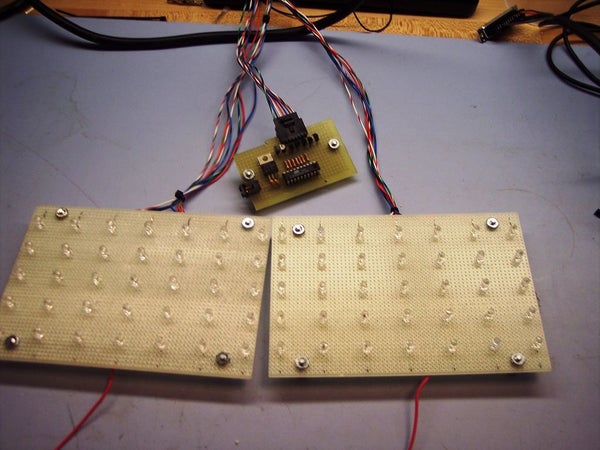
This instructable shows how to control a group of led’s with one microprocessor output.
The micro I will be using is an Atmel Attiny2313.
Step 1: Parts and Tools
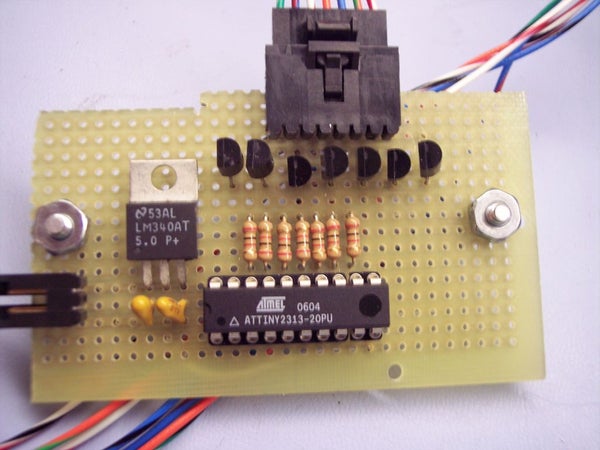
Parts:
Attiny2313 (got 5 free samples from Atmel)
20 pin socket
Resistors (any size will work, depending on your setup. I will explain later)
5v regulator (any will work, I’m using an LM340)
Transistors or Mosfets (easiest to find and cheapest ones are usually 2n3904’s. Just make sure it’s an NPN transistor, or an N-Channel Mosfet)
2 small Capacitors (look up data sheet for regulator, .1uf and .22uf with LM340)
Lots of LED’s
Some protoboard or a breadboard
Any programmer for the AVR
Wire
Tools:
Soldering Iron
Step 2: Schematic and How It Works
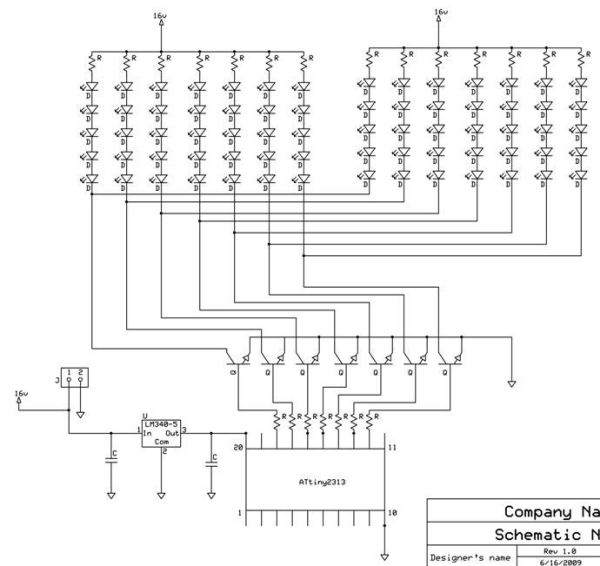
The first schematic shows how I hooked up rows of led’s to output pins. The output pin of the AVR goes to the base of a transistor, which is wired to work as a switch. When the output is low, or 0v, the transistor is off, and the current can’t flow through the load to ground. When the output is high, or 5v, the transistor is on and current can flow through the load to ground. This is called low side switching, and can be used for led’s, dc motors, stepper motors, and many other things that require more voltage or current than the micro can output.
The load for this project will be some led’s.
The led’s can be wired any way that you want, but the power supply you are using will determine how you can hook them up.
For me, I found a laptop charger which can output 16v at 7.5 amps max.
Now the most efficient way to hook up the leds was in a series parallel array as shown in the third picture.
To determine the resistor size, first find out how much voltage is dropped per led. For blue and green led’s that I used, the voltage drop is around 3 to 3.3 volts. Red and yellow led’s are around 2.2 volts.
Now add up all of the voltage drops in series (3*5=15v)
Now subtract that from your source voltage (16-15=1v)
Now you know how much voltage is dropped by your resistor (1v)
Now use ohm’s law to solve for R: V=IR (1v=.015R)
*I used 15ma for my led’s, this is typical for 5mm led’s
So now each strand is using 15ma from your supply.
Each strand can be its own load, or you can attach as many together as you want, as long as the total current for that load does not exceed the limit for the transistor. (2n3904 can handle 100ma)
*The transistor can be replaced with an N-Channel Mosfet
Step 3: Build It
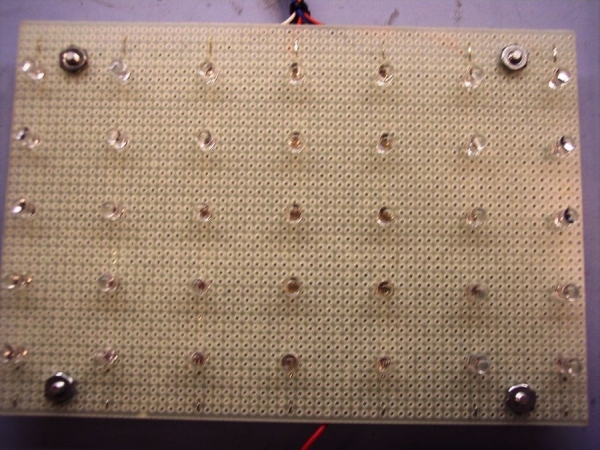
Now you can start breadboarding your circuit.
After I did a few tests on the breadboard, I soldered everything onto a protoboard.
If you wanted to get real fancy, you could layout your own board and etch it using one of the processes explained on this site.
Step 4: Program the AVR
Now it is time to program your AVR. If you don’t know how to do this, check out this instructable: https://www.instructables.com/id/Ghetto-Programming%3a-Getting-started-with-AVR-micro/
Here is the program I made:
It just goes through a loop of sequences forever.
Once the AVR is programmed, you can stick it in the socket you soldered onto your board, or if you dont have a socket, check the program on a breadboard, and if it is correct, then you can solder the chip into your board.
Source: Control Anything With One AVR Pin
- How does the transistor function in this circuit?
The transistor acts as a switch; it turns off when the output is low (0v) and turns on when the output is high (5v) to allow current to flow through the load. - What type of switching method is described?
The project uses low side switching, which is suitable for LEDs, DC motors, and stepper motors that require more voltage or current than the micro can output. - How do you determine the correct resistor size?
Calculate the total voltage drop of the series LEDs, subtract that from the source voltage to find the remaining voltage, and use Ohm's law (V=IR) to solve for resistance based on the desired current. - Can an N-Channel Mosfet replace the transistor?
Yes, the article states that the transistor can be replaced with an N-Channel Mosfet. - What power supply was used for the LED array?
A laptop charger capable of outputting 16v at 7.5 amps max was used. - What is the maximum current handling capacity of the 2n3904 transistor?
The 2n3904 transistor can handle up to 100ma of current. - What is the typical current draw per strand of LEDs?
Each strand uses 15ma from the supply, which is typical for 5mm LEDs. - How are the LEDs wired for efficiency?
The LEDs were wired in a series parallel array to maximize efficiency with the available power supply.
