
Summary of ESAB Introduces EasyShape Part Program Generator for Its Vision T5 CNC
ESAB's EasyShape Part Program Generator is an integrated system for the Vision T5 CNC that automates part program creation. It imports DXF/DWG files, applies Precision Hole Technology for high-quality plasma cuts, and includes 88 pre-designed shapes. The tool eliminates the need for offline programming software by allowing operators to generate optimized programs directly on the machine using a simple wizard interface.
Parts used in the EasyShape Part Program Generator:
- Vision T5 CNC
- EasyShape Part Program Generator
- Touch-screen keypad
- Precision Hole Technology
- CAD import capability
- Wizard interface
- m3 Plasma system
Florence, SC (PRWEB) May 27, 2011
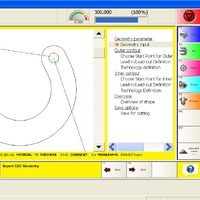
ESAB Welding & Cutting Products introduces EasyShape Part Program Generator, an integrated shape library and post-processor system built into its Vision T5 CNC. As an integrated feature of the Vision T5 CNC, the EasyShape system functions as more than just a shape library. EasyShape includes the ability to import DXF and DWG files and then automatically post-process them to create optimized part programs that are ready to cut. In addition to basic part generation capabilities, EasyShape automatically applies ESABs Precision Hole Technology to plasma cut small holes, making it easier than ever to produce the highest quality plasma cut parts.
EasyShape includes an advanced shape library with 88 pre-designed variable size shapes. These shapes can quickly be adapted to create a variety of part programs by entering the desired dimensions using the touch-screen keypad. Lead-ins & lead-outs are automatically generated based on material type and thickness, but can also be manually customized if desired. The resulting part programs will also have all necessary process automation codes embedded, so process setup is completely automated, and operator mistakes are eliminated. If a part is to be cut using plasma on carbon steel, Precision Hole Technology will be automatically applied to small holes wherever possible. This lets machine operators quickly and easily produce the best possible plasma cut holes right at the machine without manual intervention and without requiring off-line programming software or using an office PC.
In addition to the shape library, EasyShape includes a CAD import capability. Operators can directly import CAD files, which will be post-processed into optimized part programs, without any programming or manual intervention required. EasyShape automatically adds lead-ins/lead-outs based on material type and thickness. All lead-in and lead-out technology is added automatically based on the operators selection of material type, thickness and cutting process. When cutting carbon steel using ESABs m3 Plasma system, ESABs Precision Hole Technology is automatically applied to small holes and slots. Parts can be imported from DWG or DXF format. EasyShape permits post-processing of CAD files right at the machine, eliminating the need to purchase off-line programming software in many applications. For small shops that prefer to have the machine operator also do the programming, EasyShape makes the job easier than ever.
EasyShapes easy-to-use Wizard interface takes only minutes to learn, with no CAD or programming experience required. The EasyShape feature is integrated with the Vision T5 CNC and uses a common Wizard interface with simple, guided, step-by-step operation. Even an untrained operator can learn to use EasyShape in just a few minutes.
ESAB Welding & Cutting Products is one of the worlds largest and most knowledgeable manufacturers of welding and cutting equipment and welding filler metals. Recognized as the technological leader in the industry, ESAB is committed to providing customized solutions for its customers. For more information on these products, visit http://www.esabna.com, http://www.esab-cutting.com or call 1-800-ESAB-123.
###
- What file formats can be imported into EasyShape?
EasyShape allows operators to import DXF and DWG files directly. - How does EasyShape handle lead-ins and lead-outs?
Lead-ins and lead-outs are automatically generated based on material type and thickness but can also be manually customized. - Does EasyShape require off-line programming software?
No, EasyShape permits post-processing of CAD files right at the machine, eliminating the need for off-line programming software. - Can untrained operators use the EasyShape feature?
Yes, even an untrained operator can learn to use EasyShape in just a few minutes due to its simple wizard interface. - What technology is applied to small holes during plasma cutting?
ESABs Precision Hole Technology is automatically applied to small holes and slots when cutting carbon steel. - How many pre-designed shapes are included in the library?
The advanced shape library includes 88 pre-designed variable size shapes. - Can users customize the dimensions of the pre-designed shapes?
Yes, shapes can be adapted by entering desired dimensions using the touch-screen keypad. - Is process setup automated with EasyShape?
Yes, all necessary process automation codes are embedded so process setup is completely automated.
