
Summary of Atmega 32u4 Based USB EEPROM Reader
This project converts an external I2C EEPROM (AT24C512) into a USB storage device using an Arduino Pro Micro with an ATmega32u4 controller. It utilizes the LUFA firmware to handle protocol conversion between USB and I2C standards without writing low-level driver code. A Python desktop application facilitates data operations like reading, writing, and erasing on the virtual drive.
Parts used in the USB Storage Device Project:
- Arduino Pro Micro
- Connecting wires
- Micro USB cable
- I2C EEPROM (AT24C512)
- 4.7K Ohms resistors - 2
External memories are frequently used to store and carry computer data. The USB flash drives are quite common nowadays. This project is an attempt to demonstrate making of USB storage devices. The project converts an external EEPROM which basically has I2C interface to an USB device. The project actually works like a protocol changer between I2C and USB standards. The external EEPROM used in the project is AT24C512 which has 512 Kb memory space. In this project a desktop application written in Python will be used to write, read and erase data from the EEPROM. The 8-bit USB AVR – Atmega 32u4 will be used as the controller chip on the device to accept control instructions from the host computer according to USB protocol and implement the data control operations on EEPROM through I2C protocol. The project device uses AVR based Lightweight USB Framework (LUFA) as the firmware to implement the USB protocol as well as perform the protocol conversion.
The LUFA’s communication device class (CDC) is modified to program the project. By using the LUFA firmware, the device driver code to implement USB protocol and the I2C protocol will not needed to be written explicitly. By only using an API provided in the open source framework, the conversion between the protocols will be done.
The Communication Device Class (CDC) devices can basically perform three tasks -:
• Device management (configuration of specific devices, notification of certain events)
• Call management (Establishment of telephone calls or termination)
• Data transmission (sending and receiving device data)
This project uses CDC class driver for the data transmission purpose.
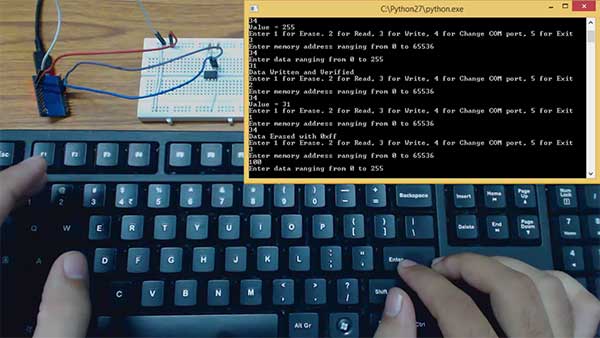
The project is built on Arduino Pro Micro. The device does to need any human inputs. The Control instructions from host computer on USB are received by the device from the USB port of the Arduino board. For interfacing with the EEPROM through I2C, SDA (PD1) and SCL (PD0) pins of the Arduino Pro Micro are connected with the SDA and SCL pins of the EEPROM chip.
PREREQUISITES
This project is based on Arduino Pro Micro which has the USB AVR – Atmega 32u4 as the sitting MCU. In order to understand this project, one must have basic knowledge of the AVR microcontrollers and the embedded C programming for AVRs. WinAVR Studio is used to write, edit and compile the project code, so closely following the project shall require familiarizing with the above stated IDE as well. Though LUFA framework takes care of implementing the USB protocol as well as I2C protocol and has APIs to abstract the lower level codes, understanding USB protocol is recommended to understand how actually the project works. In fact, if anyone has already worked on some other microcontroller, it will not be much pain to understand and follow the project. The project is based on using APIs of the LUFA framework and modifying the demo files that comes with the framework itself.
COMPONENTS REQUIRED
1. Arduino Pro Micro
2. Connecting wires
3. Micro USB cable
4. I2C EEPROM (AT24C512)
5. 4.7K Ohms resistors – 2
SOFTWARE TOOLS REQUIRED
1. WinAVR Studio
2. AVR Dude
3. LUFA Firmware
4. Python 2.7.12
5. Pyserial 2.7
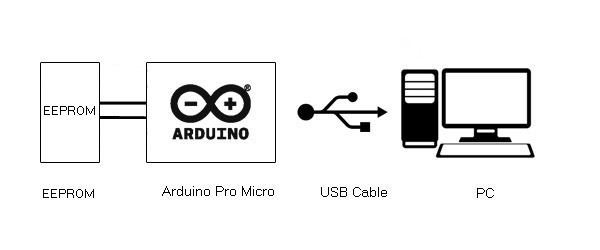
BLOCK DIAGRAM
CIRCUIT CONNECTIONS
The project is built on Arduino Pro Micro in which Atmega 32u4 works as the controller chip. The USB to I2C protocol conversion is carried out on the Arduino board itself. The Arduino board has in-built USB port to connect with the personal computer and has SDA (PD1) and SCL (PD0) pins for serial communication on I2C. So only the Arduino board is needed and connecting wires for connecting with EEPROM through I2C interface and USB cable for connecting with the PC are required. The Arduino board and EEPROM are connected according to the following table -:
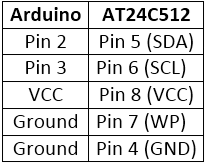
As per the I2C standard, 4.7 KΩ resisters are used to pull up SDA and SCL pins. The Program code for the project is burnt to the Arduino Pro Micro using AVR Dude. Once the firmware is loaded to the Arduino board, the device works like an USB flash drive having 512 Kb memory.
HOW THE PROJECT WORKS
In this project USB protocol needs to be implemented and an API of virtual serial device from the LUFA framework is used to implement the project. The device is configured to communication device class (CDC). For protocol conversion, the device is configured to Abstract Control Model Subclass. The USB communications device class (CDC) is a composite USB device class, and the class may include more than one interface.
The project is USB CDC class device. In the LUFA framework CDC class related modules are in the LUFA-Source-Folder /LUFA/Drivers/USB/Class/Device folder. Other device class related module are also in the same folder. The LUFA framework has demo projects for different USB device classes in the LUFA-Source-Folder\Demos\Device\ClassDriver folder. For implementing the project, demo project for virtual serial device provided in the LUFA framework will be modified and complied. The demo project for virtual serial device is in the LUFA-Source-Folder\Demos\Device\ClassDriver\VirtualSerial folder. The folder contains VirtualSerial.c file which will be modified to implement the project. An additional file will be imported for implementing the I2C protocol which will be written explicitly.
Read More: Atmega 32u4 Based USB EEPROM Reader
- What is the main function of this project?
The project converts an external I2C EEPROM into a USB storage device acting as a protocol changer. - How does the device manage protocol conversion?
It uses the AVR based Lightweight USB Framework (LUFA) to implement USB and I2C protocols via APIs. - Which microcontroller serves as the controller chip?
The 8-bit USB AVR Atmega 32u4 on the Arduino Pro Micro acts as the controller. - Can the project be operated without human input?
No, the device does not need any human inputs once the firmware is loaded. - What software tools are required to compile the code?
WinAVR Studio is used to write, edit, and compile the project code. - How are the SDA and SCL pins connected?
The SDA PD1 and SCL PD0 pins of the Arduino Pro Micro connect directly to the EEPROM pins. - Which USB class driver is utilized for data transmission?
The Communication Device Class CDC driver is modified for data transmission purposes. - What is the memory capacity of the external EEPROM used?
The project uses an AT24C512 which provides 512 Kb of memory space.
