
Summary of Scientific Calculator using AVR Microcontroller
This project implements a scientific calculator using an AVR microcontroller, featuring dual keypads for input and a 16x2 LCD display for output. It supports trigonometric functions including sine, cosine, and tangent. The firmware is developed in Codevision AVR C, with downloadable source code and Proteus simulation files available for further study.
Parts used in the Scientific Calculator using AVR Microcontroller:
- AVR microcontroller
- Two keypads
- 16x2 LCD display
- Codevision AVR C software environment
- Proteus simulation file
This project gives you a nice and simple scientific calculator using AVR microcontroller. It has 2 keypads as shown in the circuit diagram and the results are shown on the 16×2 LCD display. You can do sin,cos, tan functions using this project.
The code is written in Codevision AVR C. You can download the codevision project file and also the proteus simulation file.
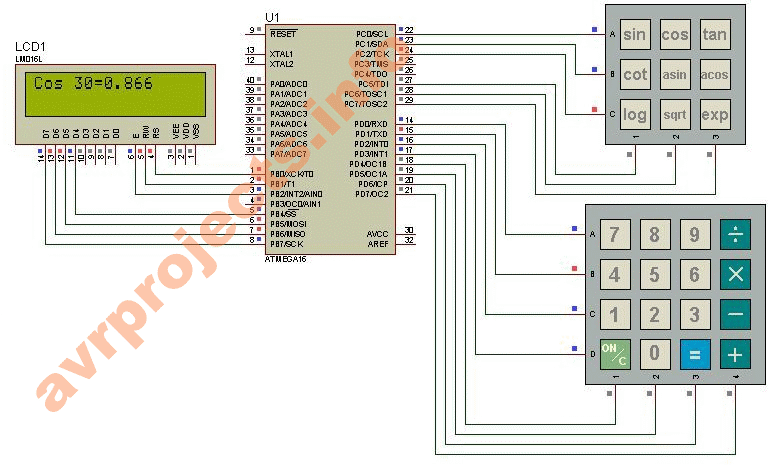
For more Detail: Scientific Calculator using AVR Microcontroller
- What functions does this calculator support?
The device can perform sin, cos, and tan functions. - How are results displayed on the device?
Results are shown on a 16x2 LCD display. - What input method is used for the calculator?
The system uses two keypads as shown in the circuit diagram. - Which programming language was used for the code?
The code is written in Codevision AVR C. - Can I download the project files?
Yes, you can download both the Codevision project file and the Proteus simulation file. - Is there a simulation available for this project?
A Proteus simulation file is provided alongside the code. - What type of microcontroller powers this project?
An AVR microcontroller is used to build this simple scientific calculator.
