
Summary of Frogger Video Game Using Atmel Mega32
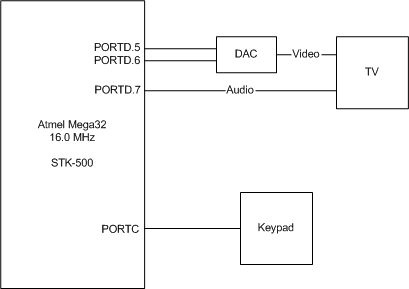
This project recreates the classic Frogger game for a 5-inch black-and-white TV using NTSC standards. The team utilized a keypad for input and developed a unique soundtrack, aiming to avoid visual artifacts like flicker. Although the original plan included specific memory and latch components purchased from DigiKey, these parts were ultimately not used in the final build.
Parts used in Frogger Video Game:
- Keypad
- 5" TV
- Custom Soundtrack Components
Introduction
Sound Bite
One word: FROGGER!!
Why Frogger?
We chose Frogger for several reasons. First, we believe that it is an entertaining game, which is complex enough to implement as a project. Second, Frogger allows us to use knowledge that we have acquired in this class about TVs and NTSC signals. Lastly, Frogger brings back fond childhood memories for us, and by recreating this game, we hope that it does the same for others.
About Our Version of Frogger
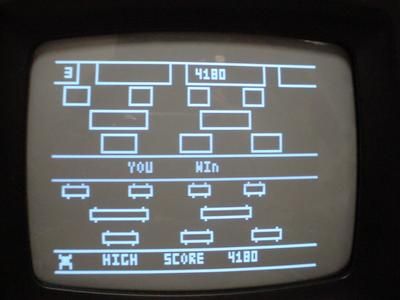
The original version of Frogger was developed by Konami in 1981. Our version of Frogger is somewhat different from the original, but the basics of the game are still the same. The goal of the game is to get a frog safely home to one of the three lily pads at the top of the screen. However, a frog must cross a road while dodging cars, and it must cross a pond while hopping onto logs before it can reach a lily pad. To complete a level, the player must get three frogs to the three lily pads at the top of the screen. However, if three frogs are killed in the process, the game is over. Overall, there are three levels, where each level is increasingly difficult (i.e. the time is shortened).
Our game takes user input from a keypad, and it is displayed in black-and-white on a 5″ TV. Also, our game includes sound, an essential component to an entertaining video game. Our version of Frogger has its own unique soundtrack that we developed solely for this game.
Objectives
Our goal for this project is to meet the following specifications:
- Display the game in black-and-white on a TV, while meeting NTSC standards.
- Use a keypad for user input.
- Incorporate sound into the game.
- There should be no flicker, image distortion, or other visual artifacts.
Parts list:
These are the parts that we ordered from www.digikey.com. However, we did not need them in the end.
- 1 32K x 8 SRAM — Part #: 428-1061-ND; $2.30 each
- 2 Addressable Latches — Part #: 296-8291-5-ND; $0.40 each
- Total Cost: $3.10
For more detail: Frogger Video Game
-
What is the goal of the game?
The goal is to get a frog safely home to one of the three lily pads at the top of the screen. -
How does the player control the frog?
The game takes user input from a keypad. -
On what display is the game shown?
The game is displayed in black-and-white on a 5 inch TV. -
Does the game include sound?
Yes, the game includes sound with a unique soundtrack developed solely for this project. -
How many levels are in the game?
There are three levels where each level is increasingly difficult. -
When does the game end?
The game is over if three frogs are killed in the process. -
What standards must the video output meet?
The display must meet NTSC standards without flicker or image distortion. -
Were the ordered SRAM and Latches used?
No, the team did not need the SRAM and Addressable Latches they ordered in the end.
