
Summary of NEW NXP MCUXPRESSO ECLIPSE IDE V11.0
NXP released MCUXpresso IDE v11.0, featuring a 64-bit Eclipse framework, updated ARM toolchain (GCC8), and integrated Config tools. This version supports Windows, Ubuntu, and macOS, offering enhanced debugging with SEGGER J-Link and PEMicro probes, plus Cortex-M33 SWO Trace support. New features include an improved Develop perspective layout, an Analysis menu for trace views, and the innovative Image view for symbol browsing.
Parts used in MCUXpresso IDE v11.0:
- Eclipse framework 4.10.0v201812
- CDT 9.6.0
- ARM toolchain GCC8
- MCUXpresso Config tools version 6
- NXP SDK 2.6
- SEGGER J-Link software v6.44i
- PEMicro debug probe software v4.13
- Cortex-M33 based MCUs
- SWO Trace feature
- Image view feature
A few days ago NXP has released a new version of their Eclipse IDE flagship: the MCUXpresso IDE v11.0.
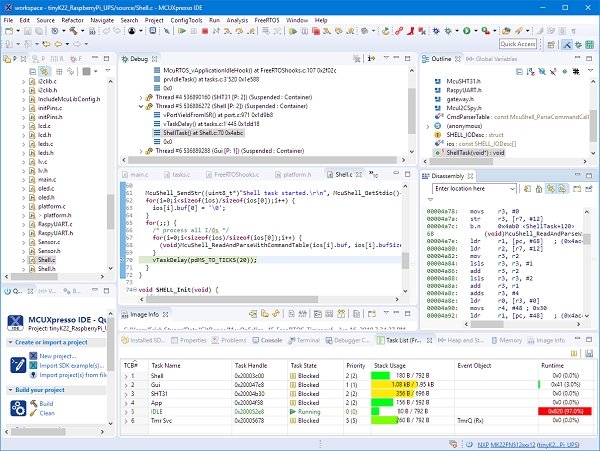
The previous v10.3.1 was released back in Feb 2019, and the 11.0 now in June this year matches up with the Fall university semester. I appreciate that the releases are about every 6 months, so this gives me time to use it in my university lecture material and lab work. I had the weekend for trying it out, and I’m very pleased.
On a top level
There are lots improvements in this release for which the release notes are a good starting point. A few things noteworthy on the top level:
- The Eclipse framework has been moved to 4.10.0v201812 with CDT 9.6.0. As a consequence, this is now 64bit on Windows too. It runs on Windows (7,8,10), Ubuntu (16.04 & 18.04 LTS) plus on MacOS (10.11 or later).
- The ARM toolchain has been updated to GCC8 with the 2018q4-major release$
- The MCUXpresso Config tools have been integrated with version 6
- The IDE supports the latest NXP SDK 2.6 release
- Both SEGGER J-Link (v6.44i) and PEMicro debug probe (v4.13) software has been updated
- Extended support for Cortex-M33 based MCUs which includes SWO Trace
As always, the release notes and the user manual are a good source of information.
Below are some times which I have found very useful:
Develop Perspective
The default ‘Develop’ Eclipse perspective has an improved layout. There is is third column in the layout.
The ‘Outline’ and ‘Terminal’ views are now by default included in this perspective.
A new ‘Analysis’ menu gives an easy access to trace, SWO and Power views:
Image Info
This is a new feature/view in the MCUXpresso IDE. It is a kind of ‘super symbol browser’ and very useful to get an overview about the application. It works both for the image of a project or I can load an external image for analysis.
Read more: NEW NXP MCUXPRESSO ECLIPSE IDE V11.0
-
What is the new default layout in the Develop perspective?
The layout now includes a third column by default containing the Outline and Terminal views. -
Can I use this IDE on Windows 7 or later?
Yes, the IDE runs on Windows 7, 8, and 10. -
Which ARM toolchain version is included in this release?
The release includes the ARM toolchain updated to GCC8 with the 2018q4-major release. -
How does the new Image view help developers?
It acts as a super symbol browser to provide an overview of the application image or external images. -
Does this version support Cortex-M33 microcontrollers?
Yes, it offers extended support for Cortex-M33 based MCUs including SWO Trace. -
Which debug probes are supported in this update?
Both SEGGER J-Link v6.44i and PEMicro debug probe v4.13 software are updated and supported. -
Where can I find detailed information about the improvements?
The release notes and user manual serve as the primary sources for detailed information.
