
Summary of OscilloPhone: Use your Smartphone as an Oscilloscope / Signal Generator
The OscilloPhone project transforms a smartphone into a portable oscilloscope and signal generator, offering a cost-effective solution for students and makers. It features an input for visualizing signals between 150 Hz and 15 kHz with up to ±50V capability, alongside a warning LED for overvoltage. The system also includes two outputs: one generating waveforms up to 15 kHz via a potentiometer, and another power output delivering up to 2A of current for the same frequency range.
Parts used in the OscilloPhone:
- Smartphone
- Oscilloscope input circuit (based on chipstein design)
- Signal generator output circuit
- Signal generator power output circuit
- Potentiometers (for amplitude adjustment)
- Warning LED
Oscilloscopes and Signal Generators are two essential electronics devices to create and test electronic circuits. Unfortunately, these devices are very expensives for students starting electronics, or makers who want use electronic circuits in their creations just once…
The idea of my project is to rethink your smartphone as a portable, powerful and secured platform, able to simulate an oscilloscope and a signal generator for your electronic circuits. Here, your phone isn’t just an accessorize or an ordinairy remote control : it becomes the center of the project, and a tool to help you create better things in the future.
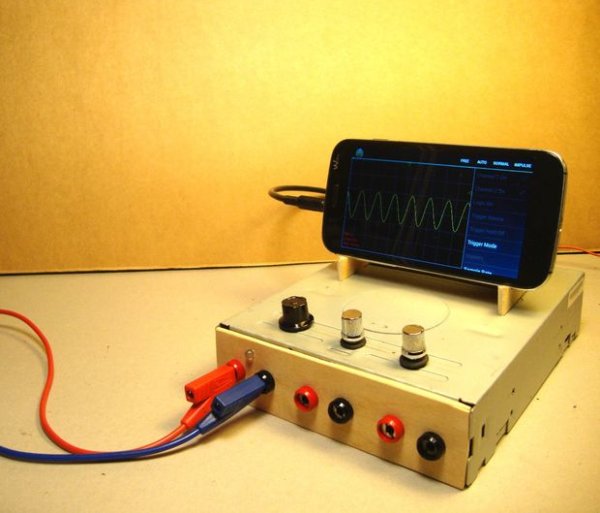
The OscilloPhone project includes:
- an oscilloscope input for visualize electronic signals ranging from 150 Hz to 15kHz. Beyond this bandwidth, the displayed signals have a lower quality. Signals up to ±50V up can be injected on the input of the circuit. A warning LED alerts the user when a too high signal is measured.
- a signal generator output, able to generate sinusoidal, square and triangular signals up to 15kHz. A potentiometer is used to adjust the signal amplitude.
- a signal generator power output, able to generate sinusoidal, square and triangular signals up to 15kHz and 2A. A potentiometer is used to adjust the signal amplitude.
A part of this project is based on an electronic circuit invented by chipstein. I reused and improved his circuit to include it in my project.
When writing this tutorial, I wanted to provide excellent quality pictures to facilitate the making of my project. I retouched some photos to get a pure white background (see step 2) using the recent Antzy Carmasaic‘s Instructable: “Pure White Background Photography Using Smartphone”
For more detail: OscilloPhone: Use your Smartphone as an Oscilloscope / Signal Generator
- What is the primary function of the OscilloPhone project?
The project rethinks a smartphone as a portable platform to simulate an oscilloscope and a signal generator. - How can I adjust the signal amplitude on the device?
A potentiometer is used to adjust the signal amplitude for both the signal generator output and the power output. - Does the device warn users about high voltage signals?
Yes, a warning LED alerts the user when a too high signal is measured at the input. - What is the maximum voltage that can be injected into the input?
Signals up to plus or minus 50 volts can be injected on the input of the circuit. - Can the signal generator produce different types of waveforms?
Yes, it is able to generate sinusoidal, square, and triangular signals. - What happens if the signal bandwidth exceeds 15 kHz?
Beyond this bandwidth, the displayed signals have a lower quality. - Who originally invented the electronic circuit used in this project?
A part of the project is based on an electronic circuit invented by chipstein. - What is the maximum current the power output can generate?
The signal generator power output is able to generate signals up to 2 amperes.
