
Summary of Simplified AVR LCD routines using ATmega8 microcontroller
This article explains how to create a lightweight, custom 8-bit numeric LCD library for AVR microcontrollers to save program memory compared to universal libraries. It details pin configuration macros and provides a list of essential control functions like initialization, string output, and cursor management. The author demonstrates the library using an ATmega8 microcontroller in a Proteus simulation environment.
Parts used in Simplified AVR LCD routines:
- AVR microcontroller (specifically ATmega8)
- Numeric LCD display
- 74HC164 shift register
- Proteus simulator
- WinAVR AVR GCC compiler
- AVRLIB library (referenced as a comparison)
- Flash memory for storing strings
Controlling numeric LCD isn’t so tricky as it may look like. O course you can find numbers of LCD libraries. One of more universal you can find in AVRLIB library for WinAVR AVR GCC compiler. Main disadvantage of such universal libraries that they compile all functions even if you don’t want them. This way huge libraries occupy more program memory than you would like to. One way is to write simple routines specified only to your design.
My simple LCD library include only 8 bit mode. Each pin, connected to LCD, can be configured separately. For instance:
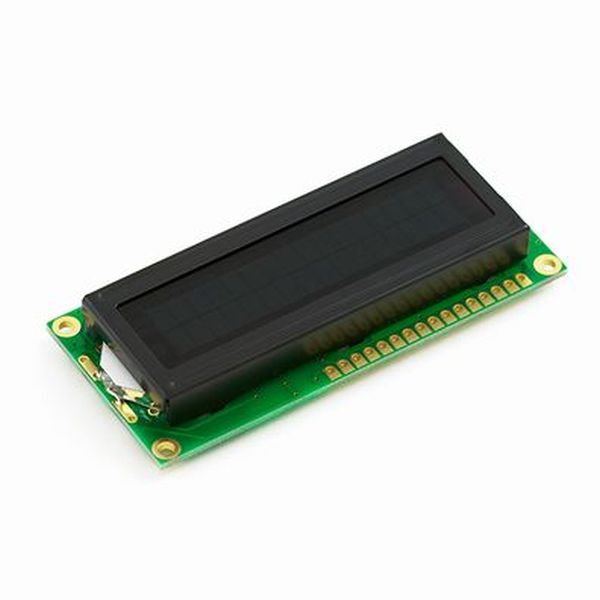
#define LCD_RS 0 //define MCU pin connected to LCD RS
#define LCD_RW 1 //define MCU pin connected to LCD R/W
#define LCD_E 2 //define MCU pin connected to LCD E
#define LCD_D0 0 //define MCU pin connected to LCD D0
#define LCD_D1 1 //define MCU pin connected to LCD D1
#define LCD_D2 2 //define MCU pin connected to LCD D1
#define LCD_D3 3 //define MCU pin connected to LCD D2
#define LCD_D4 4 //define MCU pin connected to LCD D3
#define LCD_D5 5 //define MCU pin connected to LCD D4
#define LCD_D6 6 //define MCU pin connected to LCD D5
#define LCD_D7 7 //define MCU pin connected to LCD D6
#define LDP PORTD //define MCU port connected to LCD data pins
#define LCP PORTB //define MCU port connected to LCD control pins
#define LDDR DDRD //define MCU direction register for port connected to LCD data pins
#define LCDR DDRB //define MCU direction register for port connected to LCD control pins
I have written several LCD controlling functions that may be used more frequently:
void LCDsendChar(uint8_t); //forms data ready to send to 74HC164
void LCDsendCommand(uint8_t); //forms data ready to send to 74HC164
void LCDinit(void); //Initializes LCD
void LCDclr(void); //Clears LCD
void LCDhome(void); //LCD cursor home
void LCDstring(uint8_t*, uint8_t); //Outputs string to LCD
void LCDGotoXY(uint8_t, uint8_t); //Cursor to X Y position
void CopyStringtoLCD(const uint8_t*, uint8_t, uint8_t);//copies flash string to LCD at x,y
void LCDdefinechar(const uint8_t *,uint8_t);//write char to LCD CGRAM
void LCDshiftRight(uint8_t); //shift by n characters Right
void LCDshiftLeft(uint8_t); //shift by n characters Left
void LCDcursorOn(void); //Underline cursor ON
void LCDcursorOnBlink(void); //Underline blinking cursor ON
void LCDcursorOFF(void); //Cursor OFF
void LCDblank(void); //LCD blank but not cleared
void LCDvisible(void); //LCD visible
void LCDcursorLeft(uint8_t); //Shift cursor left by n
void LCDcursorRight(uint8_t); //Shif cursor right by n
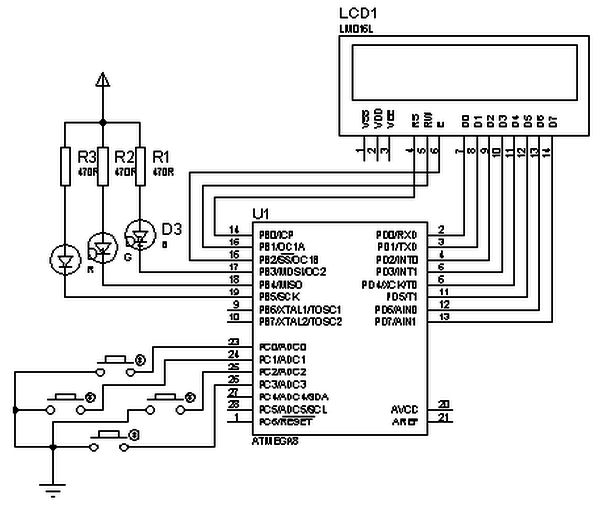
Using this LCD library I have wrote small demo demonstrating how this works. I have constructed small circuit in Proteus simulator to test it.
//————Main program————
#include <avr/io.h>
#include <avr/pgmspace.h>
#include <util/delay.h>
#include "lcd_lib.h"
//Strings stored in AVR Flash memory
const uint8_t welcomeln1[] PROGMEM="AVR LCD DEMO\0";
const uint8_t curhome[] PROGMEM="LCD cursor Home\0";
const uint8_t customsymbol1[] PROGMEM="Define symbol\0";
const uint8_t customsymbol2[] PROGMEM="at CGRAM addr=0\0";
const uint8_t customsymbolout[] PROGMEM="Output symbol\0";
const uint8_t shift[] PROGMEM="<-Shift->\0";
const uint8_t shiftdemo[] PROGMEM="Shift DEMO\0";
const uint8_t lcdblank[] PROGMEM="LCD blank DEMO\0";
const uint8_t lcdanimation[] PROGMEM="LCD animation DEMO\0";
For more detail: Simplified AVR LCD routines using ATmega8 microcontroller
-
Why write a simple LCD library instead of using universal ones?
Universal libraries compile all functions even if not needed, causing them to occupy more program memory than necessary. -
What mode does this specific LCD library support?
This simple LCD library includes only 8 bit mode operation. -
How are pins connected to the LCD configured in the code?
Each pin connected to the LCD can be configured separately using define statements for RS, RW, E, and data lines. -
Which microcontroller is used in the demo project?
The demonstration uses an ATmega8 microcontroller. -
Where are the strings stored in the main program?
The strings are stored in AVR Flash memory using the PROGMEM directive. -
Can I configure MCU ports for both data and control signals?
Yes, the code defines separate ports for LCD data pins and LCD control pins along with their direction registers. -
What function is used to initialize the LCD?
The function named LCDinit initializes the LCD. -
How do you shift the text on the display?
You can use LCDshiftRight or LCDshiftLeft functions to shift by n characters.
