
Summary of Testing Device for DiSEqC-Switches using ATtiny13-20PI
The DiSEqC-Tester is an AVR-based device designed to test DiSEqC 1.0 and 1.1 switches using a 12VDC power supply. It cycles through port commands every second, indicated by four LEDs and sound alerts. The project utilizes an ATtiny13 microcontroller, generates specific byte sequences for port activation, and includes short-circuit protection with audio feedback. Users can select tone levels and protocol versions to verify switch functionality.
Parts used in the DiSEqC-Tester:
- ATtiny13-20PI microcontroller
- DiSEqC-Switch (compatible with 1.0/1.1 protocols)
- Four internal LEDs
- 12VDC Power Supply
- Red wire for Receiver input
- Blue wire for case connection
- Yellow wires for switch ports
- Short circuit protection circuit
This is my first AVR-project on this page. The DiSEqC-Tester allows to test DiSEqC-switches that uses 1.0 or 1.1 protocols. (DiSEqC-Switches with 2.0 and 2.1 protocol have backwards compatibility with 1.0 & 1.1 respectively and also may be tested). The device every second sends a DiSEqC-message that makes switch a DiSEqC-switch. Four LEDs are intended to show on/off state of ports of a DiSEqC-switch.
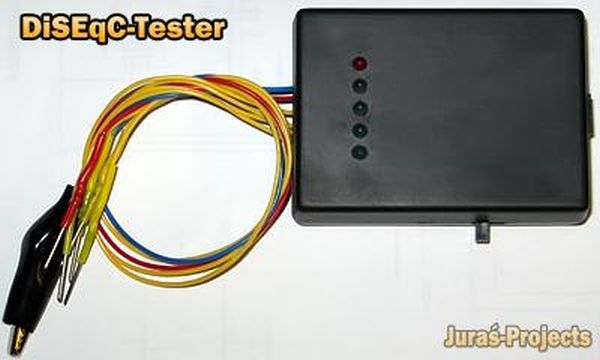
- Features:
- Power supply is 12VDC, max 200mA
- Ports quantity to monitor – 4 (using internal LEDs)
- Protocol support DiSEqC 1.0, DiSEqC 1.1 (Write Port Group Commands)
- Two levels of 22kHz-tone – 650mV, 300mV
- Switch frequency – 1Hz or 2Hz (depends on firmware version)
- Commands indication via LED blinking and sound
- Short circuit protection with sound indication
To test a DiSEqC-switch you must connect the red wire with “Receiver” input of the switch, blue wire with case, connect remaining yellow wires to ports of the switch in any order. Choose the protocol, tone-level and then turn power on. If the DiSEqC-switch is OK, a blue LED of the tester will be switching every second to another blue LED with short red LED blinking and beeping. Next photo and video shows how it looks.
The device every second generates a DiSEqC-message which has duration of 54ms. Each message consist from 4 bytes. Byte is 8 bit + 9-th odd bit. If protocol 1.0 is used, then device sends next commands-sequences: $E01038C0, $E01038C4, $E01038C8, $E01038CC, $E01038C0 and so later, else $E01039F0, $E01039F1, $E01039F2, $E01039F3, $E01039F0… These commands are so called “Write Port Group N0” (38h) and “Write Port Group N1” (39h) by DiSEqC-Protocol. The full description of DiSEqC-Protocol can be found at Eutelsat web site. For example, DiSEqC-Message $E01038C0 switches port “LNB1” of DiSEqC-Switch 1.0/2.0 into active state.
 DiSEqC-Tester firmware v1.0a (protocols 1.0, 1.1; Frequency 1Hz, no pause after power on).
DiSEqC-Tester firmware v1.0b (protocols 1.0, 1.1; Frequency 2Hz, pause 0.5s after power on).
DiSEqC-Tester board in P-CAD 2004 format
For more detail: Testing Device for DiSEqC-Switches using ATtiny13-20PI
- How does the tester indicate a working switch?
A blue LED switches every second to another blue LED with short red LED blinking and beeping. - What power supply is required for the device?
The device requires a 12VDC power supply with a maximum current of 200mA. - Which DiSEqC protocols are supported?
The device supports DiSEqC 1.0 and DiSEqC 1.1 protocols. - Can this tester work with DiSEqC 2.0 or 2.1 switches?
Yes, because switches with 2.0 and 2.1 protocols have backwards compatibility with 1.0 and 1.1 respectively. - How long is each generated DiSEqC message?
Each message has a duration of 54ms and consists of 4 bytes. - What are the available 22kHz-tone levels?
The device offers two levels: 650mV and 300mV. - What happens if a short circuit occurs?
Short circuit protection activates with a sound indication. - How many ports can be monitored simultaneously?
The device monitors up to 4 ports using internal LEDs.
