
Summary of The Arduino LED Cube using LED microcontroller
This article guides readers on building a 3x3x3 LED cube using an Arduino. It explains the basics of LEDs, lists necessary materials like LEDs and a soldering iron, and details the assembly process involving creating layers, bending cathodes, and connecting anode columns.
Parts used in the LED Cube:
- 27 LEDs
- Arduino Diecimila or Duemilanove
- 2ft of wire
- Breadboard
- Soldering iron
- Solder
- Foam core (for jig)
Are you bored?
Do you want to make something amazing to impress your friends with?
Let’s try making an LED cube…..
A work of art, that lights up…..
Step 1 What in the world is and LED?
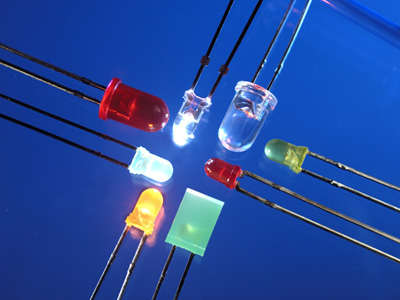
LED is an acronym for Light Emitting Diode, where electricity can only go one way and when it passes through the “LED” it lights up!
Who cares what an LED is… Well you should because this Monitor your looking at probably has LEDs in it. So there you go.. You learned something new.
Step 2 Materials you will need.
Let’s see what you need to make this…
27 LEDs —->wow 27, well radioshack sells 20 for 3 bucks. You can go to digikey, or be smart and get two packs of assorted LEDs at radioshack.
Arduino Diecimila or Dumeliavore(spelling is wrong) i think?—-> Go to the maker shed or arduino.cc
some like 2ft of wire(choose your favorite)
A breadboard —–> pretty common
a soldering iron! “WARNING SOLDERING IRONS ARE VERY HOT, AND SOLDER COINTAINS A CHEMICAL KNOWN TO CAUSE DISESE”
and your set to go!
Step 3 Assemble the Cube!
So as you can see in that first picture. The cube is 3x3x3. Which means a 3×3 led in one layer, and three layers of 3×3 LEDs.
You need to make a jig for this. I used foam core and basically drill some holes in a 3×3 matrix shape about 1/2 an inch between each hole.
now, when yo het all of your LEDs in the holes and the pins are sticking up to the sky you need to bend the cathodes.
Wait! What did he just say! Yes, i said cathode, a cathode is the negative lead. This is the shorter one. Easy enough to understand. The longer one is the positive and bear with me, this one is called the anode.
now you want to bend the cathode (the shorter one) the way the arrows go on this picture. Then when that cathode is bent it should be touching the other LEDs cathode. This is your soldering place.(melt the solder here).
Great all done! Now you have a 3×3 led square. Repeat this step two more times so you have three. Remember 1st grade 1+2=3.
Lay those three LED squares on the table in front of you. now, i used some wire we discussed earlier to connect them all. On the squares there should be 9 anodes sticking up. You want to connect the anode of the first LED square to the corresponding anode one the second layer.
So, when your finished you should have 9 columns of anodes.
Then you need to solder you some wires going from the negative connections of all three layers. You should end up with three separate wires coming from the negatives(the cathodes).
For more Detail: The Arduino LED Cube using LED microcontroller
- What does LED stand for?
LED is an acronym for Light Emitting Diode. - How many LEDs are needed for this project?
You need 27 LEDs to build the cube. - Can I buy LEDs at RadioShack?
Yes, RadioShack sells them, such as packs of 20 for three dollars. - What is the negative lead of an LED called?
The negative lead is called the cathode. - Which lead on an LED is longer?
The longer lead is the positive one, known as the anode. - How do you connect the layers of the cube?
You connect the anode of the first square to the corresponding anode on the second layer to form nine columns. - How many separate wires come from the negatives?
You should end up with three separate wires coming from the negatives. - What material was used to make the jig?
Foam core was used to create the jig with holes drilled in a 3x3 matrix.
