
Summary of TIL311 / INL0397-1 Hexadecimal Display usning AVR microcontroller
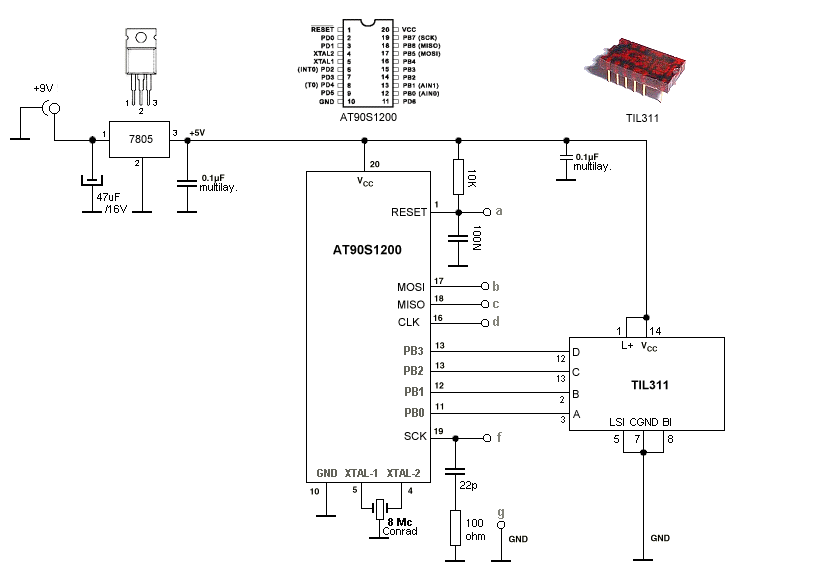
This article explains how to control a TIL311 hexadecimal dot-LED display using an AVR microcontroller. It details the 14-pin configuration of the display, including data inputs and supply voltages, and provides assembly code examples for setting values on PortB of an AT90S1200. The text highlights the display's integral TTL logic, allowing it to show all hexadecimal and decimal numbers with minimal wiring.
Parts used in the TIL311 Hexadecimal Display Project:
- TIL311 hexadecimal dot-LED-display
- AT90S1200 microcontroller
- PortB input pins
- Assembly language code
PIN 1 LED SUPPLY VOLTAGE
PIN 2 LATCH DATA INPUT B
PIN 3 LATCH DATA INPUT A
PIN 4 LEFT DECIMAL POINT CATHODE
PIN 5 LATCH STROBE INPUT
PIN 6 OMITTED
PIN 7 COMMON GROUND
PIN 8 BLANKING INPUT
PIN 9 OMITTED
PIN 10 RIGHT DECIMAL POINT CATHODE
PIN 11 OMITTED
PIN 12 LATCH DATA INPUT D
PIN 13 LATCH DATA INPUT C
PIN 14 LOGIC SUPPLY VOLTAGE, Vc
How to program an AVR:
To control the TIL311 you must set a 4-bit number (16 values -> 6=hex, 10=deci) on the inputs. In this example use the first nibble (nibble is half a byte, 1 byte = 8-bit) of PortB of the AT90S1200. If you want to display e.g. the number 8 on the display, you must set the bit on input D of the TIL311, D has the binairy weight 8 (D=8, 1000 binairy):
ldi display, 0x08
out PORTB, display
With only a few lines of assembly you can wake-up the TIL311. The next example is a decimal upcounter with two TIL311’s.
Brief introduction:
On this page you will find a few examples on how to control a TIL311 hexadecimal dot-LED-display. The TIL311 was developed in 1972 by Texas Instruments, it’s a display with integral TTL logic, it has a 4-bit databus, so with only a few wires you’re able to display all hexadecimal numbers (0 – F), which means also all decimal numbers (0 – 9) With a microcontroller attached to it you can display various things, like temperature (e.g. 2 displays), make a counter, an electronic dice, etc. Here a diagram on how to connect a TIL311 to a microcontroller.
For more detail: TIL311 / INL0397-1 Hexadecimal Display usning AVR microcontroller
- How do I program the TIL311?
You must set a 4-bit number on the inputs using assembly code. - Can I display all hexadecimal numbers with this setup?
Yes, the 4-bit databus allows displaying all hexadecimal numbers from 0 to F. - Does the TIL311 have built-in logic?
Yes, it features integral TTL logic developed by Texas Instruments. - What is the binary weight for input D?
The binary weight for input D is 8. - How many wires are needed to connect the display?
Only a few wires are required due to the 4-bit databus. - Can this project be used to make a counter?
Yes, you can use two displays to create a decimal upcounter. - What microcontroller is used in the example?
The example uses the AT90S1200 microcontroller. - Is it possible to display temperature with this system?
Yes, you can display various things like temperature using two displays.
