
Summary of Tiny LED Time Watch
This article details a four-channel thermometer project using an ATtiny85 microcontroller to monitor temperatures via four 1-Wire sensors. The system displays real-time readings on a compact 128x32 OLED screen, suitable for diverse applications like greenhouse control, PC monitoring, and amplifier testing. It supports both DS18B20 and MAX31820 sensors, offering flexibility in voltage requirements and packaging options.
Parts used in the Four-Channel Thermometer:
- ATtiny85 microcontroller
- Four DS18B20 or MAX31820 temperature sensors
- 128x32 OLED display with SPI interface
- Digital wires or twisted-pair cables
This article describes a four-channel thermometer that monitors the temperature at four temperature sensors, and gives a continuous readout on a small 128×32 OLED display:
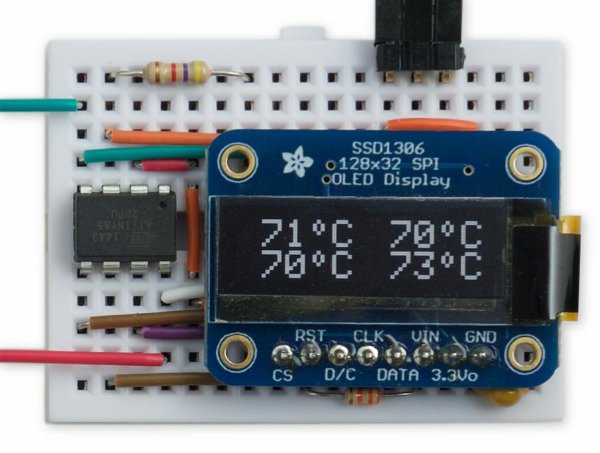
It could be used in any application where you want to monitor multiple temperatures, such as in controlling a greenhouse, checking the output transistors in a power amplifier, monitoring key points in an overclocked gaming PC, monitoring the chips on a Raspberry Pi, or checking the temperature in different rooms in a home.
Here’s an example of using the Four-Channel Thermometer to monitor the temperature of the power transistors in a Class A power amplifier:
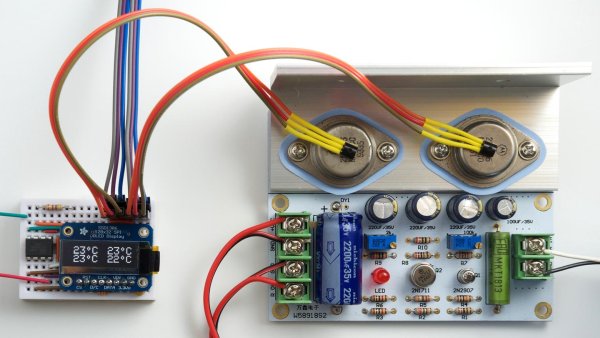
The Four-Channel Thermometer uses an ATtiny85 to read the data from four DS18B20 or MAX31820 temperature sensors, using the 1-Wire protocol, and display the temperatures on a small OLED display.
For the display I chose a 128×32 OLED display, a small display about 2.5cm (1″) wide with a very clear, bright monochrome display, and an SPI interface, available from Adafruit [1] or Proto-PIC in the UK [2]. A similar display is also available from Aliexpress [3].
For the sensors I used DS12B20 [4] temperature sensors in a TO-92 transistor package, which have a supply range of 3.0V to 5.5V. The MAX31820 [5] is equivalent and cheaper, but has a maximum supply voltage of 3.7V. Alternatively you can find a pack of 10 DS18B20s on Banggood [6]. The DS18B20 temperature sensors are also available encapsulated into a waterproof cable [7].
You can connect to the temperature sensors using twisted-pair cables of several metres; with long cables a linear topology is recommended rather than a star configuration [8].
For more detail: Tiny LED Time Watch
- What components does the Four-Channel Thermometer use?
The device uses an ATtiny85 microcontroller, four DS18B20 or MAX31820 temperature sensors, and a 128x32 OLED display. - Can I use this thermometer for a gaming PC?
Yes, the article states it can be used for monitoring key points in an overclocked gaming PC. - Does the project support different types of temperature sensors?
Yes, it reads data from both DS18B20 and MAX31820 temperature sensors using the 1-Wire protocol. - What is the supply voltage range for the DS18B20 sensors?
The DS18B20 sensors have a supply range of 3.0V to 5.5V. - How long can the cables connecting the sensors be?
You can connect to the temperature sensors using twisted-pair cables of several metres. - Which cable topology is recommended for long connections?
A linear topology is recommended rather than a star configuration when using long cables. - Where can I purchase the OLED display mentioned?
The display is available from Adafruit, Proto-PIC in the UK, or Aliexpress. - Is there a waterproof option for the sensors?
Yes, the DS18B20 temperature sensors are available encapsulated into a waterproof cable.
