
Summary of Tiny Touch Button
This project demonstrates a compact touch-controlled RGB light using an ATtiny10 microcontroller and four WS2812 LEDs. It leverages the light_WS2812 and TinyTouchLib libraries to operate with just two output pins, maximizing efficiency on a 6-pin device. The design includes Atmel Studio projects and Eagle schematic files for replication.
Parts used in the Touch Controlled Light:
- ATtiny10 microcontroller
- 4xWS2812 RGB LEDs
- light_WS2812 library
- TinyTouchLib library
- Atmel Studio project files
- Eagle files
With LEDs that require only one pin, you can do a lot with even just a 6-pin microcontroller!
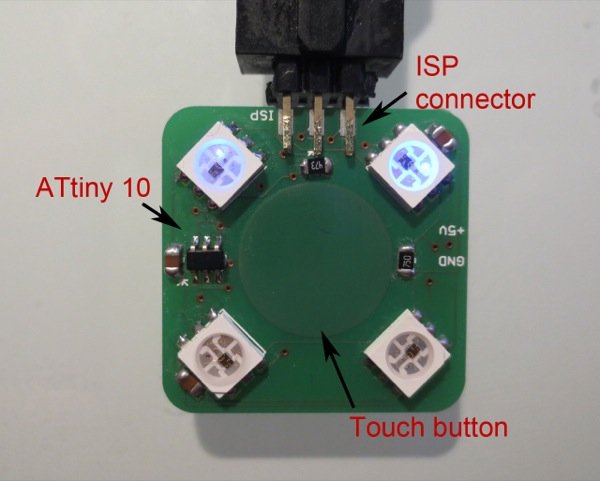
A touch controlled light with 4xWS2812 RGB LEDs and ATtiny10. This is a small hardware project which utilizes the light_WS2812 library and the TinyTouchLib to implement a touch-button controlled RGB-LED light. Only two output pins of the ATtiny10 are used. Atmel Studio project and Eagle files are included.
For more detail: Tiny Touch Button
- How many pins does the ATtiny10 use for this project?
Only two output pins of the ATtiny10 are used. - What type of LEDs are used in this hardware project?
The project utilizes 4xWS2812 RGB LEDs. - Can this project be controlled by touch?
Yes, it implements a touch-button controlled RGB-LED light. - Which libraries are required to implement the touch control?
The project uses the light_WS2812 library and the TinyTouchLib. - Is this considered a small hardware project?
Yes, it is described as a small hardware project. - What software tools are included for this project?
An Atmel Studio project and Eagle files are included. - How many pins does the microcontroller have in total?
The microcontroller mentioned has 6 pins. - Does the design require more than two output pins?
No, only two output pins of the ATtiny10 are used.
