
Summary of YAFLC (Yet Another Flickering LED Candle) using Tiny45 microcontroller
This article details a DIY flickering LED candle project using a Tiny45 microcontroller. The build involves creating two circular PCBs: one for the controller and another for the 1W warm white LED, connected via four connectors. Components include batteries, resistors, a switch, and a Perspex tube. The author uses a hot glue "wick" to diffuse light and mimic a real flame, all mounted on a wooden base with masking tape.
Parts used in Flickering LED Candle:
- Tiny45 AVR Microcontroller
- 1W Warm white (or yellow) LED
- Perspex tube
- AA or AAA size batteries- 4 (alkaline or NiMH)
- PCB stock (or a general purpose veroboard)
- Battery holders
- 1/4W resistors 50 Ohm- 4 and 10K -1
- On/Off switch
- Connecting wire
- Piece of wood for the base
- Masking tape
There are numerous posts on Instructables about how to make a flickering LED candle. This is my version.
The project requires the following components:
1. Tiny45 AVR Microcontroller (Tiny13 would also do)
2. 1W Warm white (or yellow) LED
3. Perspex tube
4. AA or AAA size batteries- 4 (alkaline or NiMH)
5. PCB stock (or a general purpose veroboard)
6. Battery holders
7. 1/4W resistors 50 Ohm- 4 and 10K -1.
8. On/Off switch
9. Connecting wire
10. piece of wood for the base
11. masking tape
Tools:
1. Solder iron and solder
2. Hot glue gun
3. AVR ISP Programmer
4. screwdriver, files, drilling machine and suitable drilling bits.
Step: 1 The circuit diagram
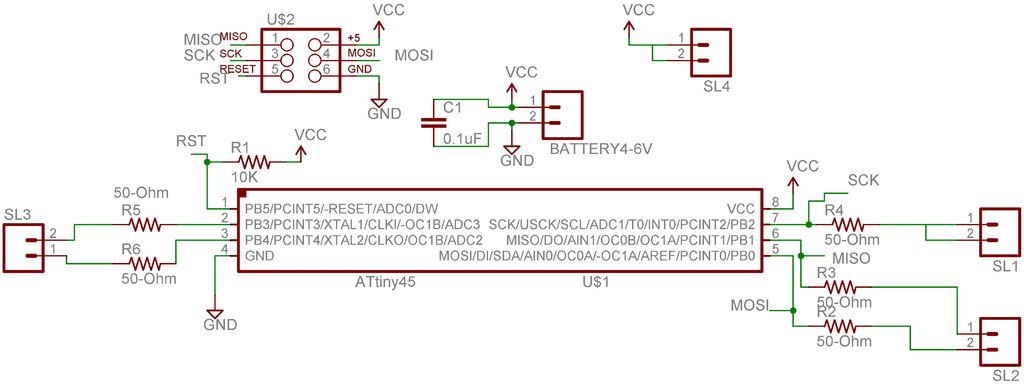
The required circuit diagram for the candle is here. Also seen is the board layout. In the board layout, the blue tracks are handled as jumper wires. The complete circuit is split in two boards, one containing the controller and the has the 1-W LED. The two boards are arranged in a double-decker, circular PCBs. The idea is to have a smaller total diameter for the circuit. four 2-pin connectors are used to connect the controller board to the LED board. The fifth connector on the controller board is for the power supply.
Step: 2 Making the PCBs
I used Modela Milling machineModela Milling machine to mill and cut my boards. You can get these boards fabricated from commercial PCB manufacturers such as PCB ExpressPCB Express or you can even make them at home as described herehere.
Step: 3 Soldering the PCBs
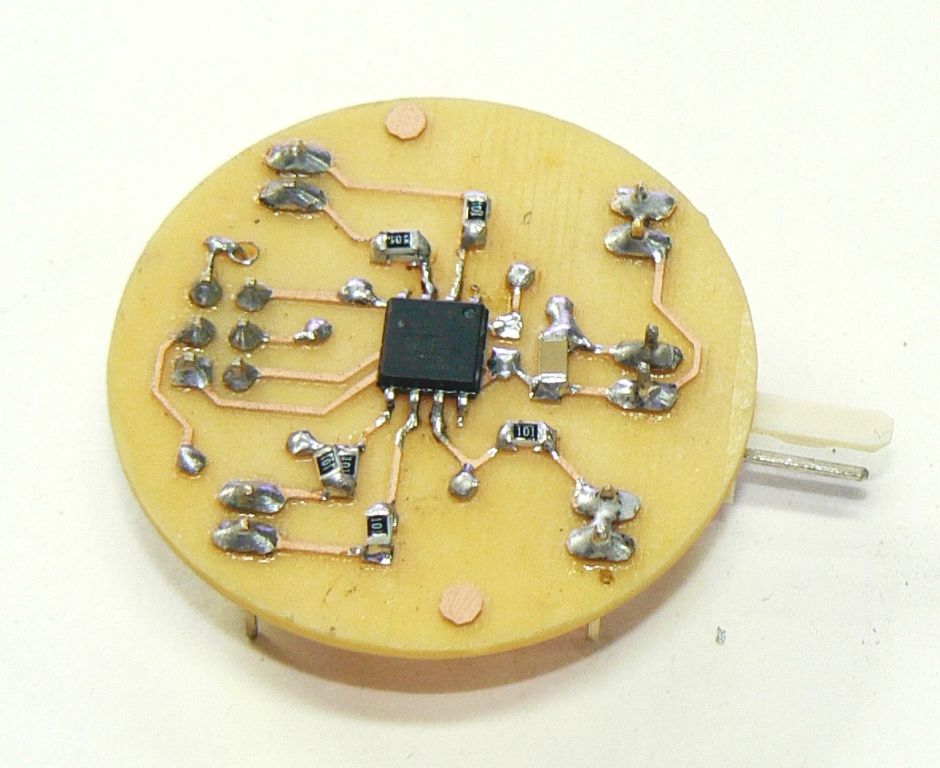
I soldered all the components as seen in the photographs. By distributing the circuit on two boards, one for the controller and another for the LED is not only useful in reducing the diameter of the board but also to ensure that when the controller board is programmed through the ISP connector (by first disconnecting the LED board from the controller board), the LED does not load the ISP signals.
I soldered all the SMD components first, followed by the jumper wires and then the rest of the components.
Step: 4 Prepare the LED board
-
What microcontroller is required for this project?
The project requires a Tiny45 AVR Microcontroller, though a Tiny13 would also work. -
How many batteries are needed for the power supply?
You need four AA or AAA size batteries, which can be alkaline or NiMH. -
Why is the circuit split into two separate boards?
Splitting the circuit reduces the board diameter and allows programming the controller without the LED loading the ISP signals. -
How does the author create the flickering wick effect?
Hot glue is poured on the LED and drawn out as a wick while cooling to diffuse light and simulate a real candle. -
What tool is used to mill the PCBs at home?
The Modela Milling machine is used to mill and cut the boards if making them at home. -
Which components must be soldered first?
SMD components should be soldered first, followed by jumper wires and then the rest of the components.
