
Summary of Your Image on an Arduino! – TFT LCD Screen Guide
This article introduces the official Arduino TFT LCD screen released at Maker Faire 2013, highlighting its ease of use for displaying information and images independently from a computer. It features a built-in microSD card socket for storing data and outlines basic project capabilities like loading content from the SD card.
Parts used in the Arduino TFT LCD Screen Project:
- Arduino
- TFT LCD screen
- microSD card socket
- microSD card
Have you ever heard of TFT LCD screens? They are great ways to display information from your Arduino, or display pictures. The Arduino team just released an official TFT LCD screen with their new Robot at Maker Faire 2013. It’s very easy to get started with!! This tutorial will show you how to get the LCD up and running, load information from the SD card, and make a few simple projects.
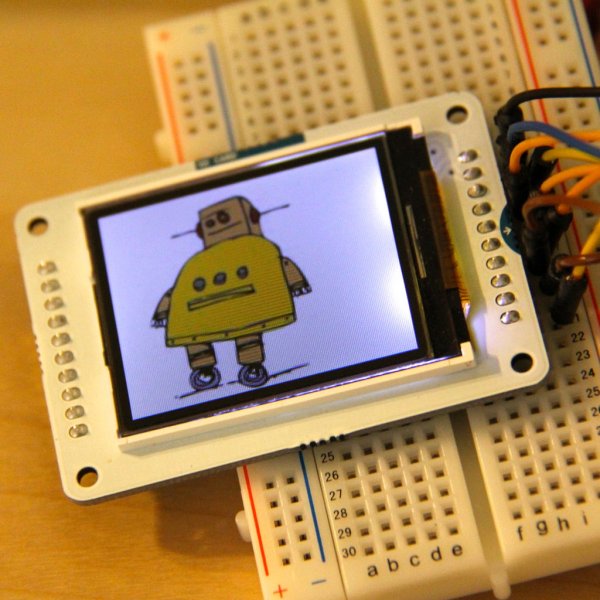
The TFT LCD screen is a great way to detach your computer, and have the Arduino relay information that you need to know onto the LCD. A great part of the LCD is that it has a built in microSD card socket. You can store images on the microSD card socket, and even some text!
If you like this Instructable, please vote for me in the Arduino contest by clicking the orange ribbon in the upper right hand corner, then vote!!!
For more detail: Your Image on an Arduino! – TFT LCD Screen Guide
- What is the primary function of the TFT LCD screen mentioned?
It is a great way to display information or pictures from an Arduino. - Where was the official Arduino TFT LCD screen first released?
The screen was released by the Arduino team at Maker Faire 2013. - Can the LCD operate without a connected computer?
Yes, it allows you to detach your computer while the Arduino relays information to the LCD. - Does the TFT LCD screen have storage capabilities?
Yes, it has a built-in microSD card socket to store images and text. - How can users get started with this specific LCD screen?
The tutorial shows how to get the LCD up and running easily. - What types of projects does the guide cover?
The guide covers loading information from the SD card and making simple projects.
