
Summary of Mushroom Environment Control – Arduino Powered
This Arduino project automates indoor mushroom cultivation by monitoring temperature, humidity, and CO2 levels. The system reads sensor data to control four relays connected to mains-powered devices like heating pads, a humidifier, and an air pump, ensuring optimal growing conditions for oyster and shiitake mushrooms.
Parts used in the Indoor Mushroom Controller:
- Arduino
- LCD Keypad shield
- 7-12 volt power supply
- USB cable
- Housing box
- Veroboard/breadboard
- 4x solid state 5v-240v relays
- Mains Power board with four sockets
- Wires
- Jiffy boxes
- Thermistors 10k x2
- Resistor 10k x2
- HS1100 humidity reader
- 555 timer (cmos type)
- Various resistors (576k, 49.9k, 1k, 909k)
- Digital divide by ten Chip
- MG811 C02 sensor with breakout board
- 2 x heating pads
- Sonic Humidifier
- Aquarium Tubing
- Air Pump (aquarium)
- Plastic lunchbox (airtight)
- HEPA Filter for Vacuum cleaner
- Hot Glue gun
- Soldering Iron
- Screwdrivers
- Multimeter
- Drill
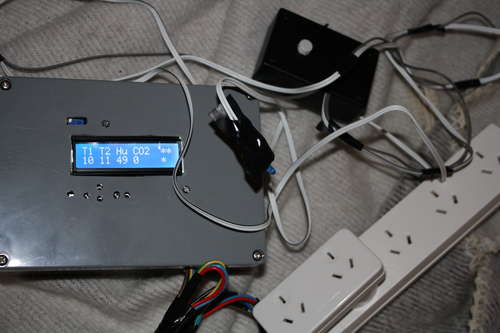 This is my first Arduino project aimed at helping me with my other hobby which is growing oyster and shiitake mushrooms indoors.
In a nutshell, the controller takes in two temperature readings, 1 Humidity reading and 1 Co2 reading and triggers a set of four relays connected to mains power.
Intended to be connected to the mains are two heating pads, a sonic humidifier and an air pump (although the choice isn’t limited to these of course).
Step 1 Items
MAIN:
-Arduino.
-LCD Keypad shield.
– 7-12 volt power supply.
– USB cable (socket that connects to USB on Arduino).
-Box To house the whole thing.
-Veraboard/breadboard.
– 4x solid state 5v- 240v relays.
– Mains Power board with four sockets.
– Wires.
– Jiffy box to house inline socket/screws to connect Sensors.
SENSORS:
-Thermistors 10k x2
-Resistor 10k x2
-HS1100 humidity reader
– 555 timer (cmos type)
– resistors: 576k, 49.9k, 1k and 909k
– Veraboard/breadboard
– Jiffy Box
– Digital divide by ten Chip
-MG811 C02 sensor (I got a breakout board with op-amp amplifier built in. You can make it yourself, it is a high precision op amp set up as non-inverting with gain around 10).
– Jiffy Box
ENVIRONMENTAL CONTROLLERS
– 2 x heating pads
– Sonic Humidifier
– Aquarium Tubing
– Air Pump (aquarium)
– Plastic lunchbox (airtight)
– HEPA Filter for Vacuum cleaner.
– Plastic tub
– Aquarium Air pump
– Aquarium Tubing
– Plastic Lunchbox (airtight)
– HEPA Filter for Vacuum cleaner
EXTRAS:
– Hot Glue gun
– Soldering Iron
– Screwdrivers
– Multimeter
– Drill
– Home brew larger.
Step 1 Items
MAIN:
-Arduino.
-LCD Keypad shield.
– 7-12 volt power supply.
– USB cable (socket that connects to USB on Arduino).
-Box To house the whole thing.
-Veraboard/breadboard.
– 4x solid state 5v- 240v relays.
– Mains Power board with four sockets.
– Wires.
– Jiffy box to house inline socket/screws to connect Sensors.
SENSORS:
-Thermistors 10k x2
-Resistor 10k x2
-HS1100 humidity reader
– 555 timer (cmos type)
– resistors: 576k, 49.9k, 1k and 909k
– Veraboard/breadboard
– Jiffy Box
– Digital divide by ten Chip
-MG811 C02 sensor (I got a breakout board with op-amp amplifier built in. You can make it yourself, it is a high precision op amp set up as non-inverting with gain around 10).
– Jiffy Box
ENVIRONMENTAL CONTROLLERS
– 2 x heating pads
– Sonic Humidifier
– Aquarium Tubing
– Air Pump (aquarium)
– Plastic lunchbox (airtight)
– HEPA Filter for Vacuum cleaner.
– Plastic tub
– Aquarium Air pump
– Aquarium Tubing
– Plastic Lunchbox (airtight)
– HEPA Filter for Vacuum cleaner
EXTRAS:
– Hot Glue gun
– Soldering Iron
– Screwdrivers
– Multimeter
– Drill
– Home brew larger.
Step 2 Thermistors
On a breadboard solder on a 10k ohm resistor, one end will connect to the Arduino ground, the other to Analog input 1 and to one of the thermistor wires.
The other end of the thermistor wire connects to +5v from the Arduino.
Do this for another Thermistor and connect it to Analog input 2 instead.
Basically it is a voltage divider with the thermistor defining the Voltage going to the Arduino analog input. One analog divider for each thermistor.
I added the circuitry in a separate jiffy box where the thermistor leads could be screwed into inline screws protruding from the box.
To test this sensor, use a multimeter to look at the voltage change as you put your finger on the Thermistor.
Step 3 Humidity Reader
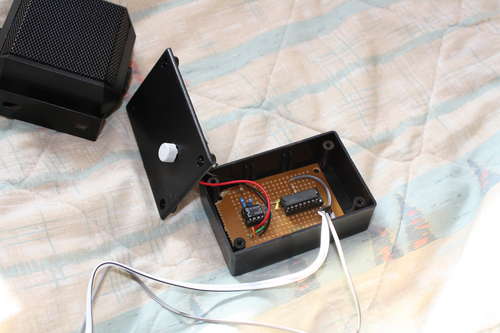 The humidity sensor is a variable capacitor which changes linearly with the relative humidity.
The datasheet shows how to hook up the sensor using a 555 timer (must use CMOS type).
I used this circuit to send data pulses to the Arduino. At first I found the pulses were too close together and did not give high enough discrimination, so at the output of the 555 I put a digital divide by ten chip. This made it so the pulses wavelength was in the hundreds of microseconds rather than the tens of microseconds.
Please find attached the datasheet which has the circuit diagram using the 555 timer.
I used the same style inline screws as described with the Thermistor step as a go between for this sensor and the Arduino.
To Test this, hook up the output to a speaker supply power (6volts will do) and breath on the sensor, you should hear a drop in frequency.
Step 4 Co2 Sensor
Initially I had ordered an MG811 Co2 sensor by itself, after setting it up I couldn’t make it work properly so I ordered one already on a board with an op amp amplifier built in.
I later found that the power supply I was running it with was faulty and the heating element in the Co2 sensor was running on overdrive.
Basically the circuit has the sensor hooked up to a non-inverting op-amp with roughly a gain of ten, and the heating element is supplied by a 6 volt voltage regulator. The set up is shown on the datasheet attached with pinouts of the sensor which is self explanatory, what isn’t self explanatory is the graph on the datasheet which gives a totally inacurate picture of the expected output of the sensor.
Give it a test by placing a Multimeter on the sensor and breathing on it, it should change reading.
For more Detail: Mushroom Environment Control – Arduino Powered
- How many temperature readings does the controller take?
The controller takes two temperature readings using thermistors. - What sensors are used to monitor the environment?
The project uses thermistors for temperature, an HS1100 for humidity, and an MG811 for CO2. - Can I use different devices than heating pads and humidifiers?
Yes, the choice of devices connected to the relays is not limited to heating pads, humidifiers, or air pumps. - Why was a digital divide by ten chip added to the humidity circuit?
It was added because the initial pulses from the 555 timer were too close together, so the chip increased the wavelength for better discrimination. - What type of 555 timer is required for the humidity sensor?
You must use a CMOS type 555 timer for the humidity sensor circuit. - How can I test if the CO2 sensor is working properly?
Place a multimeter on the sensor and breathe on it; the reading should change. - What gain value does the op-amp amplifier have for the CO2 sensor?
The high precision op amp is set up as non-inverting with a gain around ten. - What components are needed to build the voltage divider for the thermistors?
You need a 10k ohm resistor, the thermistor, and connections to the Arduino ground, +5v, and analog inputs. - How do you verify the humidity sensor is functioning during testing?
Hook the output to a speaker and breath on the sensor; you should hear a drop in frequency.
