
Summary of 8-bit ADC with ADC0808 using ATmega16 with Proteus Simulation
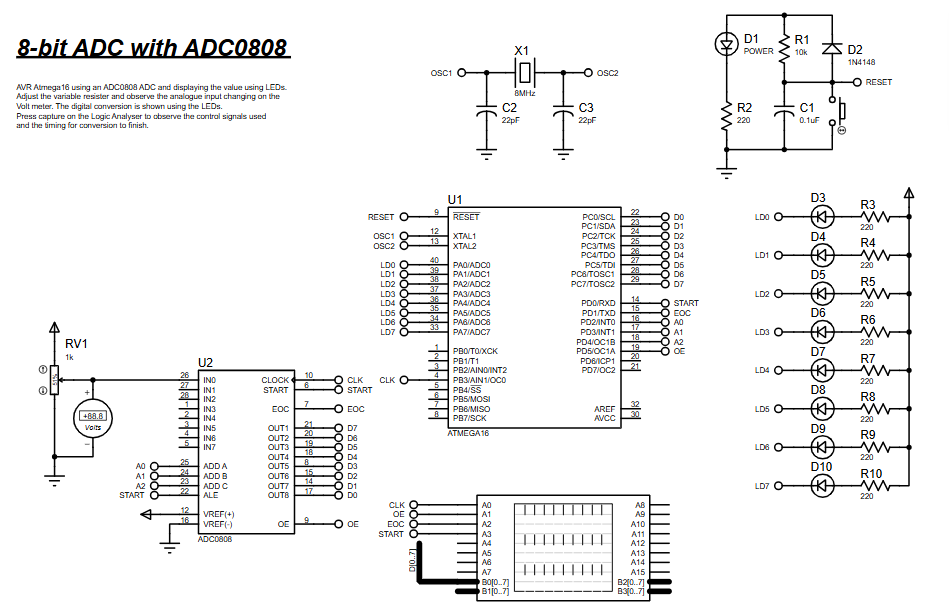
This project uses an ADC0808 8-bit ADC with an ATmega16 microcontroller to convert a potentiometer-generated analog voltage into an 8-bit digital value and display it on eight LEDs. The system is controlled via START, OE, address lines, and EOC signals; Timer0 provides the ADC clock. Designed and tested in Proteus, it demonstrates external ADC interfacing, real-time visualization, and embedded firmware control.
Parts used in the 8-bit ADC with ADC0808 using ATmega16 with Proteus Simulation:
- ATmega16 Microcontroller
- ADC0808 Analog-to-Digital Converter
- Potentiometer (RV1)
- 8 LEDs
- Current limiting resistors (220Ω)
- 8 MHz Crystal Oscillator
- Capacitors (22pF)
- Reset circuit (resistor, capacitor, diode)
- Power supply
- Proteus VSM simulation environment
Introduction
Analog signals are everywhere in real-world electronics, but microcontrollers process digital data. In this microcontroller project, an ADC0808 analog-to-digital converter is used with the ATmega16 microcontroller to convert an analog voltage into an 8-bit digital value. The converted digital value is then displayed through LEDs, making it easy to visualize the analog input level.
This project demonstrates how external ADCs interact with microcontrollers in embedded systems, especially when higher flexibility or multiple analog channels are required. The entire system is designed and tested using Proteus simulation, making it a practical DIY electronics learning project for students and hobbyists.
How the Project Works (Overview)
The project uses an ADC0808 8-bit ADC to convert an analog voltage signal into digital data. A variable resistor (potentiometer) is used to generate a variable analog voltage. This voltage is fed into the ADC input channel.
The ATmega16 microcontroller controls the ADC0808 by sending control signals such as START, OE (Output Enable), and channel select lines. Once the ADC completes the conversion, it signals the microcontroller through the EOC (End of Conversion) pin.
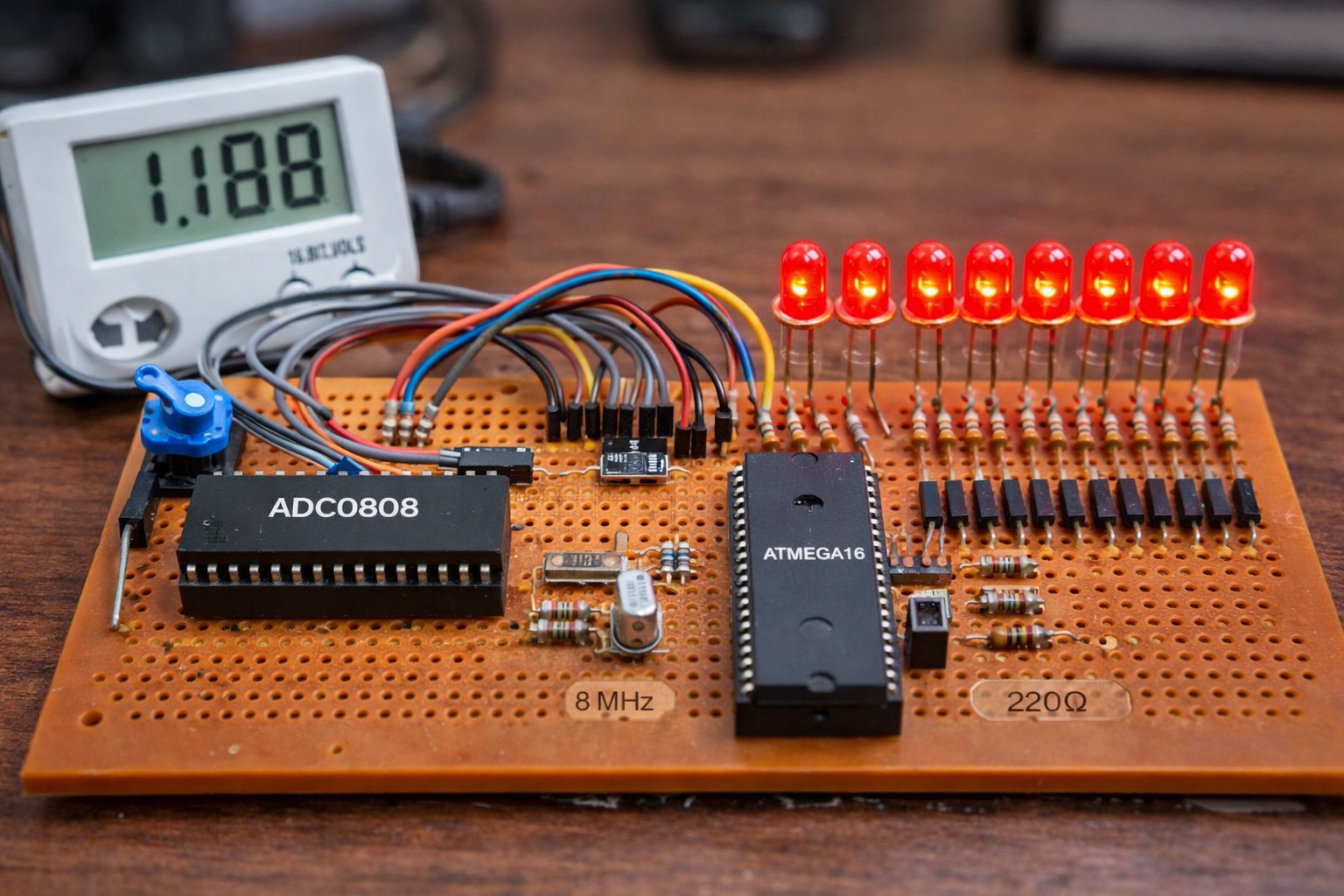
The microcontroller then reads the 8-bit digital output from the ADC and sends it to eight LEDs connected to a port. The LEDs display the binary value corresponding to the analog voltage level.
As the potentiometer value changes, the LEDs update in real time, representing the digital conversion result.
Workflow Explanation
The system can be understood as the following workflow:
-
Analog Input Generation
-
A potentiometer (RV1) generates a variable voltage.
-
-
Analog-to-Digital Conversion
-
The voltage is fed to ADC0808 channel IN0.
-
-
Microcontroller Control
-
ATmega16 controls conversion using:
-
START signal
-
Address lines (A, B, C)
-
OE signal
-
-
-
Conversion Completion
-
ADC0808 raises the EOC signal after conversion.
-
-
Data Reading
-
ATmega16 reads the 8-bit digital data from the ADC output bus.
-
-
Output Display
-
The digital value is displayed using 8 LEDs.
-
Key Features
-
8-bit analog-to-digital conversion using ADC0808
-
ATmega16 microcontroller based embedded system
-
Real-time analog voltage visualization using LED indicators
-
External ADC interface with addressable channels
-
Controlled conversion using START, OE, and EOC signals
-
Adjustable input voltage through potentiometer
-
Designed and verified using Proteus simulation
-
Demonstrates digital interfacing and embedded systems control
Components Used
The following components are used in the circuit diagram:
-
ATmega16 Microcontroller
-
ADC0808 Analog-to-Digital Converter
-
Potentiometer (RV1)
-
8 LEDs
-
Current limiting resistors (220Ω)
-
8 MHz Crystal Oscillator
-
Capacitors (22pF)
-
Reset circuit (resistor, capacitor, diode)
-
Power supply
-
Proteus VSM simulation environment
Applications
This type of embedded systems ADC project is useful in many real-world applications:
-
Sensor data acquisition systems
-
Temperature monitoring systems
-
Industrial process control
-
Digital voltmeters
-
Embedded instrumentation
-
Data logging systems
-
Robotics and automation sensing systems
Explanation of the Code
The firmware is written using AVR-GCC with WinAVR and controls the ADC0808 using digital I/O ports.
Port Configuration
-
PORTA → Connected to LEDs (output)
-
PORTC → ADC data bus (input)
-
PORTD → Control signals for ADC0808
ADC Control Signals
The program defines macros to control ADC signals:
-
START → Initiates ADC conversion
-
ADD A/B/C → Selects ADC channel
-
OE (Output Enable) → Enables ADC data output
-
EOC (End of Conversion) → Indicates conversion completion
ADC Clock
Timer0 is configured to generate the clock required by the ADC0808.
Conversion Process
The workflow implemented in code:
-
Select ADC input channel.
-
Send START signal to begin conversion.
-
Wait for EOC signal.
-
Enable ADC output.
-
Read the 8-bit digital data.
-
Display the value on LEDs.
-
Repeat continuously.
Source Code
/********************************
FILE NAME:        c8255.c
CHIP TYPE:        ATMEGA16
CLOCK FREQUENCY:  8MHZ
IDE:              VSMStudio
COMPILER:         AVR-GCC
TIME:             September 2010
********************************/
#include <avr/io.h>
#include <util/delay.h>
#define uchar unsigned char
#define uint unsigned int

// Low level port/pin definitions
#define sbit(x,PORT) (PORT) |= (1<<x)
#define cbit(x,PORT) (PORT) &= ~(1<<x)
#define pin(x,PIN) (PIN)&(1<<x)Proteus Simulation
In the Proteus simulation, the ATmega16 is connected to the ADC0808 converter through control lines and an 8-bit data bus.
The potentiometer (RV1) generates a variable analog voltage. As the voltage changes, the ADC converts the signal into an 8-bit digital value. The microcontroller reads this value and updates the LEDs.
The LEDs act as a binary visual indicator, lighting in different combinations depending on the input voltage level. This allows real-time observation of the analog-to-digital conversion process.
Conclusion
This ATmega16 and ADC0808 microcontroller project demonstrates how analog signals can be converted into digital values and displayed using LEDs. It provides a practical introduction to ADC interfacing, embedded systems design, and Proteus simulation.
By experimenting with this project, learners gain hands-on experience in external ADC control, digital interfacing, and firmware development, making it an excellent foundation for more advanced DIY electronics and sensor-based systems.
Complete File
8-bit ADC with ADC0808 using ATmega16 with Proteus Simulation
- How does the ADC0808 get the analog input?
The potentiometer RV1 generates a variable voltage that is fed to ADC0808 channel IN0. - How does the microcontroller start a conversion?
The ATmega16 sends a START signal and sets address lines to select the ADC channel. - How does the microcontroller know when conversion is complete?
The ADC0808 raises the EOC (End of Conversion) signal to indicate completion. - How is the ADC data read by the ATmega16?
The microcontroller enables OE to read the 8-bit digital data from the ADC data bus (connected to PORTC). - How is the ADC clock provided?
Timer0 in the ATmega16 is configured to generate the clock required by the ADC0808. - How is the digital result displayed?
The 8-bit digital value is output on PORTA and shown using eight LEDs with current limiting resistors. - Can the system display changes in real time?
Yes, as the potentiometer value changes, the LEDs update in real time to reflect the conversion result. - What software environment was used for simulation and development?
The project is designed and verified using the Proteus VSM simulation environment and firmware built with AVR-GCC (WinAVR).
