
Summary of Dual Thermometer using ATmega8515 with Proteus Simulation
This project implements a dual digital thermometer using an ATmega8515 and two DS18B20 sensors on a single 1-Wire bus, displaying current, minimum, and maximum temperatures for each sensor on a 16x2 LCD. The firmware (BASCOM-AVR) enumerates sensors by ROM ID with CRC checks, issues a simultaneous Convert T command, reads each sensor's scratchpad, converts raw data to decigrade, and updates the LCD; the design is demonstrated in Proteus simulation for educational and DIY use.
Parts used in the Dual Thermometer using ATmega8515 with Proteus Simulation:
- ATmega8515 AVR microcontroller
- 2 x DS18B20 digital temperature sensors
- 16x2 LCD display (configured in 4-bit mode)
- +5V power supply (VCC and GND)
- 1-Wire communication connection (data line on Port B.6)
- Proteus VSM simulation environment
- BASCOM-AVR compiler
Introduction
This microcontroller project shows how to build a dual digital thermometer using an ATmega8515 and two DS18B20 temperature sensors in Proteus simulation. The system reads temperature from both sensors, displays the live values on a 16×2 LCD, and also keeps track of minimum and maximum readings. It is a practical example of embedded systems design where one microcontroller manages multiple digital sensors on the same 1-Wire bus. For students and hobbyists working on DIY electronics, this project is a clean way to understand sensor interfacing, LCD display handling, and firmware logic. It is also useful for learning the working principle behind multi-sensor temperature monitoring in practical electronics.
How the Project Works
This project uses two DS18B20 digital temperature sensors connected to the ATmega8515. Both sensors share the same 1-Wire communication line, which is one of the most interesting parts of the design. The microcontroller first searches the bus, identifies both sensors through their unique ROM IDs, and verifies them with CRC.
After initialization, the controller sends a temperature conversion command to all sensors at once. It then reads the scratchpad data from each sensor individually, checks the received CRC, converts the raw data into decigrade values, and displays the results on the LCD. Along with the current temperature, the firmware also shows the minimum and maximum captured values for each sensor.
This makes the project a useful example of a real-world temperature sensor interface with display and data tracking.
Workflow Explanation
System Workflow
-
The ATmega8515 initializes the LCD and 1-Wire interface.
-
The controller scans the 1-Wire bus and detects two DS18B20 sensors.
-
Each sensor’s unique ID is stored for later access.
-
A common Convert Temperature command is sent to all sensors.
-
The controller reads temperature data from sensor 1.
-
The controller reads temperature data from sensor 2.
-
CRC is checked to validate each sensor’s data.
-
The temperature is converted to decigrade format.
-
Current, minimum, and maximum values are shown on the 16×2 LCD.
-
The process repeats continuously.
Schematic-Level Explanation
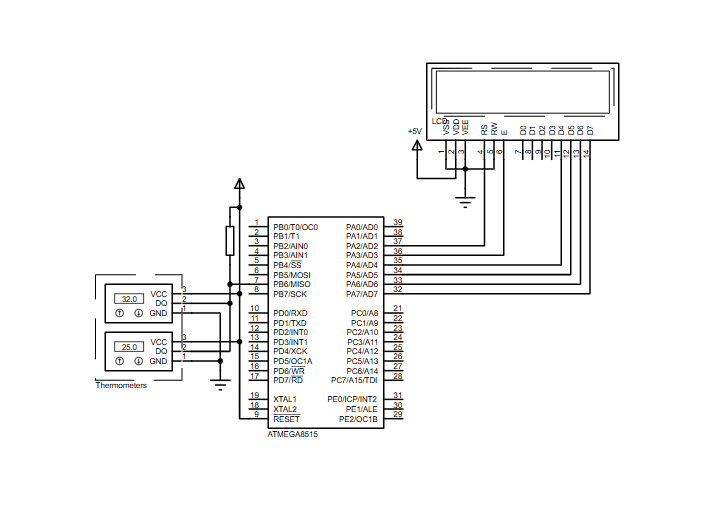
Based on the provided schematic:
-
The ATmega8515 is the main controller.
-
Two temperature sensors are connected to the same data line on Port B.6, configured as the 1-Wire bus.
-
A 16×2 LCD is connected in 4-bit mode through Port A pins.
-
The LCD is used to display sensor readings and min/max values for both channels.
-
The sensors are powered from +5V and GND, with communication handled through the shared bus line.
This is a compact and effective circuit diagram concept for dual-point temperature monitoring.
Key Features
-
Measures temperature from two DS18B20 sensors
-
Uses a single 1-Wire bus for both sensors
-
Displays data on a 16×2 LCD
-
Shows current, minimum, and maximum temperature values
-
Performs CRC verification for ROM ID and scratchpad data
-
Reads both sensors individually using their stored unique IDs
-
Simple BASCOM-AVR firmware structure for learning and modification
-
Suitable for Proteus simulation and AVR practice projects
Components Used
From the provided schematic and source code, the project uses:
-
ATmega8515 AVR microcontroller
-
2 x DS18B20 digital temperature sensors
-
16×2 LCD display
-
+5V power supply
-
1-Wire communication line
-
Proteus VSM simulation environment
-
BASCOM-AVR compiler
Applications
This type of temperature monitoring system can be used in many practical situations, such as:
-
Dual-zone temperature monitoring
-
Small laboratory temperature display systems
-
DIY room and enclosure monitoring
-
Educational embedded systems experiments
-
Industrial learning demos for sensor interfacing
-
Electronic training kits
-
Multi-point thermal observation projects
Explanation of Code
The firmware is written in BASCOM-AVR and focuses on handling two DS18B20 sensors on the same 1-Wire line.
Initialization Section
The code starts by selecting the ATmega8515 definition file and crystal frequency. It then configures:
-
1-Wire communication on
Portb.6 -
16×2 LCD in 4-bit mode using Port A pins
This part prepares the hardware resources needed for the project.
Sensor Discovery and ID Handling
The controller searches the 1-Wire bus for connected devices. Since each DS18B20 has a unique 64-bit ROM code, the firmware stores the IDs of both sensors. CRC verification is then used to ensure the IDs are valid.
This makes the project robust and allows the controller to address each sensor separately even though both are on the same bus.
Temperature Conversion Logic
The ConvAllT subroutine issues:
-
Skip ROM -
Convert T
This tells all sensors on the bus to perform temperature conversion simultaneously. It is an efficient approach and one of the main strengths of the project design.
Data Reading and Validation
After conversion, the controller verifies one sensor at a time using its ROM ID, reads the 9-byte scratchpad, and checks the CRC. If the data is correct, the raw temperature bytes are processed by the Decigrades() function.
Temperature Processing
The Decigrades() function converts the sensor’s raw temperature value into a scaled decigrade value. This allows the temperature to be displayed in tenths of a degree without using floating-point formatting.
Display and Min/Max Tracking
For each sensor:
-
Current temperature is shown
-
Minimum recorded temperature is updated
-
Maximum recorded temperature is updated
This gives the project a more complete monitoring function rather than just showing live values.
Source Code
' For commercial use, contact author.
' (c) 2001 Gote Haluza, [email protected], [email protected] (Sweden)
' version :1 , revision 2, Startdate : 18 apr 2001 Last update : 27 Apr 2001

$regfile = "8515def.dat"
$crystal = 8000000

Declare Sub Init
Declare Sub ConvAllT ' Convert T on ALL sensors
Declare Function Decigrades(BYVAL sc(9) as byte) as integer

Config 1wire = Portb.6 '0,1,2 NOP 3,4,5,6,7 works good ON MY Equipment
Config Lcd = 16 * 2
Config Lcdpin = Pin , Db4 = Porta.4 , Db5 = Porta.5 , Db6 = Porta.6 , Db7 = Porta.7 , E = Porta.3 , Rs = Porta.2

'Temp variables
Dim B As Byte
Dim W As Word
Proteus Simulation
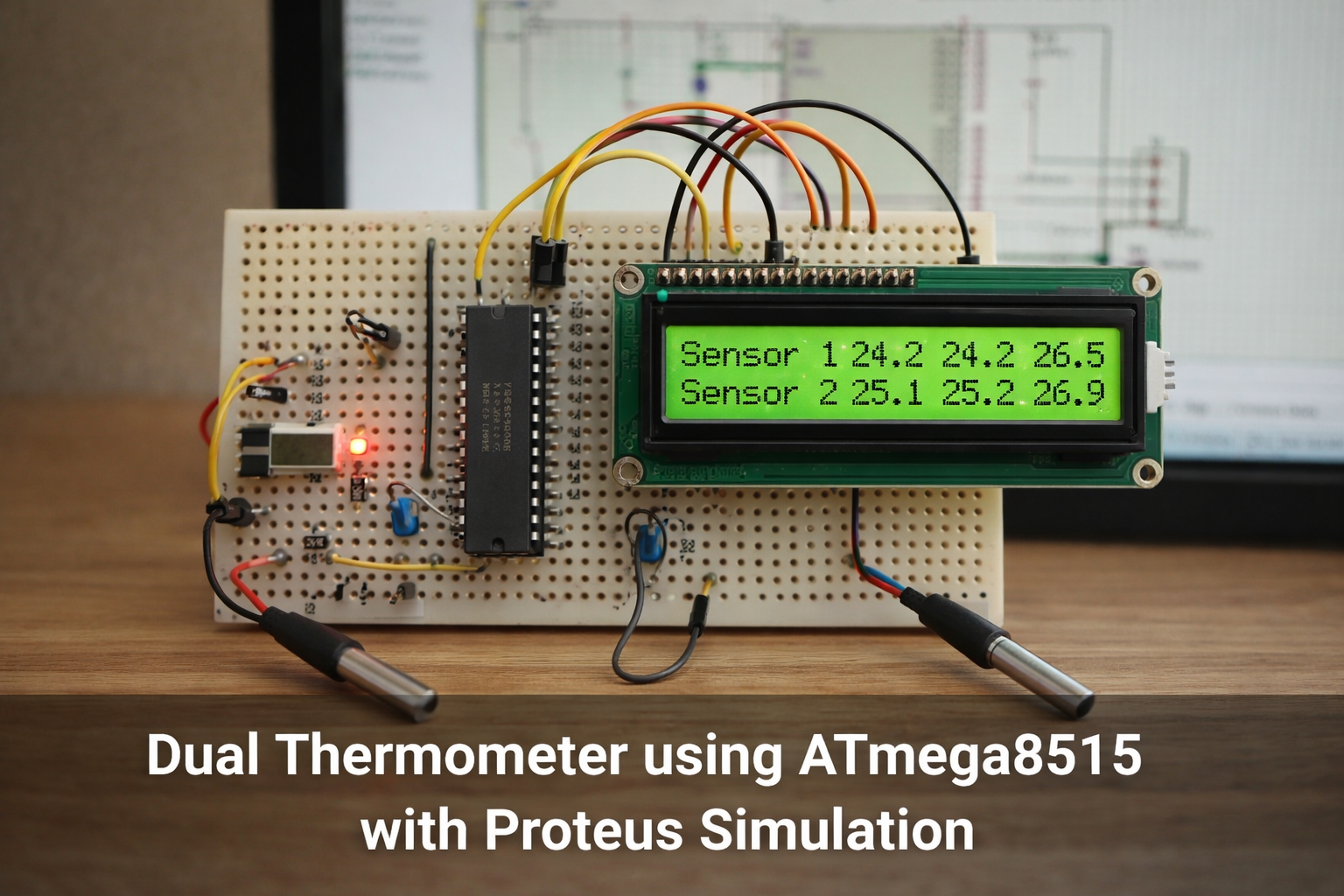
In the Proteus simulation, the ATmega8515 reads two DS18B20 temperature sensors connected on the same 1-Wire bus and displays both readings on the LCD. The display updates repeatedly, showing the latest sensor values along with the recorded minimum and maximum temperatures for each sensor.
This simulation is useful for verifying:
-
LCD interfacing
-
Multi-sensor 1-Wire communication
-
Temperature conversion logic
-
CRC-based sensor data validation
-
Overall firmware behavior before hardware implementation
- How does the project connect two DS18B20 sensors to the microcontroller?
Both DS18B20 sensors share the same 1-Wire data line connected to Port B.6 of the ATmega8515. - Can both sensors be commanded to convert temperature at the same time?
Yes; the firmware sends a Convert T command to all sensors simultaneously using ConvAllT. - How does the controller distinguish between the two sensors on the same bus?
The controller scans the 1-Wire bus, stores each sensor's unique 64-bit ROM ID, and uses those IDs to address sensors individually. - Does the project verify sensor data integrity?
Yes; CRC verification is performed for both ROM IDs and the scratchpad data read from each sensor. - What format is used to display temperature values?
Raw temperature is converted to a decigrade value (tenths of a degree) and shown on the 16x2 LCD. - How are minimum and maximum temperatures handled?
The firmware updates and displays minimum and maximum recorded temperatures for each sensor along with the current value. - What development tools are used for the firmware and simulation?
The project uses BASCOM-AVR for firmware and Proteus VSM for simulation. - Which MCU pins are used for the LCD interface?
The LCD is connected in 4-bit mode to Port A pins (Db4-Db7 on Porta.4 to Porta.7, E on Porta.3, Rs on Porta.2). - What is the purpose of searching the 1-Wire bus on startup?
To detect connected DS18B20 devices, record their ROM IDs, and verify them with CRC for later addressing.
