
Summary of Getting started with LCD's and Microprocessors
This article guides users on controlling a 16x2 LCD using an ATmega8 microcontroller with Bascom AVR software. It outlines the necessary hardware components and details the installation of BASCOM AVR and PonyProg programming tools. Finally, it instructs on building the circuit on a breadboard, emphasizing the use of resistors for the backlight if not integrated into the display.
Parts used in the LCD Control Project:
- Breadboard
- Wires
- ATmega8
- Programmer
- Bascom AVR
- 10k resistor
- 100k resistor
- 10k variable resistor
- 7805 Voltage regulator
- 100 µF 16V electrolytic capacitor
- 100n capacitor
- 16x2 LCD
In this Instructable, find out how to control LCD’s with a ATmega8 and Bascom.
You will need:
– Breadboard
– Wires
– ATmega8
– Programmer
– Bascom AVR (There is also a demo version for Free)
– 10k resistor
– 100k resistor
– 10k variable resistor
– 7805 Voltage regulator
– 100 µF 16V electrolytic capacitor
– 100n capacitor
– 16×2 LCD
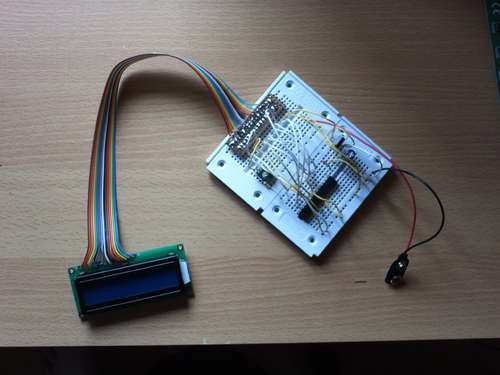
Step 1 Install Software
1) Go and download BASCOM AVRhttp://www.mcselec.com/index.php?option=com_content&task=category§ionid=3&id=67&Itemid=41
2) Install it.
3) Download PonyProg
http://www.lancos.com/ppwin95.html
4) Install it
2) Install it.
3) Download PonyProg
http://www.lancos.com/ppwin95.html
4) Install it
Step 2 Build the circuit
1) Build the circuit on your breadboard.
Warning:
When you want to use the backlight, make sure you’re using a resistor unless it’s already build in your LCD.
For more Detail: Getting started with LCD’s and Microprocessors
- What software is required for this project?
You need to install BASCOM AVR and PonyProg. - Where can I download BASCOM AVR?
It is available at the Mcselec website link provided in the text. - Is there a free version of the software?
Yes, there is a demo version for Free available for Bascom AVR. - How do I prepare the circuit before starting?
You must build the circuit on your breadboard. - What warning applies when using the backlight?
You must use a resistor unless one is already built into your LCD. - Which voltage regulator is needed?
A 7805 Voltage regulator is required for the setup. - What capacitors are listed for the project?
The project requires a 100 µF 16V electrolytic capacitor and a 100n capacitor.
