
Summary of WiFi-enabled Color LED Matrix using ESP8266 and WS2812 LEDs
This article describes a workshop at UMass Amherst where the author taught students to create animations on a 5×7 WiFi-enabled LED matrix using JavaScript. The project replaces an older Arduino-based design with an ESP8266 chip, allowing dynamic control via HTTP GET APIs without re-uploading code. This setup enables mobile phone control and paves the way for future low-resolution video streaming or daisy-chained displays.
Parts used in the WiFi-enabled Color LED Matrix:
- 5×7 WS2812 (NeoPixel) LEDs
- ESP8266 WiFi chip
- Firmware with minimal HTTP GET API
- Javascript programs
- Mobile phone
Last Thursday I had a lot of fun doing a workshop at my college (UMass Amherst) where I taught students to use a WiFi-enabled Color LED matrix combined with Javascript programs to create animations displayed onto the LED matrix. The matrix is made of 5×7 WS2812 (NeoPixel) LEDs. I’ve actually designed it two years ago and wrote a blog post about it. Back then I was using an Arduino-compatible SquareWear Mini to control the display patterns. It was fun to play with, but changing the display patterns require modifying the Arduino sketch and upload it over and over again, which took a lot of time.
This time, I improved the design by simply using a ESP8266 WiFi chip mounted at the back of the LED matrix. I wrote a firmware with a minimal set of HTTP GET API, with which you can set all pixels colors, set the brightness, or tell it to scroll a line of text. What’s cool about it is that you can now use Javascripts to send animation frames to it on the fly, which is a lot easier compared to re-writing and uploading an Arduino sketch. In addition, you can take the LED matrix on the go and use your mobile phone to control it, which is nice for wearable electronics.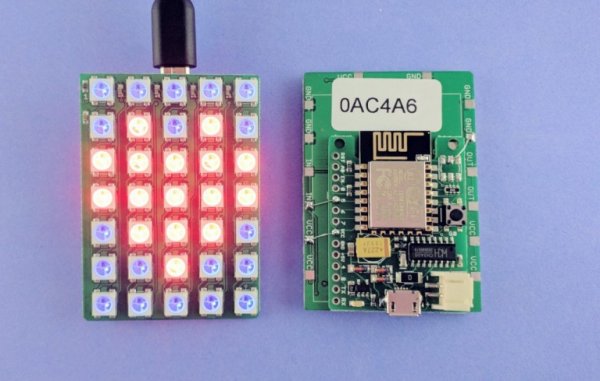
The video below goes through the details. Take a look at it first. Essentially, combining ESP8266 with the LED matrix makes a little wireless display. The next thing I should work on is to figure out how to stream video to it. It’s going to be very very low resolution for sure, but it’s gonna be fun, and I can always daisy chain multiple matrices to make a larger display.
For more detail: WiFi-enabled Color LED Matrix using ESP8266 and WS2812 LEDs
-
What components make up the LED matrix?
The matrix is made of 5×7 WS2812 (NeoPixel) LEDs. -
How does the new design improve upon the old one?
The new design uses an ESP8266 WiFi chip instead of an Arduino-compatible SquareWear Mini, allowing changes without re-uploading sketches. -
Can I control the display using a mobile phone?
Yes, you can take the LED matrix on the go and use your mobile phone to control it. -
What functions are available via the HTTP GET API?
You can set all pixel colors, set the brightness, or tell the device to scroll a line of text. -
Why is Javascript preferred for this project?
Using Javascript allows you to send animation frames on the fly, which is easier than rewriting and uploading an Arduino sketch. -
What is the next planned feature for this project?
The next step is to figure out how to stream video to the matrix, though it will be very low resolution. -
How can I make a larger display with this technology?
You can always daisy chain multiple matrices to make a larger display.
