
Summary of PCM Audio Based Door Bell using Atmega32 microcontroller
This article outlines a simple method to play PCM audio on AVR microcontrollers using high-speed PWM. The project utilizes an ATmega32 (or similar) with a converted WAV file containing sound effects, compiled via WinAVR GCC. It details the necessary circuit components and provides steps to generate 8-bit unsigned 8000 Hz WAV files for playback.
Parts used in the PCM Audio Project:
- ATmega16
- 8 MHZ Crystal
- 7805 Voltage Regulator
- 470 ohm Resistance
- 80 ohm Speaker
- 100uf Capacitance
This is a simple procedure to play PCM audio on any AVR microcontroller. AVR’s high speed PWM is used to play the audio. It almost sound fine and can be used for simple projects that require sound effects. The code is compiled in winavr GCC compiler. The microcontroller used is ATmega32, though any AVR processor can be used for the purpose. The header file included in this project contains a converted wav file which plays “its working”.
STEP 1: Circuit Diagram
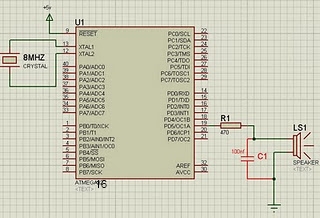
Components:
ATmega16
8 MHZ Crystal
7805
470 ohm resistance
80 ohm Speaker
100uf Capacitance
STEP 2: How to Create your PCM values
Step A:
Create a wav file (if you don’t have any). The following link convert text to speech. Save it as .wav file.
http://www2.research.att.com/~ttsweb/tts/demo.php
Step B:
Convert the created wav file into 8 bit unsigned 8000 samples per second wav file using the software switch from NCH.
For more detail: PCM Audio Based Door Bell using Atmega32 microcontroller
-
How is audio played on the AVR microcontroller?
The project uses the microcontroller's high speed PWM to play PCM audio. -
Which compiler is used for this code?
The code is compiled in the winavr GCC compiler. -
Can any AVR processor be used for this purpose?
Yes, although ATmega32 is used, any AVR processor can be used for the purpose. -
What format must the wav file be converted to?
The wav file must be converted into an 8 bit unsigned 8000 samples per second format. -
How can I create a wav file if I do not have one?
You can use the provided text to speech link to create and save a .wav file. -
What software switch is needed to convert the wav file?
The software switch from NCH is used to convert the created wav file. -
What does the included header file contain?
The header file contains a converted wav file that plays the phrase its working.
