
Summary of AVR ATmega16 Controlled Stepper Motor using Proteus Simulation
This project demonstrates controlling a stepper motor with an AVR ATmega16 in Proteus simulation, using two buttons for forward and reverse. The MCU outputs step sequences from PROGMEM on PORTD, amplified by a ULN2003A driver to energize motor coils. It uses an 8 MHz crystal, simple input debouncing via firmware, and a 50 ms step delay for speed control—useful for learning embedded motor control and testing before hardware build.
Parts used in the ATmega16 Stepper Motor Control Project:
- ATmega16 Microcontroller
- ULN2003A Darlington Driver IC
- Stepper Motor
- Push Buttons (Forward & Reverse)
- 8 MHz Crystal Oscillator
- 22 pF Capacitors
- 10 kΩ Resistors
- 220 Ω Resistors
- 1N4148 Diodes
- Power Supply
- Reset Circuit Components
Introduction
Stepper motors are widely used in embedded systems and automation projects where precise position control is required. This ATmega16 stepper motor control project demonstrates how an AVR ATmega16 controls a stepper motor using simple forward and reverse commands. The project is simulated using Proteus simulation software, allowing users to test the circuit and firmware before implementing it in real hardware.
By pressing the Forward or Reverse buttons during the simulation, the motor rotates in the corresponding direction. The microcontroller generates the stepping sequence and sends control signals to a motor driver. This project is a great example of practical electronics and DIY motor control using embedded systems.
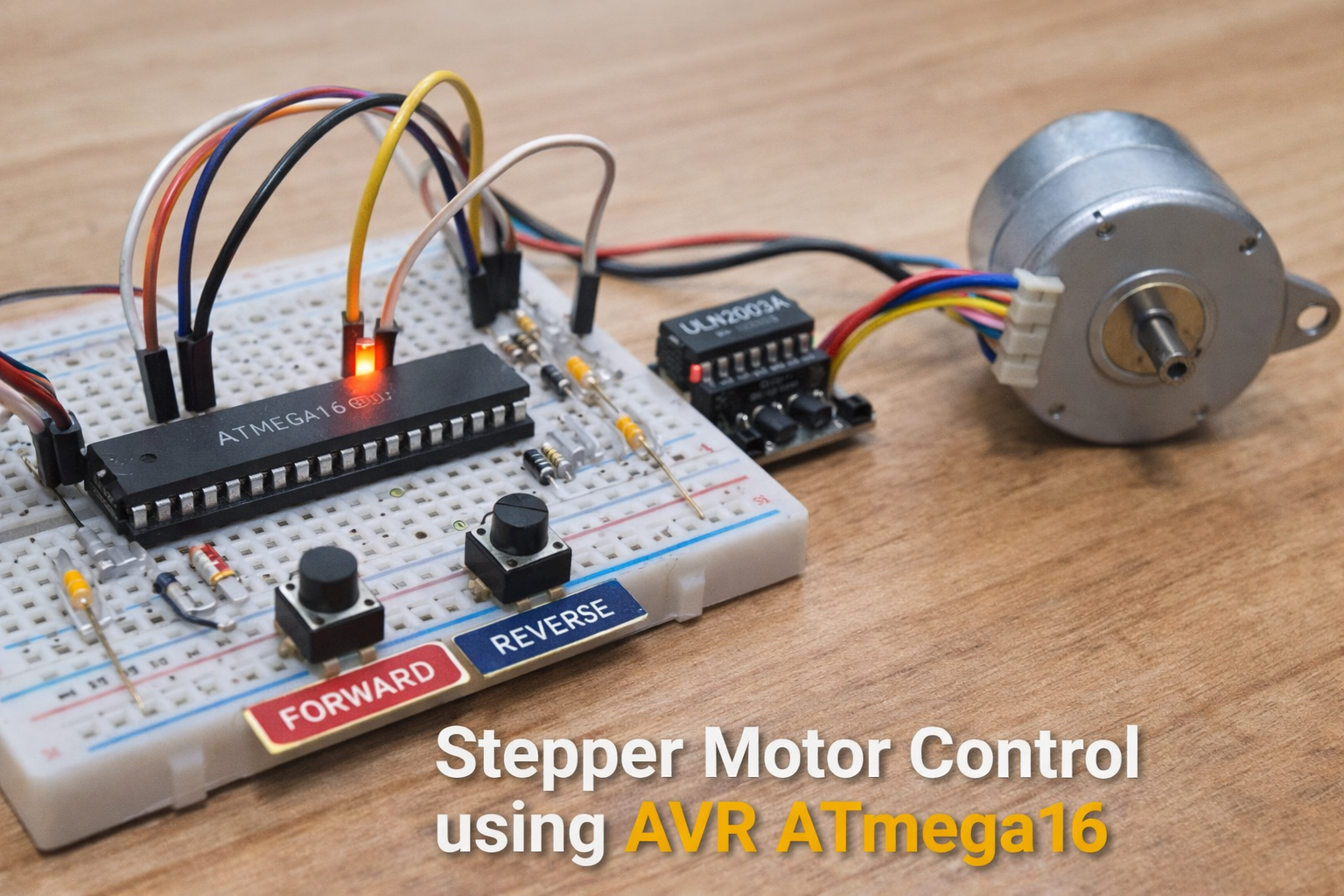
How the Project Works (Overview)
The system uses an ATmega16 microcontroller to generate stepping signals for a stepper motor. Two push buttons are connected to the microcontroller to control the direction of rotation.
When the Forward button is pressed, the microcontroller cycles through a predefined step sequence that rotates the motor clockwise. When the Reverse button is pressed, the sequence runs in the opposite order, rotating the motor counterclockwise.
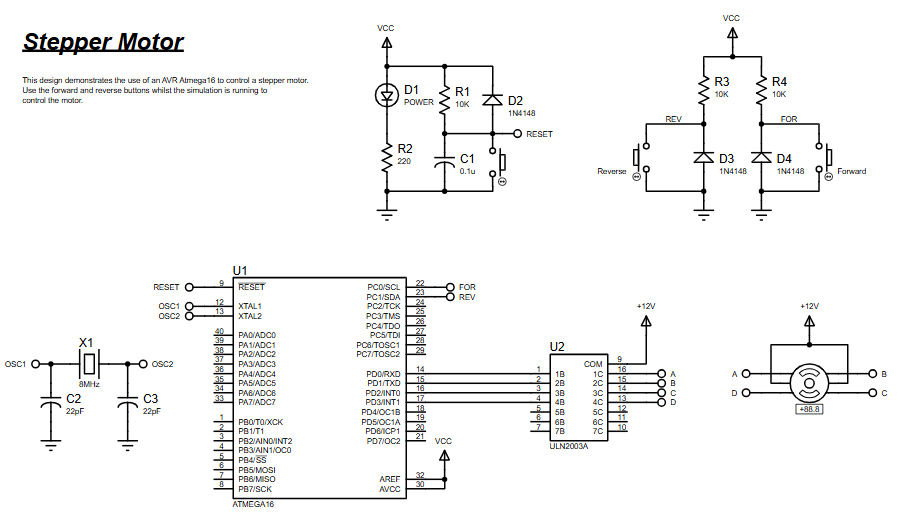
The microcontroller outputs the stepping signals through PORTD, which are then amplified by the ULN2003A motor driver. This driver provides sufficient current to operate the stepper motor coils safely.
Workflow Explanation
System Workflow
-
User Input
-
Forward and Reverse buttons connected to PORTC provide control signals.
-
-
Microcontroller Processing
-
ATmega16 reads the button inputs.
-
Determines motor direction.
-
Generates step sequences stored in program memory.
-
-
Motor Driver Stage
-
Step signals from PORTD go to the ULN2003A driver IC.
-
-
Stepper Motor
-
The driver energizes the motor coils sequentially.
-
This produces controlled motor rotation.
-
Key Features
-
AVR ATmega16 microcontroller-based motor control
-
Forward and reverse direction control
-
Step sequence stored in program memory (PROGMEM)
-
Uses ULN2003A driver IC for safe current handling
-
Adjustable stepping speed using software delay
-
Fully simulated using Proteus VSM
-
Simple digital input interface for control buttons
-
Demonstrates embedded systems motor control fundamentals
Components Used
The following components are used in the circuit diagram:
-
ATmega16 Microcontroller
-
ULN2003A Darlington Driver IC
-
Stepper Motor
-
Push Buttons (Forward & Reverse)
-
Crystal Oscillator (8 MHz)
-
Capacitors (22pF)
-
Resistors (10kΩ, 220Ω)
-
Diodes (1N4148)
-
Power Supply
-
Reset Circuit Components
Applications
This type of stepper motor control system is used in many real-world embedded applications:
-
CNC machines
-
3D printers
-
Robotics projects
-
Camera positioning systems
-
Automated conveyor systems
-
Industrial positioning systems
-
DIY automation projects
Explanation of Code
The firmware is written in C using AVR-GCC and compiled using WinAVR.
Main Functional Modules
Port Configuration
The program configures:
-
PORTD as output for stepper motor control
-
PORTC as input for direction buttons
Step Sequence Storage
A stepping sequence is stored in program memory (PROGMEM). This sequence controls how the motor coils are energized.
Direction Control
Two input pins detect button presses:
-
PINC0 → Forward rotation
-
PINC1 → Reverse rotation
Motor Rotation Logic
When a button is pressed:
-
The code increments or decrements an index.
-
The corresponding step pattern is sent to PORTD.
Timing Control
A 50 ms delay is used between steps to control the motor speed.
Source Code
/********************************
FILE NAME:        stepper.c
CHIP TYPE:        ATMEGA16
CLOCK FREQUENCY:  8MHZ
IDE:              VSMStudio
COMPILER:         AVR-GCC
TIME:             September 2010
********************************/
#include <avr/io.h>
#include <util/delay.h>
#include <avr/pgmspace.h>
#define uchar unsigned char
#define uint unsigned int

// Low level port/pin definitions
#define sbit(x,PORT) (PORT) |= (1<<x)
#define cbit(x,PORT) (PORT) &= ~(1<<x)
#define pin(x,PIN) (PIN)&(1<<x)

// Pins definition
#define pos pin(0,PINC)
#define neg pin(1,PINC)
#define out PORTDSimulation Behavior
-
When the simulation starts, the microcontroller initializes the ports.
-
Pressing the Forward button rotates the motor in one direction.
-
Pressing the Reverse button rotates the motor in the opposite direction.
-
The stepping sequence is visible on PORTD outputs, which drive the ULN2003A.
-
The driver then energizes the stepper motor coils sequentially.
This allows developers to test embedded firmware and circuit design before building the physical hardware.
Conclusion
This project demonstrates a simple yet effective stepper motor control system using the AVR ATmega16 microcontroller. By combining firmware logic with a Proteus simulation environment, developers can understand the working principle of motor control in embedded systems.
It is an excellent learning project for students and electronics enthusiasts, covering microcontroller programming, driver circuits, and practical motor control concepts used in modern automation and robotics systems.
Complete File
AVR ATmega16 Controlled Stepper Motor using Proteus Simulation
- How does the project control stepper direction?
Two push buttons on PORTC select direction; the code runs the step sequence forward for the Forward button and in reverse order for the Reverse button. - How are stepping signals output from the microcontroller?
Stepping signals are sent from PORTD, where step patterns stored in PROGMEM are written to PORTD. - Does the project use a motor driver?
Yes, the ULN2003A driver IC is used to amplify PORTD outputs and safely drive the stepper motor coils. - What clock frequency does the firmware assume?
The firmware is designed for an 8 MHz crystal oscillator. - How is motor speed controlled?
Motor speed is adjusted by a software delay; the code uses a 50 ms delay between steps. - Can the project be simulated before hardware build?
Yes, the entire circuit and firmware are simulated using Proteus VSM. - What pins detect the forward and reverse buttons?
PINC0 detects Forward and PINC1 detects Reverse button presses. - Where is the step sequence stored?
The stepping sequence is stored in program memory (PROGMEM). - What development tools and compiler are referenced?
The firmware is written in C for AVR-GCC and the IDE listed is VSMStudio; WinAVR is used for compilation.
