
Summary of I/O Expander with 8255A using ATmega16 with Proteus Simulation
This project demonstrates expanding I/O pins on an ATmega16 microcontroller using the 8255A Programmable Peripheral Interface. By connecting push buttons to the input port and LEDs to the output port, the system allows real-time control of eight LEDs via button presses. The design utilizes a 74LS373 latch for address multiplexing and is fully simulated in Proteus, offering a practical solution for embedded systems with limited pins without requiring physical hardware.
Parts used in the I/O Expander with 8255A using ATmega16:
- ATmega16
- 8255A Programmable Peripheral Interface
- 74LS373
- LEDs (8x)
- Push Buttons (8x)
- Resistors (220Ω, 10kΩ)
- Crystal Oscillator (8MHz)
- Capacitors (22pF, 0.1µF)
- Diode (1N4148)
Introduction
Expanding I/O pins is a common requirement in many microcontroller projects, especially when working with limited-pin devices like the ATmega16. This project demonstrates how to use the 8255A Programmable Peripheral Interface to control multiple LEDs using fewer pins.
Using Proteus simulation, this design shows a practical approach to extending digital I/O capabilities in embedded systems. Push buttons act as inputs, while LEDs display outputs, making it a great hands-on example for DIY electronics and learning peripheral interfacing.
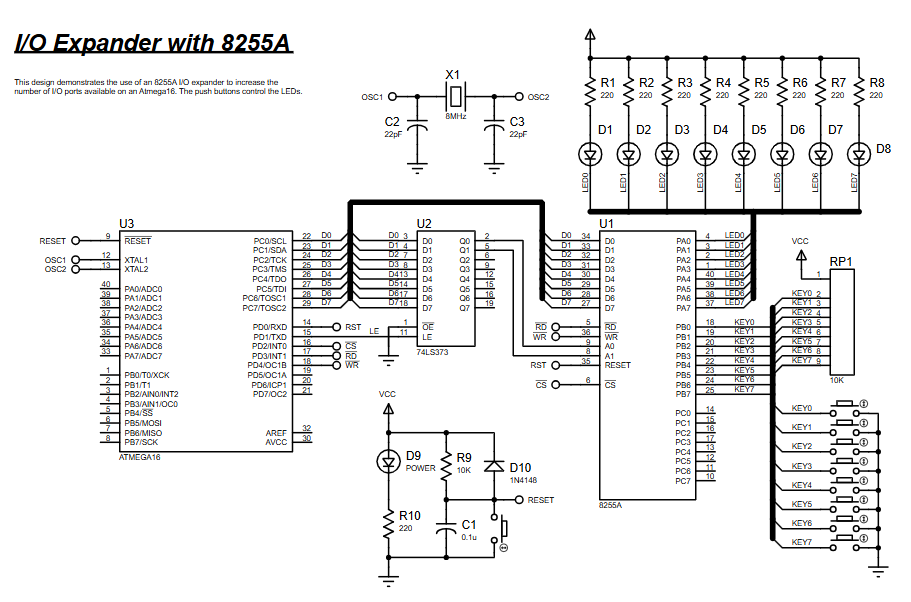
How the Project Works (Overview)
At its core, the system connects the ATmega16 to the 8255A I/O expander using a parallel data bus. The microcontroller sends commands and data to the 8255A, which then manages multiple input and output lines.
-
Push buttons (KEY0–KEY7) are connected to the input port of the 8255A
-
LEDs (D1–D8) are connected to the output port
-
The microcontroller reads button states and updates LEDs accordingly
This effectively multiplies the available I/O pins without increasing MCU complexity.
Workflow Explanation
Workflow:
-
ATmega16 initializes ports and disables the 8255A
-
Control word is written to configure 8255A ports
-
Address is latched using external latch (74LS373)
-
Microcontroller reads input from 8255A (buttons)
-
Data is processed and written back to output port
-
LEDs reflect the button states in real time
Key Features
-
Expands limited MCU pins using 8255A I/O expander
-
Bidirectional data communication via parallel interface
-
Real-time LED control using push button inputs
-
Uses latch (74LS373) for address/data multiplexing
-
Efficient control using RD, WR, CS, and RESET signals
-
Fully simulated in Proteus (no hardware required)
Components Used
-
ATmega16
-
8255A Programmable Peripheral Interface
-
74LS373
-
LEDs (8x)
-
Push Buttons (8x)
-
Resistors (220Ω, 10kΩ)
-
Crystal Oscillator (8MHz)
-
Capacitors (22pF, 0.1µF)
-
Diode (1N4148)
Applications
-
Expanding I/O pins in embedded systems
-
Industrial control panels
-
LED display systems
-
Keypad interfacing
-
Automation systems
-
Educational learning for microcontroller interfacing
Explanation of Code
The firmware is written using AVR-GCC and focuses on low-level hardware control.
Key Functional Parts:
-
Port Control Macros
Defines bit-level operations for control signals (RD, WR, CS, RESET) -
Latch Function (
latch_it)
Handles address/data multiplexing using the 74LS373 latch -
Initialization
-
Sets stack pointer
-
Configures PORTD and PORTC
-
Disables and resets 8255A safely
-
-
Control Word Setup
Configures 8255A ports (input/output modes) -
Main Loop
-
Reads input from 8255A (buttons)
-
Stores value in variable
-
Writes same value to output port
-
Updates LEDs
-
This demonstrates a clean working principle of interfacing external peripherals with a microcontroller.
Source Code
/********************************
FILE NAME:        c8255.c
CHIP TYPE:        ATMEGA16
CLOCK FREQUENCY:  8MHZ
IDE:              VSMStudio
COMPILER:         AVR-GCC
TIME:             September 2010
********************************/

#include <avr/io.h>

#define uchar unsigned char
#define uint unsigned int
Proteus Simulation
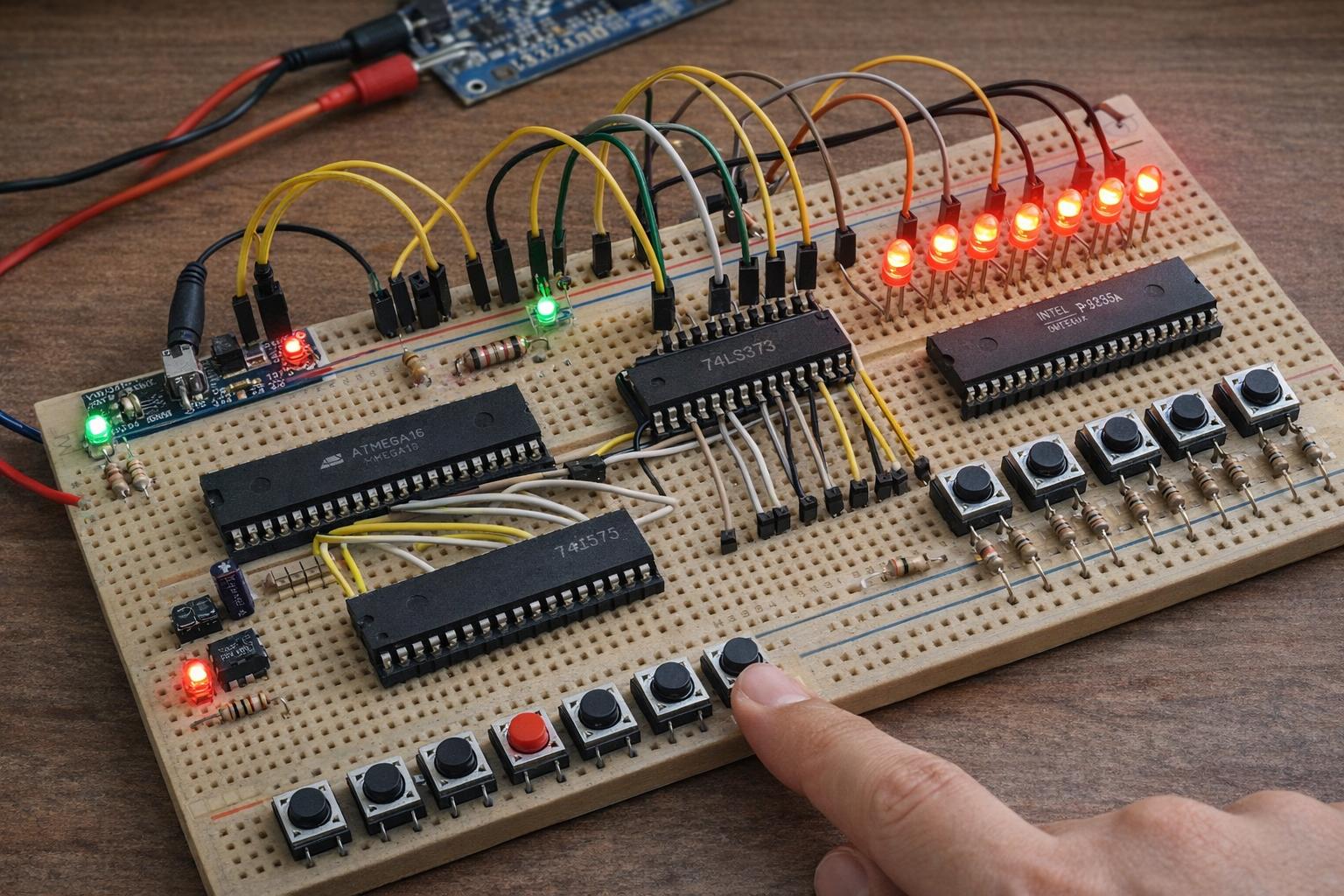
In the Proteus simulation, pressing any push button immediately updates the corresponding LED. The 8255A acts as a bridge between input and output, while the ATmega16 handles logic and control.
-
Buttons → Input port of 8255A
-
LEDs → Output port
-
Real-time response confirms proper interfacing
Conclusion
This project is a solid example of how to extend I/O capability in embedded systems using an external interface IC. By combining the ATmega16 with the 8255A, you can build scalable and efficient microcontroller projects.
It’s a great learning exercise for understanding parallel communication, circuit design, and Proteus simulation, making it ideal for both beginners and intermediate learners in DIY electronics.
Complete File
I/O Expander with 8255A using ATmega16 with Proteus Simulation
- How does the system expand available I/O pins?
The system connects the ATmega16 to the 8255A I/O expander using a parallel data bus, effectively multiplying available pins without increasing MCU complexity. - What components act as inputs and outputs?
Push buttons (KEY0–KEY7) serve as inputs connected to the input port, while LEDs (D1–D8) act as outputs connected to the output port. - Does the simulation require physical hardware?
No, the project is fully simulated in Proteus, so no physical hardware is required to demonstrate the concept. - How is address/data multiplexing handled?
An external latch, specifically the 74LS373, is used to latch the address and handle data multiplexing. - What compiler is used for the firmware?
The firmware is written using AVR-GCC and focuses on low-level hardware control. - Can this design be used for industrial applications?
Yes, applications include industrial control panels, automation systems, and educational learning for microcontroller interfacing. - What signals are used for efficient control?
Efficient control is achieved using RD, WR, CS, and RESET signals. - How do the LEDs reflect button states?
The microcontroller reads button states from the 8255A, processes the data, and writes it back to the output port to update LEDs in real time.
