
Summary of DIY AVR Programmers
This article guides hobbyists on creating or acquiring AVR programmers to avoid purchasing commercial units. It outlines options for building serial and parallel port programmers using PC interfaces, as well as affordable USB alternatives available for purchase or DIY construction. The text provides specific resource links for schematics, driver software like PonyProg, and detailed design documents from Atmel to assist in the project.
Parts used in the DIY AVR Programmer:
- PC serial port
- AVR microcontroller
- PonyProg driver software
- Laptop with USB interface
- Low-cost AVR USB programmer hardware
- DIY USB programmer components
- In-System Programmer schematic (Atmel)
- PC parallel port
- Parallel port programmer download
For those who are trying to make AVR kit at home, an AVR programmer which can be simple to make will be really useful, as it’ll avoid buying the programmer!! Here I’m giving a few webpage links on how to make a programmers yourself.
– Here is a simple AVR serial programmer, works with PC serial port, easy to make
For complete info check out the webpage:
AVR Serial programmer from Extremeelectronics.co.in
– For using the serial programmer discussed above, a driver software is required to be installed in your pc. Download it from here:
PonyProg : AVR serial programmer
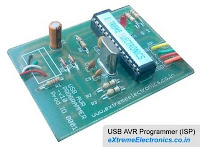
– If you are using a laptop which doesn’t have serial port then you can buy a low-cost AVR USB programmer shown in the figure. Visit this webpage for buying it:
Here is one more option for buying a cheap USB programmer for AVR at around $15 cost:
AVR USB Programmer lite
And if you want to make an USB programmer yourself, check out here an easy to make AVR USB programmer:
DIY AVR USB Programmer
– Atmel has given a detailed document on design of In-System Programmer for AVR. It inclludes the schematic of the programmer. Download this pdf document from here:
In-System Programmer for AVR, from Atmel
– For those who like pc parallel port better, here is a page containing data on how to make a parallel port AVR programmer along with the download for the pc:
Parallel port programmer for AVR
For more details, click here: DIY AVR Programmers
- How can I make a simple AVR programmer at home?
You can build a simple AVR serial programmer that works with a PC serial port by following instructions on Extremeelectronics.co.in. - What driver software is required for the serial programmer?
PonyProg is the required driver software that must be installed on your PC to use the discussed serial programmer. - Can I use a laptop without a serial port for this project?
Yes, you can buy a low-cost AVR USB programmer if your laptop does not have a serial port. - Is there a cheap option to buy a USB programmer?
Yes, you can purchase an AVR USB Programmer lite for around $15. - How do I make an AVR USB programmer myself?
You can check out resources for an easy-to-make DIY AVR USB programmer online. - Where can I find the schematic for an In-System Programmer?
Atmel provides a detailed document including the schematic for the In-System Programmer for AVR. - Is it possible to use a PC parallel port for programming?
Yes, there are pages containing data on how to make a parallel port AVR programmer along with necessary downloads. - What is the best way to avoid buying a programmer?
Making a simple AVR programmer yourself at home avoids the need to buy one.
