
Summary of Interfacing RTC & serial EEPROM using i2c bus, with ATmega128 uC
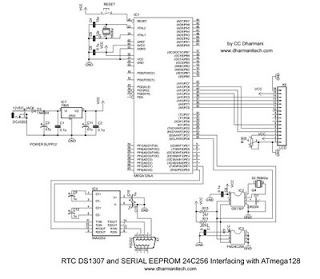
This article details an experiment interfacing a 24C256 serial EEPROM and DS1307 RTC with an ATmega128 microcontroller via the I2C bus. An RS232 port connects the system to a PC using Hyper Terminal at 19200 baud, allowing users to manage data storage and time settings through a nine-option menu.
Parts used in the AVR Microcontroller I2C Experiment:
- ATmega128 microcontroller
- 24C256 serial EEPROM
- DS1307 RTC module
- I2C bus interface
- RS232 port
- PC computer
- Hyper Terminal software
Hi friends,
here is my experiment with i2c bus for interfacing serial EEPROM (24C256) and RTC (DS1307) using AVR microcontroller ATmega128. The circuit is also provided with an RS232 port for connecting with PC to send commands for reading/writing EEPROM or setting date/time in RTC (Click on images to enlarge them).
Communication with PC is done through Hyper Terminal. A screen shot of the message sent to PC by microcontroller immediately after power ON is shown in the figure at the left, where the user is asked to enter choice from the menu options related to EEPROM and RTC. User can store data in EEPROM, or set RTC date and time by entering them using PC keyboard.
Hyper Terminal is used with 19200 Baud, No parity, No hardware flow control settings.
When the circuit is powered on, a welcome message is displayed on the Hyper Terminal window and a menu with 9 options (0-8) is displayed (refer to the figure). The options are explained here:
0: Erase EEPROM (fills eeprom with 0xff bytes)
1: Write EEPROM (starts writing eeprom starting with 0x0000 address)
2: Read EEPROM (reads eeprom starting with 0x0000 address)
3: Write eeprom page (writes one page of eeprom at specified page number)
4: Read eeprom page (Reads one page of eeprom at specified page number)
5: Display RTC Date (Displays current date from RTC)
6: Display RTC time (Displays current time from RTC)
7: Update RTC Date (Setting new date in RTC)
8: Update RTC time (Setting new time in RTC)
For more detail: Interfacing RTC & serial EEPROM using i2c bus, with ATmega128 uC
- How is communication established between the microcontroller and the PC?
Communication is done through an RS232 port using Hyper Terminal. - What are the specific Hyper Terminal settings required for this project?
The settings must be 19200 Baud, No parity, and No hardware flow control. - What happens when the circuit is powered on?
A welcome message appears followed by a menu with 9 options (0-8) displayed on the Hyper Terminal window. - How can a user erase the EEPROM contents?
Select option 0 from the menu to fill the EEPROM with 0xff bytes. - Can the RTC date and time be updated remotely?
Yes, users can set new dates and times using options 7 and 8 via the PC keyboard. - What does option 3 allow the user to do?
Option 3 writes one page of the EEPROM at a specified page number. - How does the system read data from the EEPROM?
Users can select option 2 to read starting from address 0x0000 or option 4 to read a specific page.
