
Summary of Pastilda: Open-source Hardware Password Manager
Pastilda is an open-source hardware password manager acting as a USB intermediary between your computer and keyboard. It securely stores encrypted KeePass 2.x databases, allowing users to auto-login to various accounts by triggering "Pastilda mode" with a specific key combination. The device encrypts credentials in memory and only reveals them after master password verification, ensuring the PC never directly sees the physical keyboard or unencrypted data.
Parts used in Pastilda:
- USB flash drive component
- KeePass 2.x portable app
- KeePass 2.x database (.kdbx file)
- Two USB ports (one for keyboard, one for PC)
- Special key combination (Ctrl + ~)
Pastilda is an open-source hardware password manager, designed to manage your credentials in a handy and secure way.
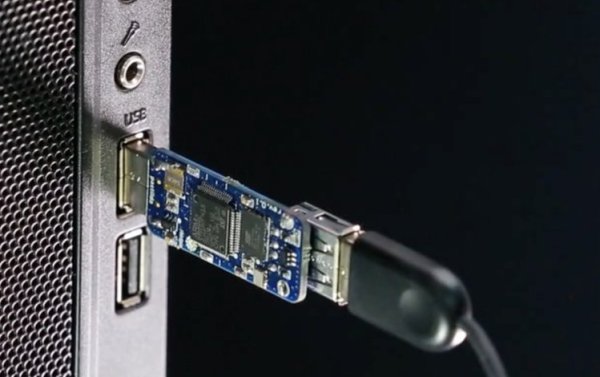
Pastilda works as a middleman between your computer and keyboard. It provides easy and safe auto-login to your OS, bank accounts, mailboxes, corporate network or social media. Pastilda stores encrypted passwords in its memory. You can request a particular password at any time by pressing a special key combination on your keyboard.
Pastilda has two USB ports: one for your keyboard, one to connect to your PC. Your OS will recognize Pastilda as a USB keyboard and a USB flash drive.
The flash drive component stores the encrypted KeePass 2.x database (.kdbx file) and the KeePass 2.x portable app as needed. Your real keyboard is now visible only to Pastilda, your PC won’t see it at all.
In normal working mode, all keystrokes from your keyboard are passed through Pastilda to your PC unchanged.
When you need to sign into an account, you switch to “Pastilda mode”. That’s done by placing your cursor inside the login text box and pressing the “Ctrl + ~” key combination. Pastilda will then ask you to enter the master password for your KeePass database, right in the current text box.
If the password is entered correctly, Pastilda will decrypt and display your database. You can navigate through it with left, right, up, and down arrows or you can just start to input the name of the entry in your database and Pastilda will display matching variants. Once you find the entry you’re looking for, press Enter and Pastilda will automatically enter the corresponding login and password.
If the password is incorrect, Pastilda gives you the option to try again or go back to regular mode by pressing the Esc key on your keyboard.
Read more: Pastilda: Open-source Hardware Password Manager
- How does Pastilda function as a middleman?
Pastilda sits between your computer and keyboard, passing keystrokes through unchanged until you activate its secure mode. - What components are stored on the flash drive part of Pastilda?
The flash drive holds the encrypted KeePass 2.x database and the KeePass 2.x portable app. - Can my PC see my real keyboard when using Pastilda?
No, your real keyboard is visible only to Pastilda; your PC will not see it at all. - How do I switch to Pastilda mode to log in?
Place your cursor in the login text box and press the Ctrl + ~ key combination. - What happens if I enter the wrong master password?
Pastilda offers the option to try again or return to regular mode by pressing the Esc key. - Does Pastilda store passwords in plain text?
No, Pastilda stores encrypted passwords in its memory within a .kdbx file. - How can I navigate entries in the decrypted database?
You can use left, right, up, and down arrows or type the entry name to find matching variants. - What types of accounts can Pastilda help log into?
It supports auto-login for OS, bank accounts, mailboxes, corporate networks, and social media.
