
Summary of Z80 Monitor Type Operating System and SBC
EfexV4 is a monitor ROM for Z80 systems, enabling inline assembly, disassembly, and debugging on real hardware without CP/M or complex setups. It requires a standard SBC with 32KB RAM, 8KB ROM, a UART (8251), and a PIO (8255). The software features a full-featured assembler, a hex input system, and a disassembler that flags invalid bytes. Future plans include USB keyboard support, LCD integration, a BASIC interpreter, and SD card support to create a standalone computer.
Parts used in the EfexV4 Project:
- Z80 architecture Single Board Computer
- UART 8251 chip
- PIO 8255 chip
- 62256 SRAM (32KB)
- 28c64 ROM (8KB)
- IC 74LS139 decoder
- Terminal emulator program
- 4 MHZ crystal oscillator
EfexV4 is a monitor ROM with inline assembler and disassembler and
basic utilities to write, run and debug your z80 programs in real hardware
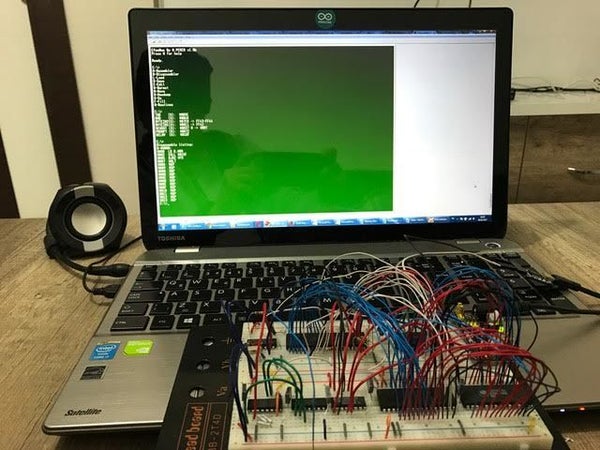
EfexMon do not needs CP/M, N8VEM or other complicated hardware. You need only standard Z80 architecture SBC and one UART with terminal
Step 1: HARDWARE TO RUN EfexMonV4
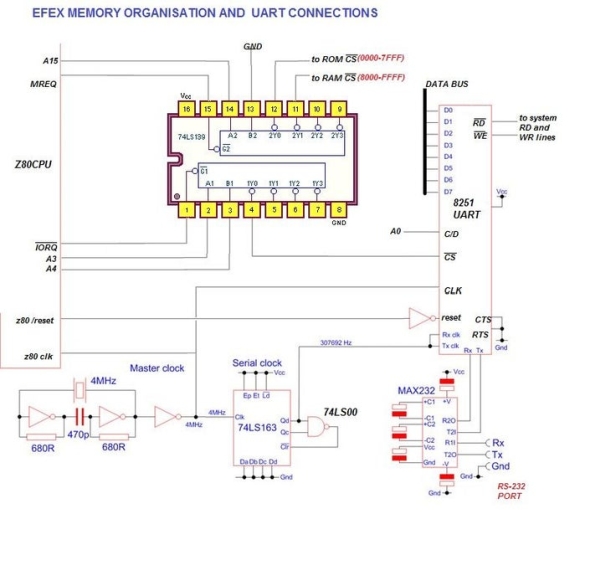
MEMORY MAP
XTAL = 4 MHZ
USE ATTACHED CLOCK CIRCUIT
ROM START: 0000H TOTAL LENGHT 8KB
RAM START: 8000H RAM END : FFFFH
STACK: F800H
SYSTEM VARIABLES: F900H-F910H FF00-FFFFH
UART 8251 PORT ADRESS: 00H, BAUDRATE: 19200 KBS 8-n-1
PIO 8255 PORT ADRESS: 08H : CONNECT 8255 CS TO IC 74LS139’S PIN 5
Step 2: SOFTWARE
As described in previous page, Efexmon needs 32Kb of ram (62256 SRAM is good), and 8 Kb of ROM (28c64 may be)
stack and system variables sits top of ram, so, after 8000H there is tons of free bytes
Step 3: USAGE:
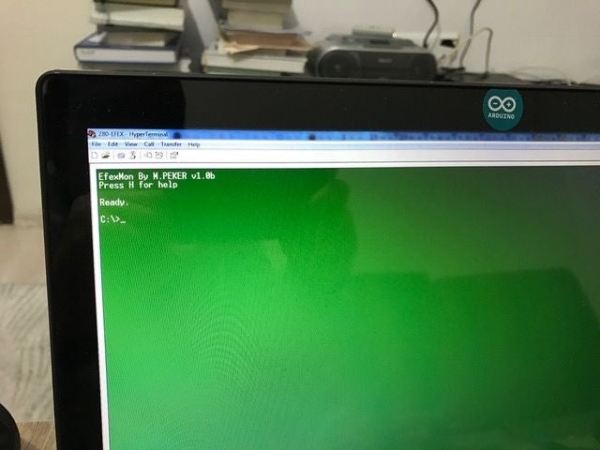
You must use a Terminal emulator program to reach EfexV4
System starts with greeting message and version info
command promt comes then
C:\> this is an irony to DOS promt 🙂
all input must be UPPERCASE CHARACTERS! dont forget to press caps lock one time.
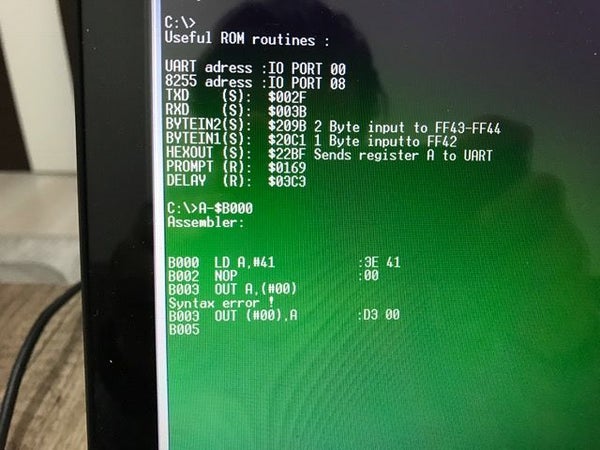
Pres H for help, press U for useful routines
(S) mean subroutine must be called
(R) mean routine must be jumped
ASSEMBLER:
Aseembler is full powered and rocksolid, only (IX+*) and (IY+*) bit maniplation commands excluded
except this, Efex assembler accepts all official z80 commands.
During mnemonic input, backspace is welcome till # or $ characters. do not backspace after this chars.
(Full backspace function disabled to fit ROM in 8k)
Some parts of this ROM written on itself! with its own assembler.
DISASSEMBLER:
Disassembler can recognise all z80 code and it can recognise non-command bytes
and points them with ‘***’ sign
INPUT:
Efex Hexadecimal inputs can recognise nonhex chars and ignores them.
Once input started, you must fill all areas till end;
#: mean 1 byte input (two hex char)
$:mean 2 byte input (four hex char)
Step 4: Source Code
Please don’t hesitate to contact me for any questions
Source code is not under GNU licence. It cannot be use for commercial purposes!
For using commercial purpose of code, you need my permission.
You may freely use, modify or share it by my name
Thank you for your respect to hard work and time spend on this code
Dr. Mustafa Kemal PEKER (MD)
Step 5: WHATS NEXT?
-USB KEYBOARD SUPPORT (TEST IMPLEMENTATION COMPLETE)
-LCD ON BOARD WIDE SCREEN 128X64 GRAPH LCD IN TEXT MODE(TEST IMPLEMENTATION COMPLETE)
-BASIC INTERPRETER (TEST IMPLEMENTATION COMPLETE)
–SD CARD SUPPORT
THIS FOUR IMPLEMENTATION WILL MAKE EFEXV4 A STANDALONE COMPUTER
Step 6: SOURCES
1) z80 instruction table http://clrhome.org/table/
2) TASM assembler code tables: http://www.filewatcher.com/m/tasm301.zip.144656-0.html
3) Grandmaster Erturk KOCALAR’s 6809 monitor (inspired) http://www.8bitforce.com/simon6809/
4) Grant Searle’s works (inspired) http://searle.hostei.com/grant/
5) Integrated circuits and microprocessors. R C HOLLAND 1986 book
6) Z80SimulatorIde http://www.oshonsoft.com/z80.html
7) Leventhall Z80 assembly routines book
8) Brian M. Phelps’s 6502 works http://mypeoplepc.com/members/spacebacker/symon/index.html
9) Zilog z80 catalogs and chip descriptions
10) z80 info website http://www.z80.info/
11) Project based on :https://www.instructables.com/id/Build-your-own-z80-microcomputer/
12) My followers opinions and talks
Source: Z80 Monitor Type Operating System and SBC
- What hardware is required to run EfexMonV4?
You need a standard Z80 architecture SBC and one UART with a terminal emulator; no CP/M or N8VEM is needed. - Can I use EfexV4 without CP/M?
Yes, EfexMon does not need CP/M, N8VEM, or other complicated hardware. - What are the memory requirements for this project?
The system needs 32Kb of RAM and 8 Kb of ROM, with RAM starting at 8000H and ROM at 0000H. - Does the assembler accept all Z80 commands?
It accepts all official Z80 commands except for IX+* and IY+* bit manipulation commands. - How should I format my input characters?
All input must be entered as UPPERCASE CHARACTERS. - What do the symbols # and $ mean during input?
# means 1 byte input (two hex chars) and $ means 2 byte input (four hex chars). - Is the source code available for commercial use?
No, the source code cannot be used for commercial purposes without explicit permission from the author. - What future features are planned for EfexV4?
Planned features include USB keyboard support, an onboard LCD, a BASIC interpreter, and SD card support.
