
Summary of 8 channel LCD Teperature meter using microcontroller
This article describes an 8-channel LCD temperature meter using a microcontroller and up to eight DS1820 sensors on a single 1-wire bus. The system automatically detects sensor serial numbers, displays two temperatures on-screen, and outputs all eight via RS232 at 9600bps without requiring manual address programming.
Parts used in the 8 channel LCD Teperature meter:
- Microcontroller
- DS1820 digital temperature sensors
- LCD screen
- RS232 serial port interface
- Terminal program software
Description
This is the fully featured, jammed packed temperature readout unit. I can measure temperature from up at 8 DS1820 digital temperature sensors all on the same 1-wire bus. That’s right only 3 wires are needed to go to all the temperature sensors, GND, VCC and 1-wire data. All sensors will connect to the same cable!
Anyone who has used the DS1820’s will know that each DS1820 sensor will have a 48bit serial number that is used to address the sensors. With this unit the microcontroller will search the bus automatically for all present DS1820’s and record thier serial numbers in memory. You just connect the sensors and go. You dont have to program in serial numbers of each device.
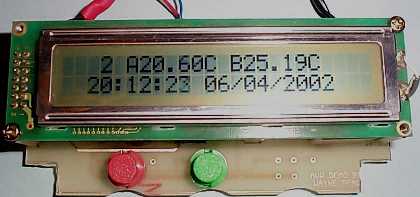
And to add to the all the features, this unit can display two temperatures on the screen and display 8 temperatures on it’s RS232 serial port. There are a few catches. 1 – You can’t yet pick the two sensors you wish to display on the screen. I only use the unit to display inside and outside temperature so there is no insentive for me to this as an option. The first two serial numbers found on the bus are displayed on the unit. The second catch, you need a PC or terminal monitoring the serial port to display greater that 2 temperatures. No time nor date is displayed on the serial port. This can be very easily added if required.
A standard terminal program can be used for logging the temperature from the Readout Unit. The comm settings are 9600bps, 8 data bits, No parity with no handshaking. The RS232 frame shows the serial numbers of all devices connected to the display unit. More than eight DS1820’s can be connected, however only the first 8 devices found are shown. After the serial numbers are dump, the temperature of these devices are then dumped to the terminal in real values. This way no conversion is required on the PC side making life easy! Below is a screen dump of 7 frames from my Readout Unit.
For more detail: 8 channel LCD Teperature meter using microcontroller
- How many wires are needed for the sensors?
Only three wires are required: GND, VCC, and 1-wire data. - Can I choose which two sensors appear on the display?
No, the unit currently only displays the first two serial numbers found on the bus. - What is the baud rate for the serial communication?
The communication settings are 9600bps with 8 data bits, no parity, and no handshaking. - Does the serial output include time or date information?
No, no time or date is displayed on the serial port output. - How many sensors can be connected to the system?
More than eight DS1820s can be connected, but only the first eight found are shown. - Do I need to program serial numbers manually?
No, the microcontroller searches the bus automatically and records serial numbers in memory. - Is data conversion required on the PC side?
No, the unit dumps real values so no conversion is required on the PC.
