
Summary of An attempt to show grayscale images on an LED dot matrix display with software PWM using PIC16F877A
Summary: A hobby project displays grayscale pictures on an 8x8 LED dot matrix driven by a PIC16F877A. Images are scaled to 8x8 in GIMP or via Python (PIL), converted to 64 grayscale values, each divided by 4 for a 0–64 software PWM range, and sent from PC to PIC over UART using pyserial. The PIC stores incoming frames in buffers and uses software PWM to control per-LED brightness, showing each 8x8 frame for about one second.
Parts used in the 8x8 LED dotmatrix project:
- PIC16F877A microcontroller
- 8x8 LED dot matrix
- PC running Python scripts
- Python Imaging Library (PIL)
- pyserial library for UART communication
- UART serial connection (USB-to-serial or serial link)
- Power supply for PIC and LED matrix
- Wiring and resistors as required for LED matrix driving
Introduction:
This is just a time pass hobby project, I am trying to display some pictures (JPEG/PNG/BMP etc) on my 8×8 led dotmatrix display. You can see photos of my 8×8 led dotmatrix display showing some grayscale pictures. The main thing which you may notice is that the brightness of each led depends on the picture information respective to the scaled(8×8) pixel of the original picture.The original pictures are drawn using GIMP image editor in linux and saved as png. The scaled pictue is sent from the PC to PIC via UART.
Any way, this will be the worst monochrome display showing pictures:-)
Photos:
Here you could see the led display showing few pictures opened in gimp editor… You could compare the pictures and observe the PWM effect on the led matrix.
Working:
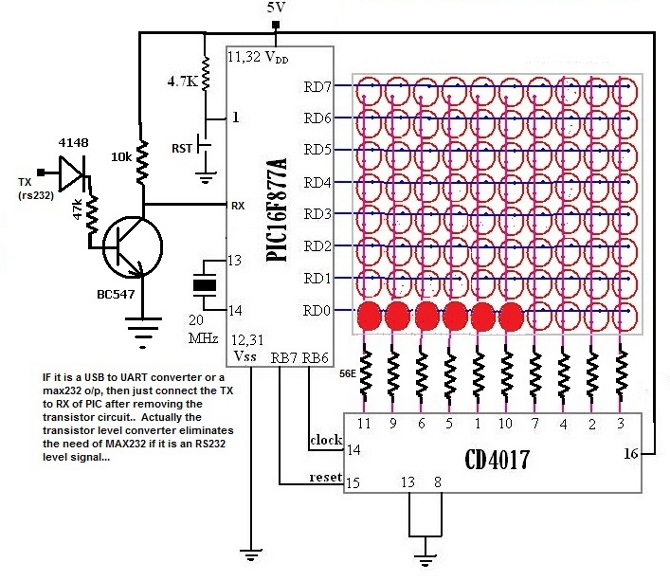
A pic16f877a is the heart of the 8×8 display. It is configured to drive the matrix. Brightness of each led is controlled by software PWM. A 64 byte buffer(in pic) is used to store the brigntness information of 64 leds. Also another 64byte buffer is used to collect data(picture information) streamed out from PC via UART. Now, from PC side, every thing is done using a python script. Python image library (PIL) is used to convert any picture to 8×8 grayscale image. Now we get 64 bytes of data from a converted picture. Each byte value is divided by 4(since value 64 is the pwm max) and introduced to the PIC via UART using pyserial. When the 64 byte packet is completely received, it is introduced to the display. It show a single frame for about one second. Then next 64byte is sent from the PC and it is displayed and it continues.For more Detail: An attempt to show grayscale images on an LED dot matrix display with software PWM using PIC16F877A
- What microcontroller is used to drive the 8x8 LED dot matrix?
PIC16F877A is used as the heart of the 8x8 display. - How is image brightness handled for each LED?
Brightness of each LED is controlled by software PWM on the PIC using a 64 byte brightness buffer. - How are pictures prepared on the PC before sending?
Pictures are scaled to 8x8 and converted to grayscale using Python Imaging Library (PIL) or GIMP. - How is image data transferred from PC to PIC?
Image data is sent as 64-byte packets over UART using the pyserial library. - What is done to grayscale byte values before sending to PIC?
Each grayscale byte is divided by 4 to fit the PWM maximum of 64. - How long is each frame displayed on the LED matrix?
Each 8x8 frame is shown for about one second before the next packet is displayed. - How many buffers are used on the PIC and for what?
Two 64-byte buffers are used: one for brightness values for display and another to collect incoming UART picture data. - Can various image formats be used for this project?
Yes; JPEG, PNG, BMP etc can be converted to 8x8 grayscale before sending.
