
Summary of Real Time Clock/Calendar/Alarm with Interpreter for battery backed-up and battery powered operation with DS interface using ATtiny12
This article describes a low-cost Real-Time Clock (RTC) circuit using the Atmel ATtiny12L microcontroller, designed for battery-powered operation with under $1.50 component costs. The system features ultra-low current consumption by sleeping most of the time and supports alarm-triggered events via an interpreter stored in EEPROM. Key hardware includes a transistor-based power switching circuit to manage 5V and 3V battery sources, along with a wire-wrapping lariat for easy chip removal during development.
Parts used in the Real Time Clock/Calendar Project:
- Atmel ATtiny12L-4PI microcontroller
- One-transistor power switching circuit
- 32768 Hz crystal oscillator
- Battery (3V)
- Power supply (5V)
- Socket for the microcontroller
- Blue wire-wrapping wire (lariat)
Based on the Atmel ATtiny12L-4PI microcontroller -A real Time Clock/Calendar for less than US$1.50 in moderate quantity.
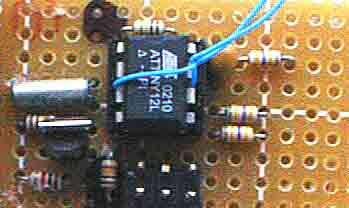
- Low current operation (chip sleeps most of the time)
- Alarm and external event triggered interpreter operation
- Capable of stand-alone timer and alarm use. No additional processor required once programmed.
- One external input pin and one open drain output pin for interpreter
DOWNLOAD
AVRStudio Hex file for clock CV0011.hex
This documentation printed to .PDF format t12clock.pdf
Short form programming and reference guide dscmap.pdf
AVR STudio source 02.11.10 V0011.asm
Note:
After programming, you must:
1. Select the Low Frequency Crystal oscillator 67ms + 32k clock, and
2. Disable Reset to free up pin 1 as open drain output.
You might want to enable brownout detection if the EEPROM is important in your application, but be aware that activating brown out detection will increase current drain.
The clock is based on the Atmel ATtiny12 processor which is ideal for this kind of application because of its low current drain when clocked by a 32768 Hz crystal.
Architectural Description
A DS interface allows access to a register file, EEPROM, and an instruction interpreter. A separate interpreter interprets instructions stored in the EEPROM. EEPROM interpreter operation can be initiated by a clock/calendar alarm, an external event, or by command via the DS interface. The register set plays a central role in moving information between the DS interface and the clock and EEPROM interpreter. One external input can be sampled by the interpreter and one external open drain output can be driven by the interpreter
The clock’s output can be read from registers 3 through 8, but writing to these registers does not affect the clock unless the “write time buffers to clock” flag is set in the control register (register $0F). See the Register Assignments section for more detail.
For more detail: Real Time Clock/Calendar/Alarm with Interpreter for battery backed-up and battery powered operation with DS interface using ATtiny12
- How can the clock operate with low current?
The chip sleeps most of the time to achieve low current operation. - Does the project require an additional processor after programming?
No, it is capable of stand-alone timer and alarm use without an additional processor. - What triggers the interpreter operation in this circuit?
Interpreter operation can be initiated by a clock/calendar alarm, an external event, or via the DS interface command. - Which pins are available for external input and output?
The system uses one external input pin and one open drain output pin for the interpreter. - How do you read the clock's output values?
The clock's output can be read from registers 3 through 8. - What happens if you write to registers 3 through 8 directly?
Writing to these registers does not affect the clock unless the write time buffers to clock flag is set in control register $0F. - What configuration steps are required after programming?
You must select the Low Frequency Crystal oscillator 67ms + 32k clock and disable Reset to free up pin 1 as an open drain output. - Can brownout detection be enabled for this project?
Yes, you might want to enable brownout detection if the EEPROM is important, though it increases current drain.
