
Summary of DIY USB password generator using ATtiny Microcontroller
This article describes a DIY USB HID keyboard device built with an ATtiny microcontroller. It automatically types a password stored in EEPROM upon connection, which can be regenerated by pressing CAPS LOCK multiple times. The project repurposes a 512 MB flash drive enclosure and uses a small tripad veroboard to minimize component count.
Parts used in the DIY USB Password Generator:
- ATtiny microcontroller
- Zener diodes
- Resistors
- Jumpers
- 2×8 pad tripad veroboard
- USB connector from a 512 MB flash drive
- Stripped short USB cable
- EEPROM (for storing passwords)
Having done half a dozen V-USB tutorials I decided it’s time to whip up something cool. As USB keyboards were an area untouched. I decided to make a small USB HID keyboard device that types a password stored in EEPROM every time it’s attached. A new password can be generated just by tabbing CAPS LOCK a few times (4 times to start password regeneration and one tab for each password character generated, 10 is the default password length). Below you can see the device in action:
The place I work at requires me to change my password every few months so this would be one way to skip remembering a new password altogether. (as long as I remember to write it down before regenerating a new one so password can be changed:).
What is inside?
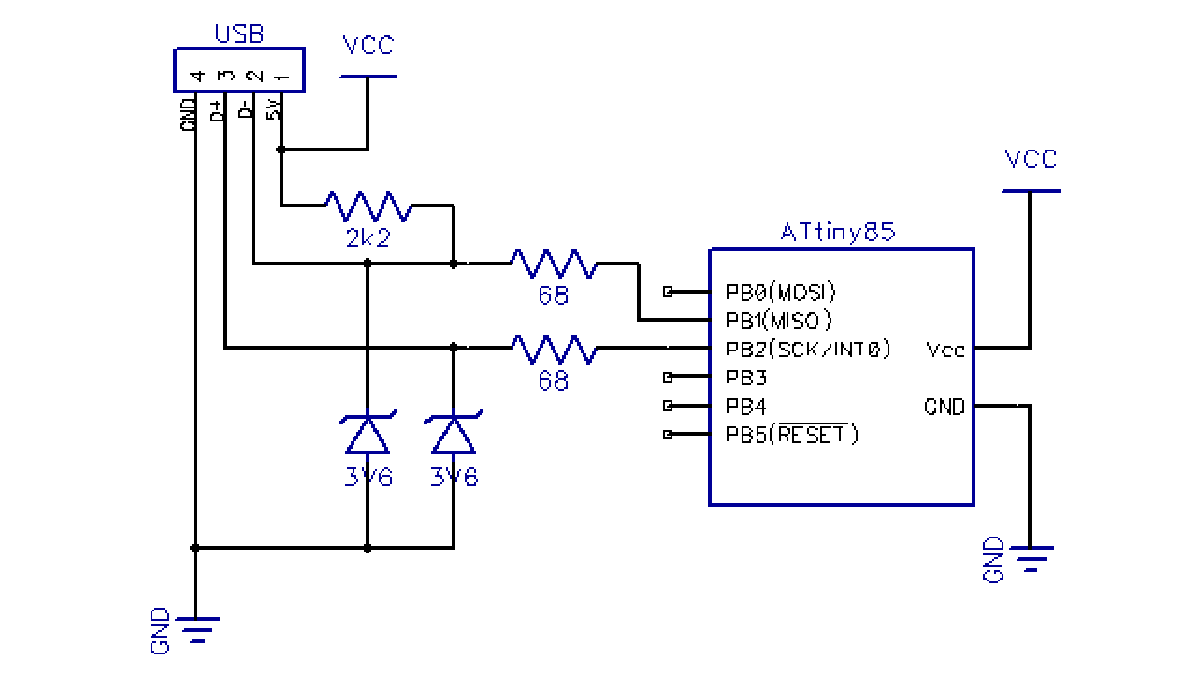
The device is powered with a simplified version of the hardware I used in my ATtiny85 USB tutorial – I stripped away the LCD, reset pullup and both capacitors. If you’re better in cramming components inside enclosures I suggest adding at least a 0.1 uF capacitor between VCC and GND, but it seems to work fine even without it:

The enclosure was graciously donated by an old 512 MB flash drive. I couldn’t make myself to break the USB connector from the circuit board inside. So I stripped appart a short USB cable instead (shown on left):
After some thinking and iterative soldering. I managed to cram everything on a tripad veroboard with 2×8 pads with the following initial setup:
Soldered the connector first. Then the zener diodes. Then resistors and jumpers, and finally VCC, GND and the ATtiny itself. I used the following tricks to make all ends meet:
For more detail: DIY USB password generator using ATtiny Microcontroller
- How does the device generate a new password?
Pressing CAPS LOCK four times initiates regeneration, followed by one tab press for each character of the desired length. - What is the default password length for this project?
The default password length is set to 10 characters. - Can I add a capacitor to improve stability?
It is suggested to add at least a 0.1 uF capacitor between VCC and GND, though the device works without it. - Where did the author get the enclosure for the device?
The enclosure was donated from an old 512 MB flash drive. - Which components were removed from the original hardware design?
The LCD, reset pullup, and both capacitors were stripped away from the previous ATtiny85 USB tutorial design. - What order should components be soldered on the veroboard?
The recommended order is the connector, zener diodes, resistors, jumpers, and finally VCC, GND, and the ATtiny itself. - Does the device require a specific power source?
The device is powered via the simplified USB hardware setup described in the ATtiny85 USB tutorial. - What happens when the device is attached to a computer?
The device acts as a USB HID keyboard and types the password stored in EEPROM immediately upon attachment.
