
Summary of AVR Based 8-bit DAC using ATmega16 with Proteus Simulation
This article details an embedded systems project using an ATmega16 microcontroller to generate a continuous sawtooth waveform. The system converts 8-bit digital data into an analog signal via the DAC0832 IC, which is then processed by an LM358 operational amplifier. Simulated in Proteus, the project effectively demonstrates digital-to-analog conversion principles for educational purposes, utilizing specific control signals and timing delays to produce real-time voltage outputs.
Parts used in the AVR Based 8-bit DAC Project:
- ATmega16 Microcontroller
- DAC0832 (8-bit DAC)
- LM358 Operational Amplifier
- Crystal Oscillator (8 MHz)
- Capacitors (22pF, 0.1µF)
- Resistors (10K, 220Ω)
- Diodes (1N4148)
- Power Supply (+5V, -5V)
- Proteus Virtual Instruments (Graph/Voltmeter)
Introduction
The AVR based 8-bit DAC project demonstrates how a digital signal generated by a microcontroller can be converted into an analog waveform using the DAC0832 IC. This is a classic microcontroller project widely used in embedded systems and DIY electronics learning.
Using an ATmega16 and Proteus simulation, the project outputs a continuously changing analog signal (sawtooth waveform). It helps beginners understand the bridge between digital logic and real-world analog signals, which is essential in practical electronics design.
How the Project Works (Overview)
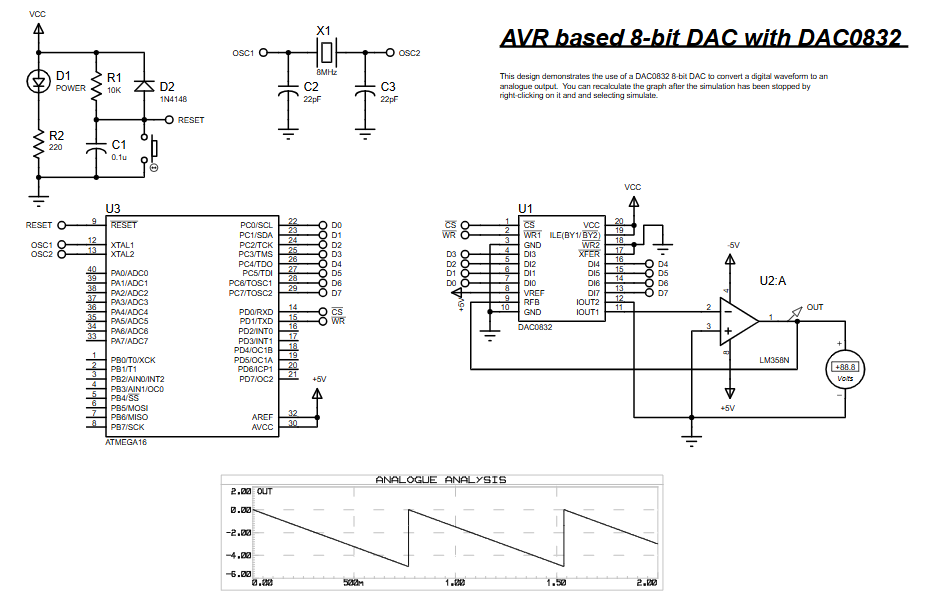
This system uses the ATmega16 microcontroller to generate an 8-bit digital value that increases continuously.
- The digital data is sent through PORTC to the DAC0832
- The DAC converts this digital input into an analog current output
- An LM358 operational amplifier converts and amplifies the signal into a measurable voltage
- The output forms a ramp (sawtooth) waveform, as seen in Proteus
The waveform repeats continuously, demonstrating real-time digital-to-analog conversion.
Workflow Explanation
The project can be understood in the following stages:
- Microcontroller (ATmega16)
- Generates incremental digital values (0 → 255)
- Sends data via PORTC
- Control Signals (PORTD)
- WR (Write) signal triggers DAC updates
- CS (Chip Select) enables DAC communication
- DAC0832
- Converts 8-bit digital data into analog current
- Op-Amp (LM358)
- Converts current output into voltage
- Amplifies the signal for display
- Output
- Analog waveform displayed in Proteus graph
Key Features
- 8-bit digital-to-analog conversion using DAC0832
- Continuous waveform generation (sawtooth output)
- Simple interfacing between ATmega16 and DAC
- Uses control signals (WR, CS) for precise timing
- Real-time analog output visualization in Proteus
- Ideal for learning embedded systems and DAC interfacing
Components Used
From the schematic and code:
- ATmega16 Microcontroller
- DAC0832 (8-bit DAC)
- LM358 Operational Amplifier
- Crystal Oscillator (8 MHz)
- Capacitors (22pF, 0.1µF)
- Resistors (10K, 220Ω)
- Diodes (1N4148)
- Power Supply (+5V, -5V)
- Proteus Virtual Instruments (Graph/Voltmeter)
Applications
This type of DAC microcontroller project is widely used in:
- Signal generation systems
- Audio waveform generation
- Function generators
- Embedded control systems
- Digital signal processing (DSP basics)
- Educational labs for embedded systems and Proteus simulation
Explanation of Code
The firmware is simple and efficient, focusing on DAC interfacing.
Key Functional Parts:
- Port Configuration
PORTC→ Data bus (8-bit digital output)PORTD→ Control signals (WR, CS)
- DAC Communication
- CS is kept low to enable DAC
- WR pulse triggers data transfer
- Waveform Generation
- A variable
dataincrements continuously (0–255) - Sent to DAC → produces ramp signal
- A variable
- Timing Control
_delay_ms(3)controls waveform speed
- Low-Level Bit Macros
- Used for setting/clearing control pins efficiently
Source Code
/********************************
FILE NAME:        dac0832.c
CHIP TYPE:        ATMEGA16
CLOCK FREQUENCY:  8MHZ
IDE:              VSMStudio
COMPILER:         AVR-GCC
TIME:             September 2010
********************************/
#include <avr/io.h>
#include <util/delay.h>
#define uchar unsigned char
#define uint unsigned int

// Low level port/pin definitions
#define sbit(x,PORT) (PORT) |= (1<<x)
#define cbit(x,PORT) (PORT) &= ~(1<<x)
#define pin(x,PIN) (PIN)&(1<<x)Proteus Simulation
In the Proteus simulation, the system produces a smooth ramp waveform.
- The graph shows a repeating sawtooth signal
- Each step corresponds to incremented digital values
- The op-amp ensures proper voltage scaling
This visualization confirms correct digital-to-analog conversion
Conclusion
This project is a solid introduction to digital-to-analog conversion in embedded systems. It demonstrates how a simple microcontroller program can generate real analog signals using external hardware.
If you’re learning microcontroller projects, Proteus simulation, or embedded systems, this is a must-try experiment that builds strong foundational skills in practical electronics and signal processing.
Complete File
AVR Based 8-bit DAC using ATmega16 with Proteus Simulation
- How does the system convert digital signals to analog?
The ATmega16 sends 8-bit digital values through PORTC to the DAC0832, which converts them into analog current. - What component amplifies the signal into a measurable voltage?
An LM358 operational amplifier converts the current output into voltage and amplifies the signal. - Does the project use specific control signals for communication?
Yes, WR (Write) triggers updates and CS (Chip Select) enables DAC communication via PORTD. - What type of waveform is generated by this setup?
The system produces a continuously repeating ramp or sawtooth waveform. - Can I visualize the output in real-time?
Yes, Proteus virtual instruments like the Graph and Voltmeter display the real-time analog output. - What controls the speed of the waveform generation?
The _delay_ms(3) function in the code controls the waveform speed. - Is this project suitable for learning embedded systems?
Yes, it is ideal for beginners learning about digital-to-analog conversion and practical electronics design. - What frequency does the crystal oscillator operate at?
The project uses an 8 MHz Crystal Oscillator.
