
Summary of SMT160 based Temperature indicator
This project builds a temperature indicator using an SMT160 digital sensor whose output is a duty-cycle modulated signal. The SMT160 duty cycle relates to temperature by D.C. = 0.320 + 0.00470 × t, so temperature is computed as T = (D.C. − 0.320)/0.0047. The AVR (ATmega8) measures high and low pulse durations with Timer1, computes duty cycle and temperature in Bascom, and displays the rounded temperature on a 16x2 LCD.
Parts used in the SMT160 Temperature indicator:
- SMT160 temperature sensor
- ATmega8 microcontroller (m8def.dat)
- 16x2 LCD display
- Connection wires
- Power supply (suitable for ATmega8 and SMT160)
- Push-in headers or PCB for mounting
- Optional clock/crystal 1 MHz (or internal RC configured to 1 MHz)
- Resistors for LCD contrast and backlight as needed
There are lot of temperature sensors both with analog & digital outputs. This project gives you an another temperature indicator which has been done with a digital sensor SMT160.
Although it is a digital sensor it does not gives out the temperature directly. The output is duty cycled modulated. The sensor can measure temperature from -45deg to +150deg.
The output duty cycle is D.C. = 0.320+0.00470 x t, here t is the temperature.
Therefore Temperature T = Dc / 0.0047
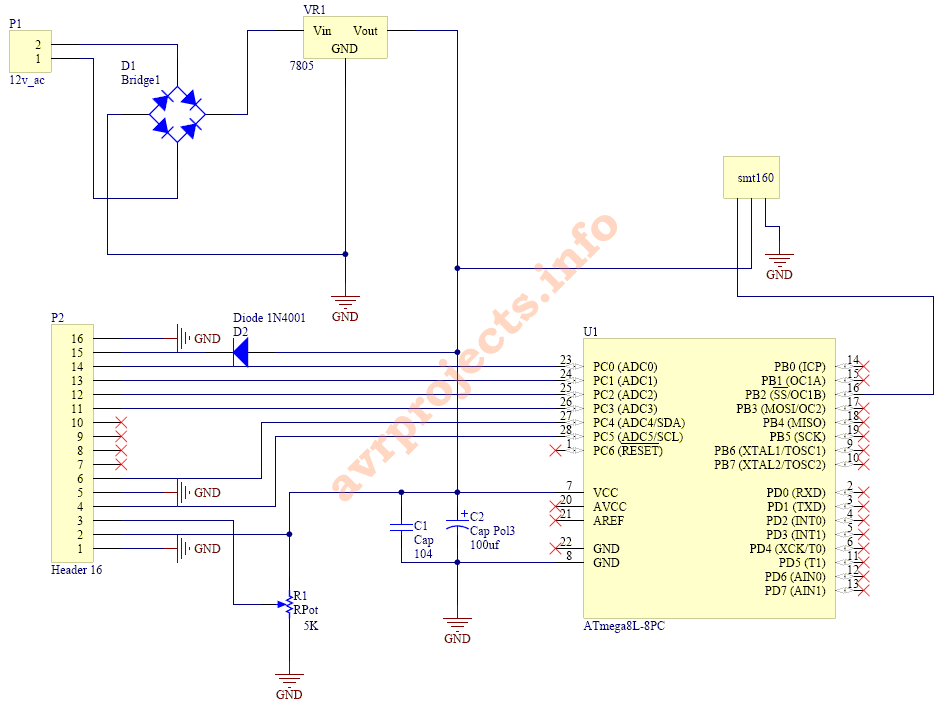
Bascom Code
‘——————————–main——————————————-
$regfile = “m8def.dat”
$crystal = 1000000
‘——————————-lcd———————————————
Config Lcd = 16 * 2
Config Lcdpin = Pin , Rs = Pinc.5 , E = Pinc.4 , Db4 = Pinc.3 , Db5 = Pinc.2 , Db6 = Pinc.1 , Db7 = Pinc.0
‘——————————–dim——————————————-
Dim avr_reset As Word
Dim Avr_set As Word
Dim Temp As Single
Dim Duty As Single
Dim X As Integer
‘——————————————————————————-
Config Timer1 = Timer , Prescale = 1
Enable Timer1
‘——————————–main——————————————
Config Pinb.2 = Input
‘——————————————————————————
Cursor Off
Cls
Locate 1 , 5
Lcd “Hello”
Locate 2 , 1
Lcd “avrprojects.info”
Wait 2
Cls
Smt160:
Do
Gosub Read_data_sm160
Locate 1 , 1
Lcd “T= ” ; Temp ; “c “;
Wait 1
Loop
‘——————————————————————————-
Read_data_sm160:
Bitwait Pinb.2 , Set
Bitwait Pinb.2 , Reset
Bitwait Pinb.2 , Set
Bitwait Pinb.2 , Reset
Bitwait Pinb.2 , Set
Bitwait Pinb.2 , Reset
Stop Timer1
Bitwait Pinb.2 , Set
Timer1 = 0
Start Timer1
Bitwait Pinb.2 , Reset
‘Xl = Timer1
avr_set = Timer1
Timer1 = 0
Start Timer1
Bitwait Pinb.2 , Set
‘Xf = Timer1
Avr_reset = Timer1
X = Avr_set + Avr_reset
Duty = Avr_set / X
Duty = Duty – 0.32
Waitms 1
Temp = Duty / 0.0047
Waitms 1
Locate 1 , 1
Temp = Round(temp)
Stop Timer1
Return
For more Detail: SMT160 based Temperature indicator
- What range of temperature can the SMT160 measure?
The sensor can measure temperature from -45°C to +150°C as stated in the article. - How is temperature derived from the SMT160 output?
Temperature is calculated from the duty cycle using the relation D.C. = 0.320 + 0.00470 × t and rearranged as T = (D.C. − 0.320)/0.0047. - Does the SMT160 output a direct temperature value?
No, the SMT160 outputs a duty-cycled modulated signal rather than a direct temperature value. - How does the microcontroller measure the duty cycle?
The ATmega8 uses Timer1 to measure high and low pulse durations (avr_set and avr_reset) then computes duty = avr_set / (avr_set + avr_reset). - Which microcontroller and development language are used in the project?
The project uses an ATmega8 microcontroller programmed in Bascom (Bascom-AVR) as shown by the provided code. - How is the temperature displayed?
Temperature is rounded and displayed on a 16x2 LCD using the Bascom LCD configuration in the code. - What initial steps does the code perform on startup?
The code configures Timer1 and LCD, shows a hello message and website string, then enters a loop reading the SMT160 and updating the LCD every second. - How is the duty value adjusted before computing temperature?
The measured duty is reduced by 0.32 (Duty = Duty − 0.32) before dividing by 0.0047 to get temperature.
